


























Skip to technology filters Skip to main content
Dynatrace Hub

Extend the platform,
empower your team.

Popular searches:
Home hero bg
AWS ConnectorAWS Connector
AWS Connector

AWS Connector

Automate your AWS infrastructure with actions across EC2, S3, Lambda, and more.

App
Free trialDocumentation
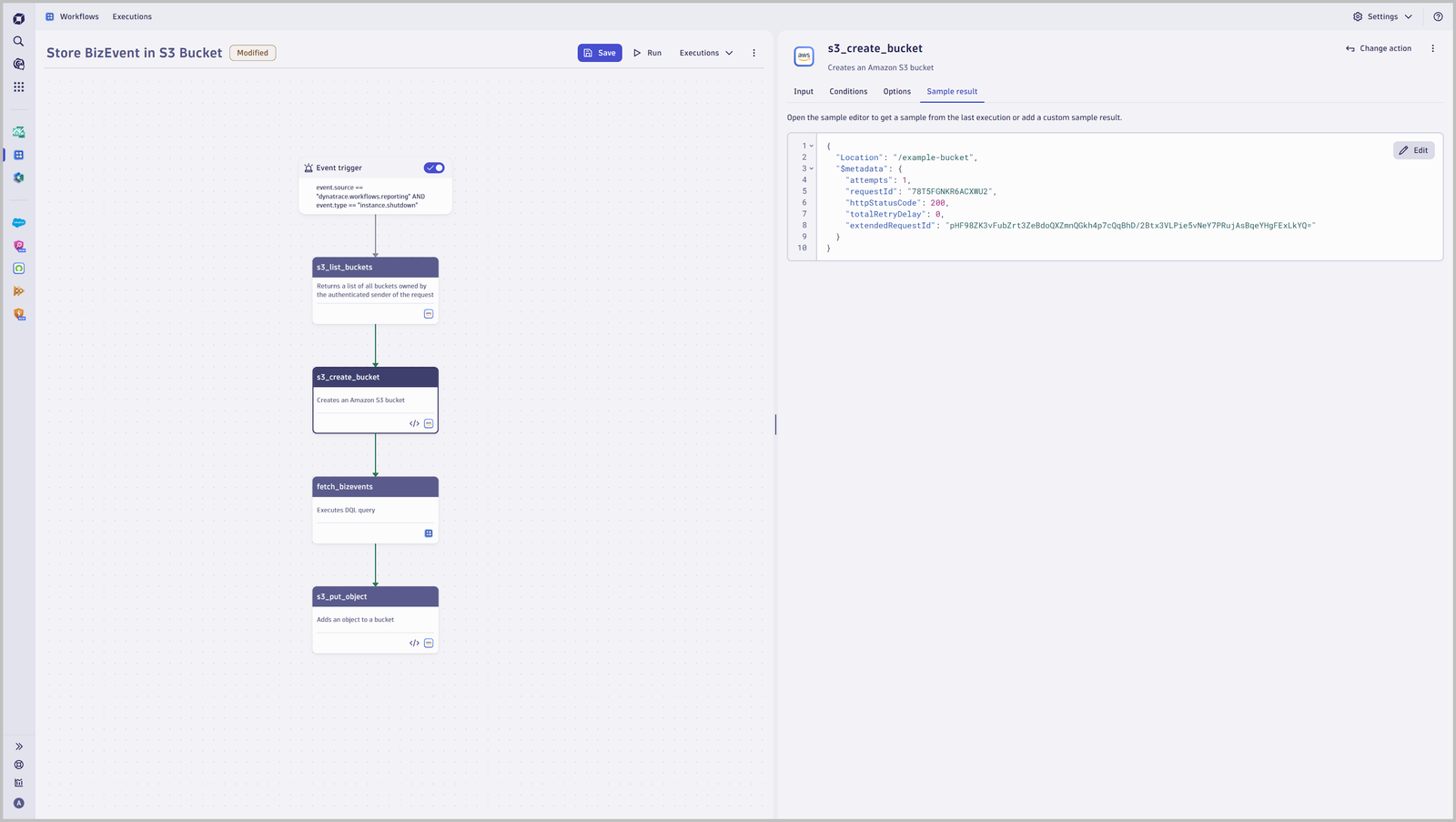
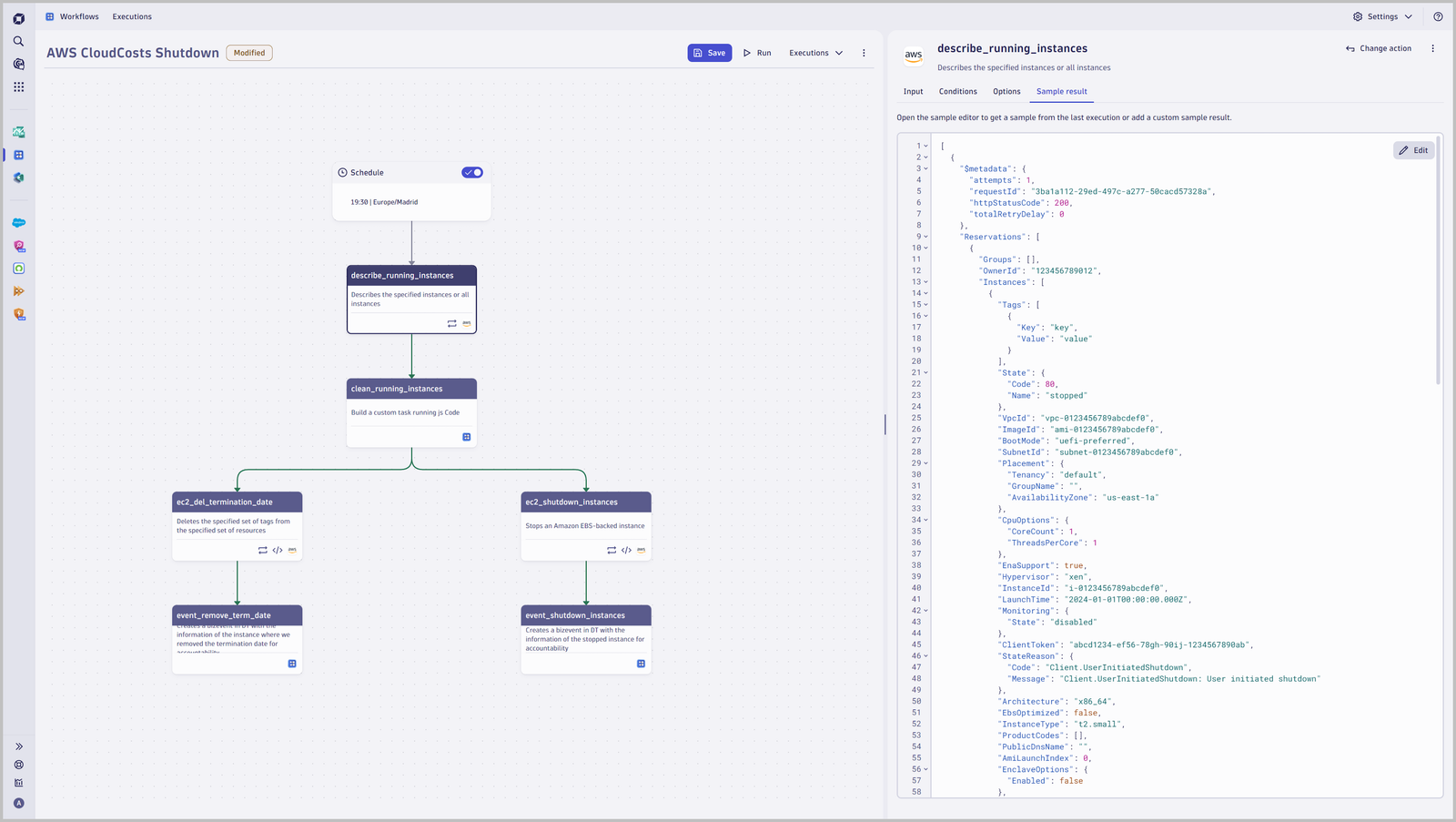
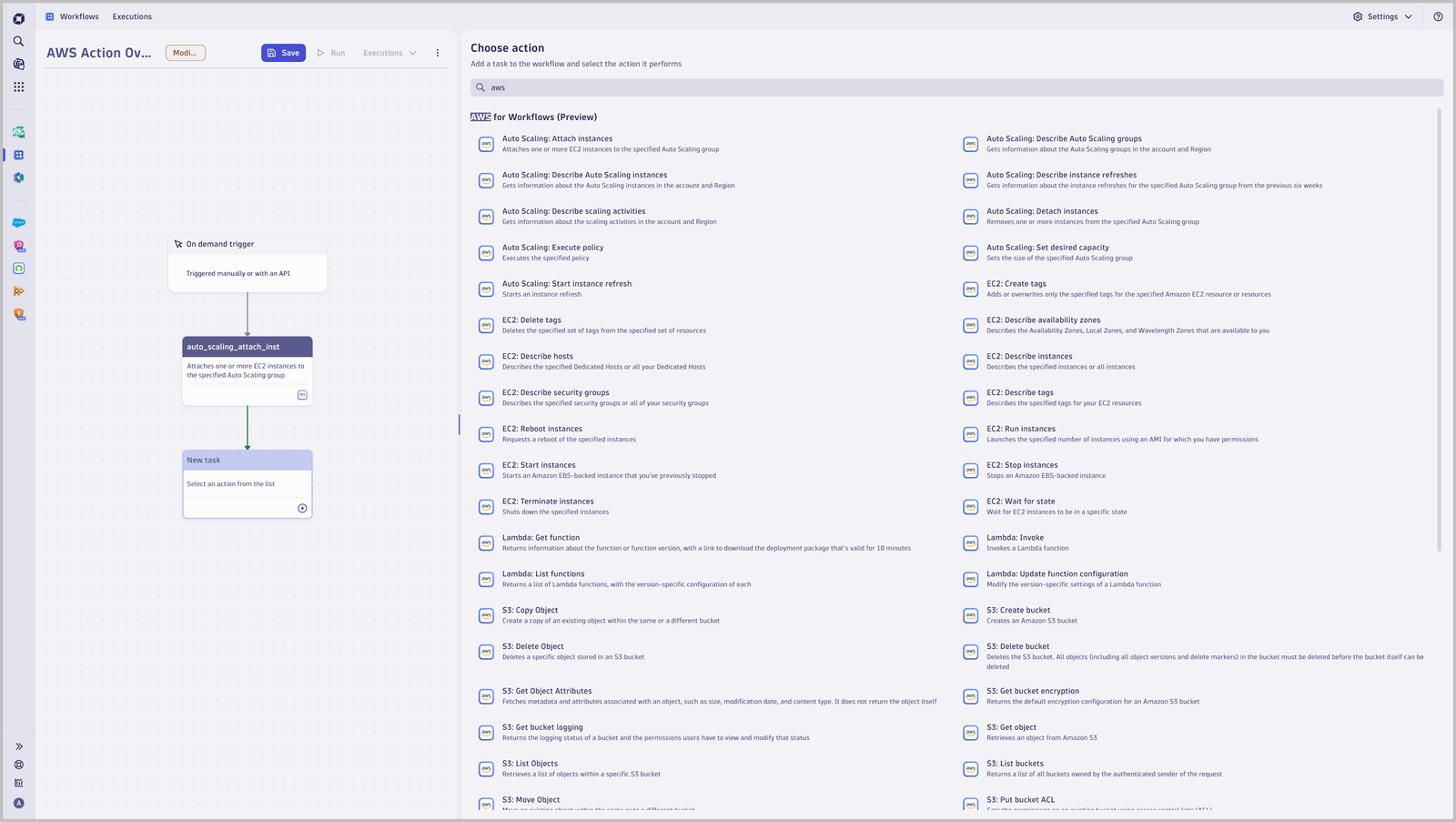
Example workflow to store Dynatrace BizEvents in S3 buckets.Example workflow to optimize cloud costs in AWS. Tags mark specific instances that are marked for termination.Excerpt of AWS actions, which allows you to manage tags, adjust Auto Scaling Groups based on Dynatrace insights and predictive analytics, ingest logs to S3, and more.
  • Product information
  • Release notes

Overview

Combine the strength of Dynatrace, AIOPS and predictive analytics with your AWS infrastructure:

  • Leverage Dynatrace Workflows to react to insights gathered by AI-based full stack AWS monitoring on resources such as Amazon EC2, AWS Lambda, and Kubernetes
  • Seamlessly and securely authenticate with OpenID Connect (OIDC) based authentication
  • Query and manipulate AWS resources, such as EC2 instances, S3 buckets, or Auto Scaling Groups, to optimize cloud costs by adjusting scaling in combination with Dynatrace predictive analytics, ingesting events and logs to S3, isolating instances in case of an attack, and more.

Use cases

With a broad set of AWS workflow actions, you can enable use cases like:

  • React to problems or outages and adjust availability zones
  • Optimize your cloud costs by leveraging Dynatrace predictive analytics to adjust the correct sizing of your AWS infrastructure
  • Isolate machines in case of identified vulnerabilities or attacks
  • Take snapshots of environments for forensic analysis

Get started

Install AWS, then follow the instructions detailed in Dynatrace Documentation.

Before you start, make sure that AWS is installed, outbound connections are configured, the connection to AWS is authorized, and the OIDC-based authentication is configured as outlined in the documentation.

Details

A broad set of AWS workflow actions across AWS services allows you to:

  • EC2: Create or delete tags, describe tags, availability zones, hosts, instances, security groups, start, run, stop, terminate instances, and more
  • EC2 Auto Scaling: Attach instances, describe Auto Scaling Groups and instances, detach instances, execute policy, set desired capacity, and more
  • Lambda: Invoke a Lambda function list or update the configuration
  • S3: Create or delete buckets, get bucket logging and list objects, list buckets, move and put objects, rename objects, and more
Dynatrace
Documentation
By Dynatrace
Dynatrace support center
Subscribe to new releases
Copy to clipboard

Related to AWS Connector

Workflows logo

Workflows

Automate tasks in your IT landscape and move towards autonomous operations.

Full version history

ReleaseDate

Full version history

  • Editable connection names - Connection names are now editable after creation, making it easier to keep your settings aligned with how teams actually use and share connections.
  • Improved Lambda invoke configuration - The FunctionName input in the lambda-invoke action is now required, helping prevent misconfigured executions.
  • New workflow templates - You can now start faster with ready-to-use templates for common AWS automation scenarios, including scanning for publicly exposed security groups, blocking Amazon S3 public access, archiving BizEvents to S3, and storing logs in S3 with an email link to the stored object.
  • Various improvements and dependency updates.

Full version history

  • Various improvements and dependency updates.

Full version history

  • Various improvements and dependency updates.

Full version history

  • Various improvements and dependency updates.

Full version history

  • Required FunctionName Field – The lambda-invoke action now requires the FunctionName input instead of treating it as optional.

Full version history

  • New Consumer Selection for Connection Management - When creating connections in the Connection Overview, users can now specify the consuming application: Workflows (existing option) or OpenPipeline.
  • Updated Connection Overview - The overview now includes a Consumer App column, indicating whether each connection belongs to Workflows or OpenPipeline.
  • Consumer-Based Filtering - A new filter option above the connection overview allows to view connections by consumer.
  • Setup Status Column Added - Introduced a new Setup column in the settings overview to show which parts of each connection’s setup are complete.

Full version history

  • App Renamed to AWS Connector - The App has been renamed from "AWS" to "AWS Connector" to align with the Connectors concept.
  • Enhanced Connection Management with Access Control - We've introduced a new, enhanced schema for AWS Connections that includes fine-grained access control and sharing options.
  • Important Deprecation of Existing Connection Schema - With the launch of the new schema, the existing AWS connection schema will be set to read-only and will be fully deprecated by the end of March 2026. Customers must migrate to the new connection schema for any future modifications. The existing connections will continue to function for the next six months.
  • Flexible Body Input in S3 Put Object Action - The S3 Put Object action now accepts JavaScript objects as input for the Body field, allowing for more dynamic data handling.

Full version history

  • Bugfix - Fixed an issue with the app crashing when using an invalid connection.

Full version history

  • Enhanced Pagination Support - Added NextToken and MaxResults input fields to improve pagination capabilities across multiple actions. This allows for more efficient handling of large datasets and better control over result sets. The updated actions include:
    • Auto Scaling: Describe Auto Scaling Groups
    • Auto Scaling: Describe Auto Scaling Instances
    • Auto Scaling: Describe Instance Refreshes
    • Auto Scaling: Describe Scaling Activities
    • EC2: Describe Instances
    • EC2: Describe Hosts
    • EC2: Describe Security Groups
    • EC2: Describe Tags
    • S3: Get Object Attributes
    • S3: List Buckets
    • SSM: List Documents
    • SSM: Describe Automation Executions
    • SSM: List Commands

Full version history

  • New SSM Command Actions - Added actions to send SSM commands and retrieve the list of executed commands.

Full version history

  • Grouped input fields - Improved the user experience by grouping related input fields, making navigation and usage easier.
  • Permission Error Display - Accurately display permission errors when creating a connection within a workflow action, ensuring users are promptly informed of any access issues.

Full version history

  • New IAM Role Policy Actions - Introduced several new actions to manage IAM role policies and tags.
  • New EC2 EBS Volume Management - Introduced actions to create, attach, and detach Amazon EC2 EBS volumes, providing enhanced control over your storage resources.
  • Bugfix in List Documents action - Resolved an issue where list-documents action would not apply filters correctly.
  • Bugfix in Start Automation Execution action - Fixed the target input format to ensure proper functionality.

Full version history

  • First Major Version Now Available - Enhanced inputs for actions unlock new possibilities for customization and flexibility in your workflows.
  • App renamed to "AWS" - Streamlined the app name by removing the "Preview" suffix.
  • Expanded AWS Systems Manager Support - New actions introduced to start, stop, and describe automation execution actions.
  • New EC2 Snapshot Management Capabilities - Added support for creating snapshots and modifying snapshot attributes.
  • EC2 Instance Attribute Modification - Enabled the ability to modify EC2 instance attributes, offering greater flexibility for instance management.
  • New Action for Updating Auto Scaling Group - Auto Scaling groups can be updated now with ease using the new Update Auto Scaling Group action.
Dynatrace Hub
Hub HomeGet data into DynatraceBuild your own app
Dynatrace Intelligence - Agentic Operations SystemThe Dynatrace Agentic AI ecosystem
All (914)Log Management and AnalyticsKubernetesAI and LLM ObservabilityInfrastructure ObservabilityApplication ObservabilityApplication SecurityBusiness ObservabilityDigital Experience
Filter
Type
Built and maintained by
Deployment model
SaaS
  • SaaS
  • Managed
Partner FinderBecome a partnerDynatrace Developer

Software Delivery

Empower DevOps platform engineers, SREs, and development teams to deliver higher quality software, faster, and more securely.

Popular integrations

See more (1)
GitHub logo

GitHub

Automate GitHub issues, pull requests, and workflows from Dynatrace.

Jira logo

Jira

Open, update, and close Jira tickets automatically from Dynatrace Workflows.

Jenkins logo

Jenkins

Trigger Jenkins builds and monitor job status from Dynatrace Workflows.

GitLab logo

GitLab

Amend files in GitLab repositories, trigger pipelines, and manage issues.

Slack logo

Slack

Automate Slack messaging for security incidents, attacks, remediation, and more.

ServiceNow logo

ServiceNow

Create and manage ServiceNow incidents from Dynatrace Workflows.

More options

Workflows logo

Workflows

Automate tasks in your IT landscape and move towards autonomous operations.

Keptn logo

Keptn

Event-based control plane for continuous delivery and automated operations.

Configuration as Code logo

Configuration as Code

Manage observability and security configurations as code via Terraform or Monaco.

Site Reliability Guardian logo

Site Reliability Guardian

SRG: Automated change impact analysis for your deployment and release processes.

Service-Level Objectives logo

Service-Level Objectives

Manage SLOs and error budgets to ensure service performance and reliability SLAs.

More resources

AWS Connector logo

AWS Connector

Automate your AWS infrastructure with actions across EC2, S3, Lambda, and more.

Claude Connector for Workflows logo

Claude Connector for Workflows

Connect with Claude and send prompts for further analysis using Workflows.

CI/CD Observability logo

CI/CD Observability

Monitor CI/CD pipelines such as Azure Devops, Gitlab, Github and more.

Observability for Developers on Cursor logo

Observability for Developers on Cursor

Get Real time Code-Level data directly to your Cursor IDE.

Email logo

Email

Send out-of-the-box targeted Emails with workflows.

Gemini Connector for Workflows logo

Gemini Connector for Workflows

Connect with Gemini and send prompts for further analysis using Workflows.

GitHub Copilot Coding Agent logo

GitHub Copilot Coding Agent

Automate vulnerability remediation and boost developer productivity.

GitHub Copilot Custom Agent logo

GitHub Copilot Custom Agent

Automate your development workflows with specialized agent definitions.

Observability for Developer on JetBrains logo

Observability for Developer on JetBrains

Get real-time code-level data directly to your Jetbrains IDE.

Kubernetes Connector logo

Kubernetes Connector

Automate your Kubernetes clusters: Delete failed pods and restart deployments.

Microsoft 365 logo

Microsoft 365

Send targeted emails from workflows using your Microsoft 365 account.

OpenAI Connector for Workflows logo

OpenAI Connector for Workflows

Connect with OpenAI and send prompts for further analysis using Workflows.

Ownership logo

Ownership

Enables the import of and access to ownership information of entities.

Pagerduty for Dynatrace Workflows logo

Pagerduty for Dynatrace Workflows

Streamline incident management with automated Pageruty workflows.

Red Hat Ansible logo

Red Hat Ansible

Integrate with Red Hat Ansible (EDA, AAC, AWX) to trigger job templates.

Snowflake for Workflows logo

Snowflake for Workflows

Access, query, and store Snowflake data to analyze further within Dynatrace.

Observability for Developers on VSCode logo

Observability for Developers on VSCode

Get Real time Code-Level data directly to your VSCode IDE.

Cursor IDE logo

Cursor IDE

Boost developer productivity and get real-time, code-level insights into Cursor.

Observability for Developers on Windsurf logo

Observability for Developers on Windsurf

Get real-time code-level data directly to your Windsurf IDE.

Are you looking for something different?

We have hundreds of apps, extensions, and other technologies to customize your environment

Extend your knowledge

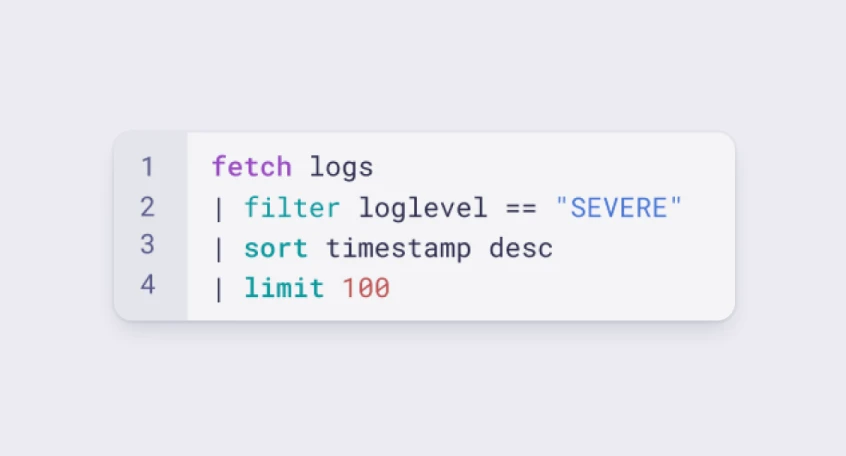
Learn the Dynatrace Query Language

Learn the Dynatrace Query Language

Explore data, discover patterns, anomalies and outliers, and create statistical modeling with DQL, our powerful query language.
Learn DQL

Solve problems with custom apps

Solve problems with custom apps

Dynatrace Developer makes it easy to create custom apps for your organisation. Start with one of our templates or use your own code.
Build apps