Skip to technology filters Skip to main content
Dynatrace Hub

Extend the platform,
empower your team.

Popular searches:
Home hero bg
CloudsClouds
Clouds

Clouds

Gain full visibility and proactive monitoring across your cloud infrastructure.

App
Try in PlaygroundDocumentation
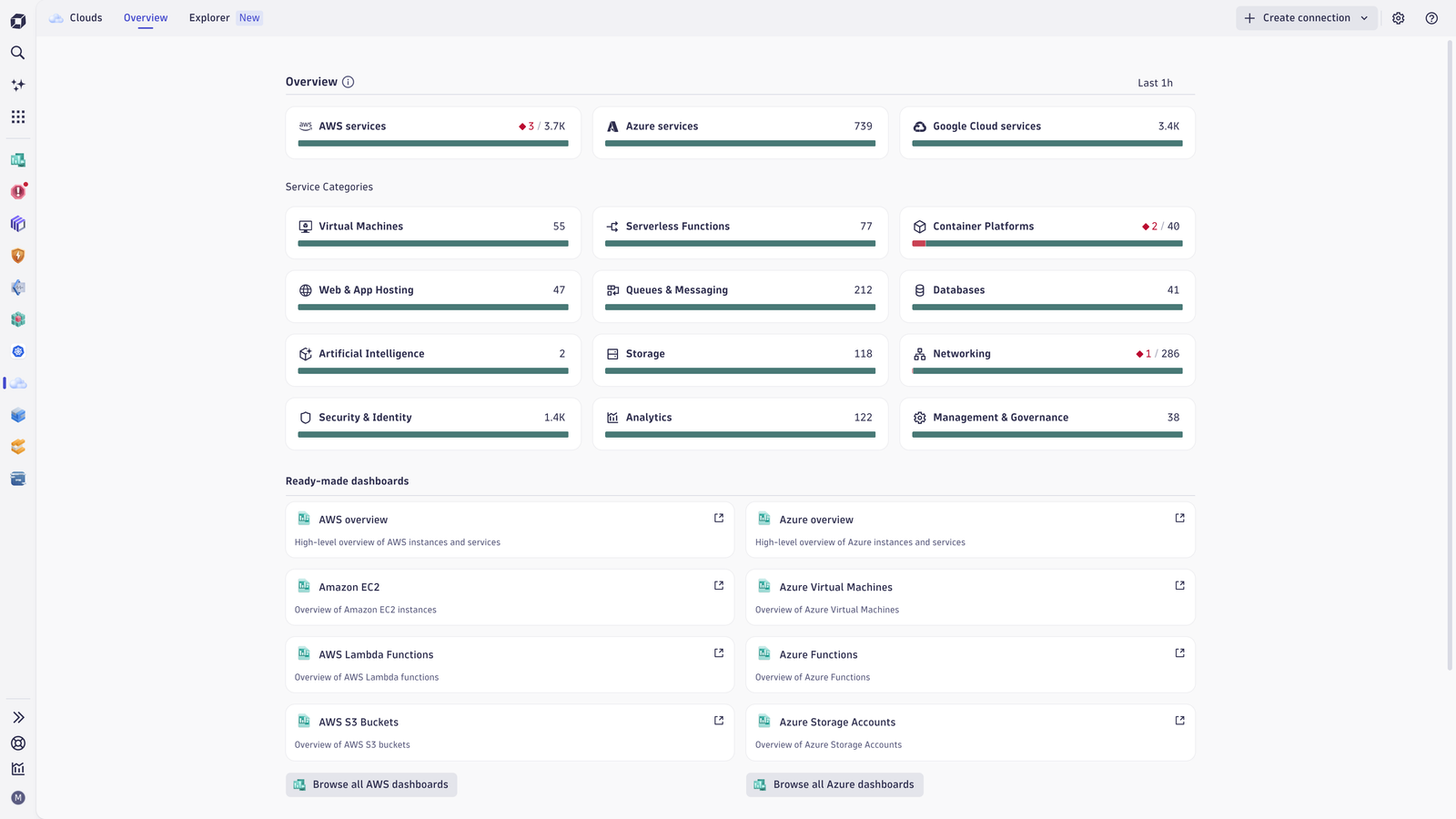
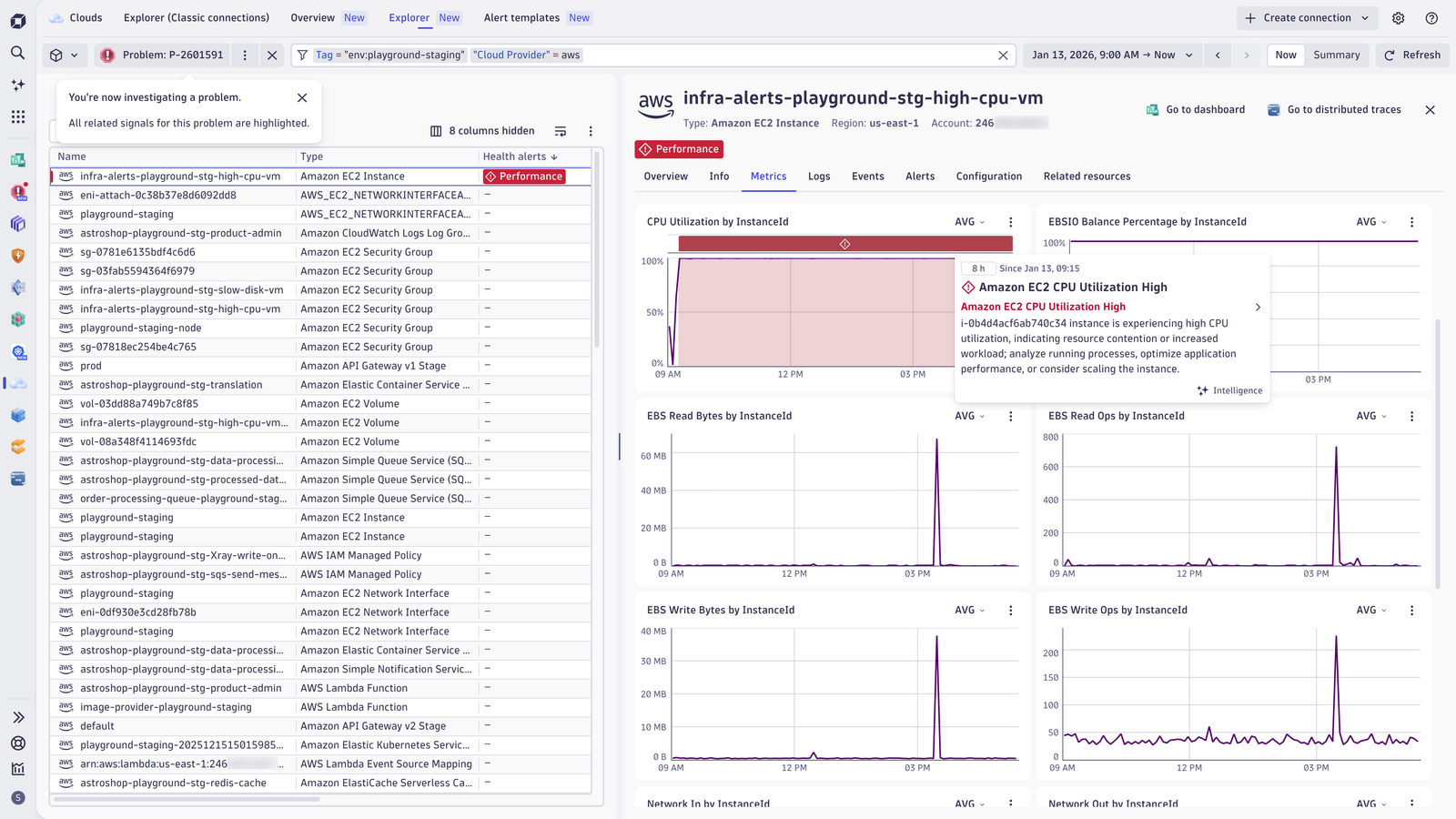
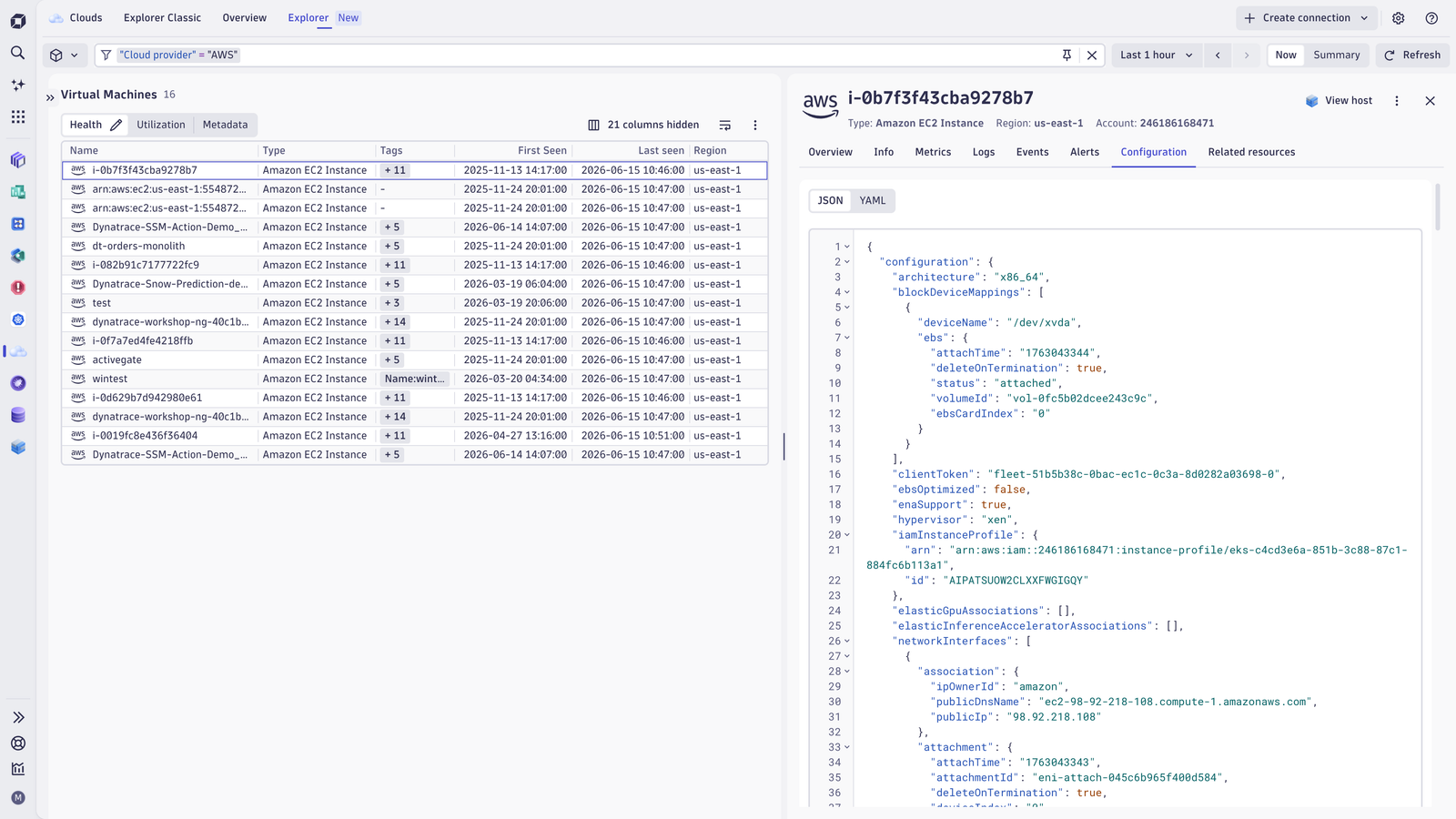
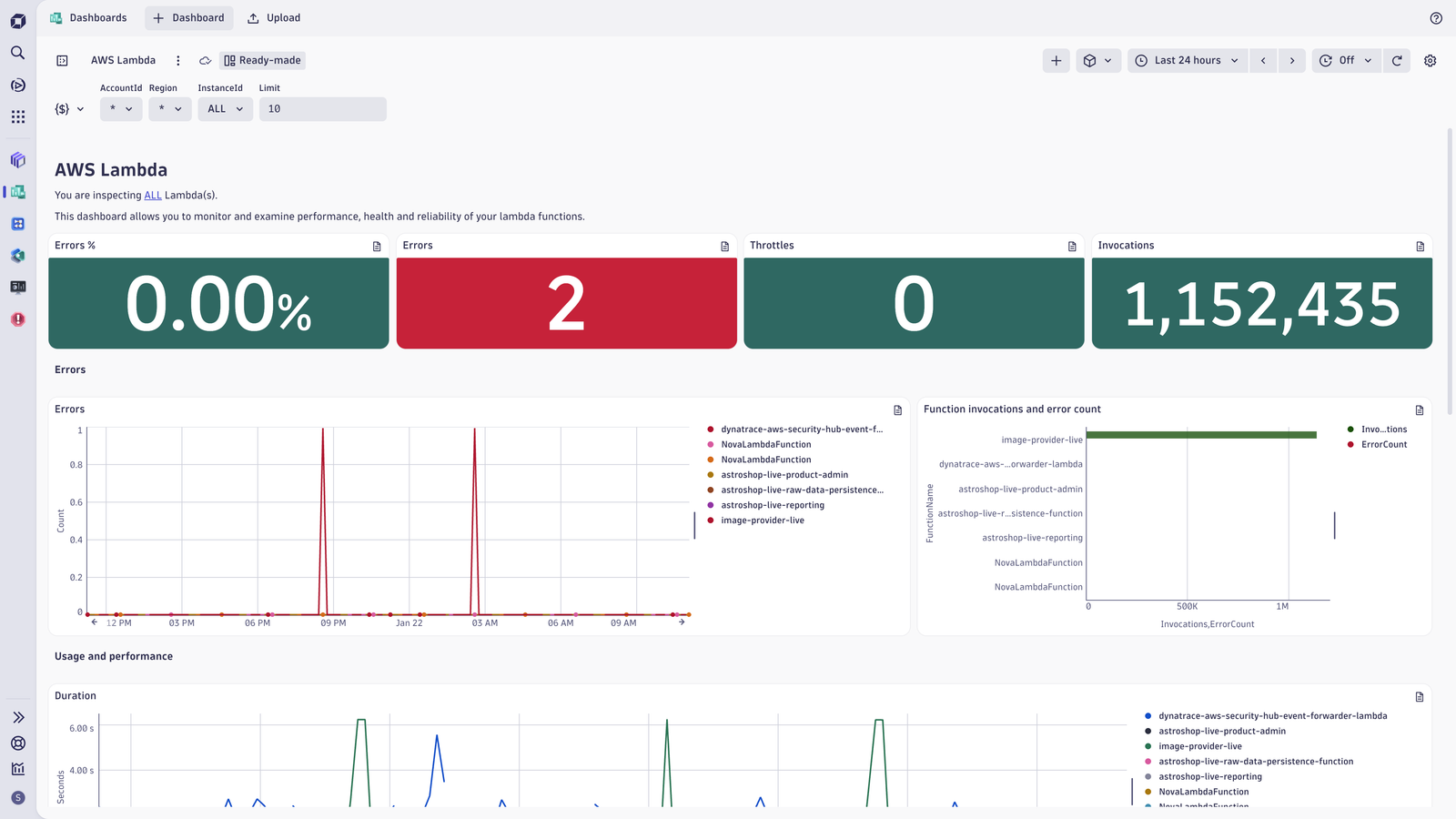
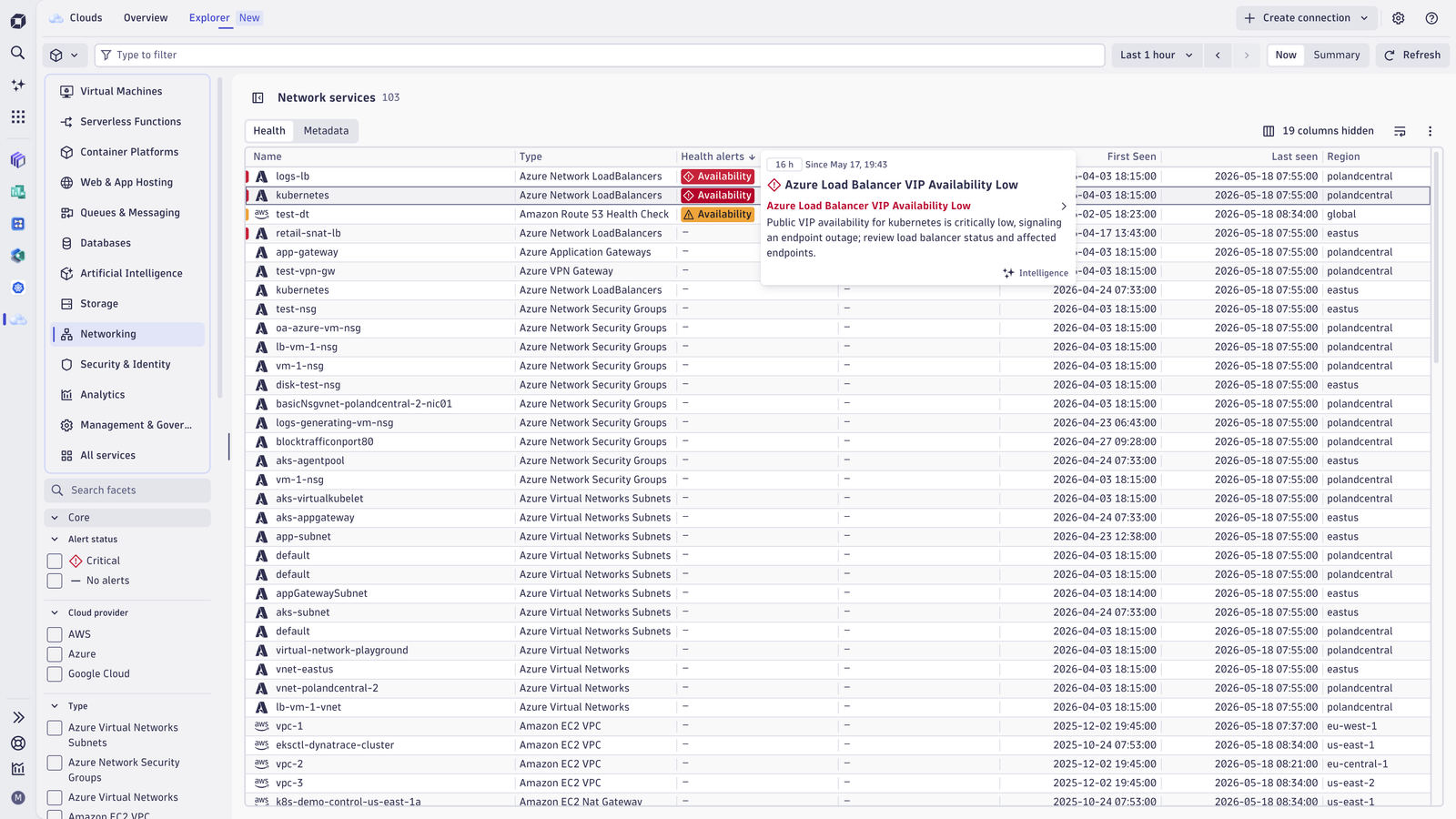
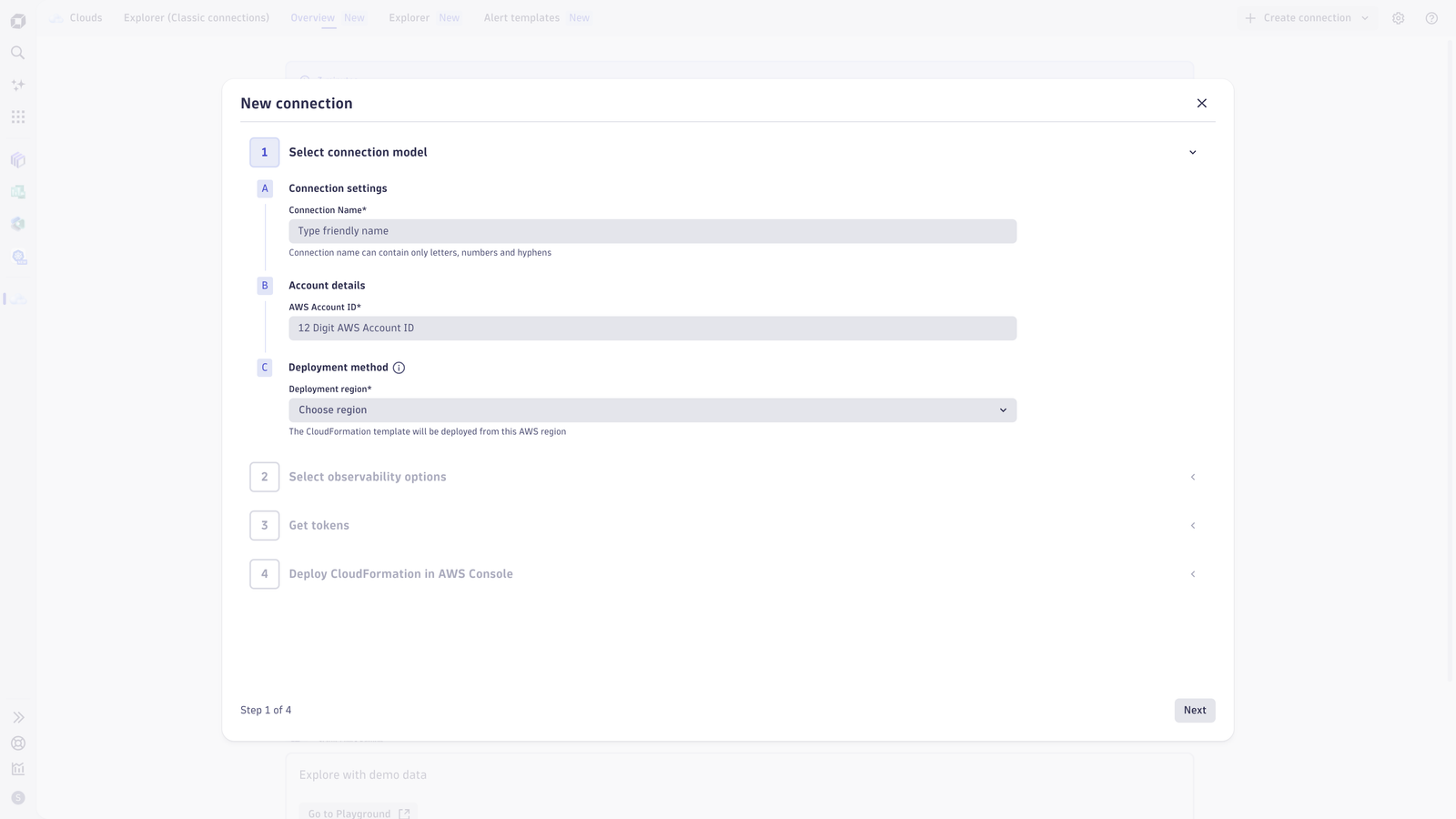
Get a comprehensive view of your multi-cloud environments and see your full cloud inventoryDetails of problems associated with selected cloud resources are easy to analyzeSee full configuration details of cloud servicesGet started immediately with ready-made dashboards. Customize them according to your needs.Use ready-made health alerts and warning signals and custom alert templates to assess health of your cloud services.Easily and seamlessly set up a new AWS connection. New Cloud Connections simplifies the onboarding experience for customers.
  • Product information
  • Release notes

Overview

The Dynatrace Clouds app is your one-stop solution for complete cloud observability, governance, and operations. It allows Cloud Ops and SRE teams to proactively monitor and manage the health, performance, utilization, and security of their (multi-)cloud infrastructure and services. Leveraging the Dynatrace Smartscape real-time dependency graph and Dynatrace Intelligence, the Clouds app provides critical dependency visibility and alerting out of the box. Built on Dynatrace’s unified observability platform, the Clouds app ensures confident operations and better business outcomes from day one.

Use cases

Keep up with rapidly dynamic environments: Break down complexity to understand and optimize your entire cloud estate.

  • Onboard your cloud accounts within minutes and immediately see your full (multi-)cloud inventory.
  • Gain a detailed view of your cloud services and their dependencies, independent of the cloud provider and architecture.
  • Analyze metrics, logs, events, traces, metadata, full configuration, and topology of your cloud services: All in-context, in one view.
  • Utilize (existing) cloud tags to define ownership, cost control, route alert notification, and drive preventive operations.

Ensure optimal health and performance across all cloud services and infrastructure by leveraging AI-driven insights.

  • Quickly pinpoint root cause and troubleshoot issues to minimize impact on end users with Dynatrace Intelligence
  • Troubleshoot faster with real-time insights into all metrics, logs, events, traces, and metadata (in context)
  • Proactive alerts, ready-made dashboards, and tag-enriched signals deliver instant clarity, accurate notifications, and faster resolution.
  • Visualize requests end-to-end with distributed tracing and code-level profiling.

Drive efficiency at scale by streamlining operations through intelligent automation

  • Provide centralized governance and orchestration across distributed teams and environments.
  • Execute remediation workflows through runbook integrations or natively through Dynatrace. Employ predictive analysis to optimize cloud infrastructure sizing and to analyze implications for cloud workloads or end users.
  • Automation: Automate remediation and optimization on cloud topology and native health events (for example, AWS Health Events)

Get started

This app has an integrated onboarding flow ("Create connection") that guides you through all required steps.

Requirements: New cloud connections require a Dynatrace Platform Subscription, including "Metrics powered by Grail", "Logs powered by Grail", and "Events powered by Grail". Classic cloud connections have no specific license requirements.

Find more information in the documentation.

Dynatrace
DocumentationMore Information
By Dynatrace
Dynatrace support center
Subscribe to new releases
Copy to clipboard

Related to Clouds

AWS logo

AWS

Reliable, scalable, and inexpensive cloud computing services.

Google Cloud logo

Google Cloud

Meet your business challenges head on with cloud computing services from Google.

Microsoft Azure logo

Microsoft Azure

Cloud computing service for building, testing, deploying, and managing services.

More resources

Observe and optimize multicloud environments with the Dynatrace Clouds app

Observe and optimize multicloud environments with the Dynatrace Clouds app

Dynatrace's new Clouds app enables streamlined multicloud management, offering a holistic view for varied cloud services. It aids in resource usage analysis and swiftly pinpoints under-utilized or over-utilized components.
Blog Post

Full version history

ReleaseDate

Full version history

2.2.1

Patch Changes

  • Rollout to the previous app version

Full version history

2.1.5

Minor Changes

  • Sets a default aggregation for built-in service metrics in Explorer Classic.
  • Cloud Alerts Widget: better error handling when the selected actor doesn't have required permissions.
  • Moves notifications into a dedicated tab in the Settings widget, replacing the previous banner.

Patch Changes

  • Minor adjustments to sidebar grouping.
  • Removes the Get Started Microguide.
  • Fixes disappearing Health Alert chips when opening entity details.
  • Metrics split by more than one dimension now show the correct data.
  • Fixes removed intent properties from the entity header.
  • Rewrites EKS cluster resolution to use the aws:eks:cluster-name tag for more reliable matches.
  • Adds plain DQL queries for Overview charts and table microcharts.
  • Fixes DynamoDB consumed capacity and error metrics.
  • Fixes metric aggregations for ElastiCache.
  • Fixes issues in the ECS dashboard and alert templates.
  • Fixes issues in the EKS dashboard and aligns metrics to the essential featureset.
  • Fixes issues in the AWS Overview dashboard.
  • Fixes nonsensical aggregations in the Azure Application Gateway dashboard.
  • Fixes BytesReceived and BytesSent aggregations in the Azure Web App dashboard.
  • Fixes dashboard button redirection for Azure Web Apps.
  • Fixes FunctionExecutionCount aggregation in the Azure Functions dashboard.
  • Fixes Azure Container Apps aggregations.
  • Sorts Service Types dropdown options alphabetically.
  • Fixes the "Create new alert" modal not validating the AWS account / Azure subscription field.
  • Adds filtering by Resource Group for Azure Health Alerts.
  • Adds handling of Warnings in the Overview tab and facets.
  • Adds a permission guard to the "Manage alerts" entry in the Connections management dropdown.
  • Fixes toast styling in the Cloud Alerts Settings widget.
  • Adds guidance and a documentation link for the service user.

Full version history

What's Changed

  • Resolved an issue where an incorrect overview page was displayed for certain users under specific conditions.

Full version history

2.1.1

New Clouds experience for Azure lets you optimize cloud operations at scale

We’ve extended the enhanced version of Clouds App to deliver deeper, actionable insights and context; greater usability; and enhanced troubleshooting for monitored Azure cloud environments.

Based on a new Azure cloud connection, metrics, logs, metadata, and topology are unified into a single AI-powered platform that delivers complete visibility and actionable insights at scale. This expanded Azure capability is part of our comprehensive Cloud Ops solution that is already available for AWS, ensuring a unified experience across multiple cloud platforms. 

Opinionated insights and ready-made dashboards powered by enriched Azure telemetry and cloud context help users quickly assess health and troubleshoot faster. 

Pre-configured health alerts are available for Azure in Clouds. Alerts are configured directly in Clouds App, where you can define them, drill down into data points, and search and filter resources. 

Broad and comprehensive Azure metrics coverage gives you a complete view of your Azure infrastructure by enabling the polling of any Azure Monitor native platform metric for any service. 

An easy onboarding and lifecycle management experience to onboard Azure subscriptions, turn them into native Dynatrace Azure connections, and manage them holistically from Clouds App.

A cloud-native, low-ops setup that's fully managed by Dynatrace SaaS. There’s no need to deploy ActiveGate compute resources for metric polling within your Azure environment. 

A rich Azure topology inventory that periodically scans Azure environments to build a dynamic inventory of resources enriched with cloud-native metadata (for example, Azure tags and subscription ID). You can visualize discovered resources in Clouds App and leverage DQL for custom analytics. 

Visit the documentation to get more information about the new Clouds App or the new cloud platform monitoring overall.

Full version history

2.0.7

Patch Changes

  • Improve performance and stability of the application.
  • Fix environment filtering for AWS.

Full version history

2.0.6

Minor Changes

This release delivers a set of UX refinements and deeper insights.

  • Refresh the banner design on the Welcome page to improve readability and highlight key actions.
  • Introduce a View Smartscape button for faster access to topology-aware analysis.
  • Add a View topology button to quickly navigate from summary views to underlying topology.
  • Add drilldowns from EC2, RDS, EKS clusters, and Lambda to their domain-specific apps for more focused root-cause analysis.

Patch Changes

This update also includes several stability, quality, and workflow improvements.

  • Update the app description so the Cloud App appears when searching for AWS, Azure, or Google Cloud.
  • Add dynamic loading of the Cloud Alerts schema in the Settings widget to keep configuration options up to date.
  • Add explicit state confirmation when changing alerts to prevent unintended modifications.
  • Make the overview banner dismissible so it doesn’t get in the way once you’re familiar with it.
  • Update overview banner texts and add a documentation button for quick access to related docs.
  • Rework the Events tab to improve clarity, navigation, and overall usability.

Full version history

2.0.4

Patch Changes

  • Improve performance and stability of the application.

Full version history

2.0.2

New Cloud Platform Monitoring

We're excited to introduce an enhanced AWS cloud platform monitoring based on new AWS connections. This new experience provides deeper, actionable insights and context, greater usability, and enhanced health and troubleshooting flows for monitored AWS accounts.

With this new Cloud App release, you can:

  • Onboard new AWS connections conveniently through the Clouds App (Create New Connection).
  • Manage the configuration of new cloud connections and assess connection health through new Settings. The connection settings are now linked in the App Header within Clouds App for new as well as classic cloud connections.
  • Use the new Overview page to get a summary of the health state of your cloud services by service category based on new AWS connections.
  • Use the new Explorer view to analyze your cloud services and accounts based on new AWS connections.
    • Explore your cloud inventory and understand your cloud architecture and dependencies.
    • Use cloud tags in the filter bar, facets, or segments to focus your exploratory analysis.
    • Access detailed AWS resource configurations and metadata.
    • Analyze the relationships between cloud services.
    • View telemetry signals (metrics, logs, cloud events) in the context of their associated cloud services.
  • Use problem mode to enable a focused investigation and analysis of a specific health-related issue.
  • Take advantage of ready-made dashboards for enhanced visibility.
    • Navigate to ready-made dashboards in context: The selected timeframe, segment and applied filters will be carried over from the Clouds App to the respective Dashboard.
  • Use alerts to automatically assess health of your cloud workloads, get notified or trigger auto-remediation workflows
    • Easily setup ready-made recommended alerts and warning signals, also upon onboarding your AWS connections.
    • Benefit from pre-defined custom alert templates for additional cloud service anomalies.
  • The Integration Manager was removed from Clouds App. Classic integrations can still be managed in Settings.

Visit the documentation to get more information about the new Clouds App or the new cloud platform monitoring overall.

Note: You can still continue to use the previously existing "Explorer (Classic connections)" to observe and analyze data coming from classic cloud connections (AWS, Azure, Google Cloud).
Azure Cloud Platform Monitoring - Preview

Want to get a similar experience for your Azure subscriptions? Request access and join our preview program

Full version history

1.13.5

Patch Changes

  • Improves stability of vulnerability components related to specific entity.

Full version history

1.13.4

Patch Changes

  • A user with limited access to entities is no longer presented with the welcome page.

Full version history

1.13.3

Patch Changes

  • Improves query performance for Azure and AWS entities.
  • Improves stabiity of the app on bigger environments.

Full version history

1.13.1

Patch Changes

  • The user can invoke the 'Add Log' integration in the entity details section under the empty Log Card.

1.13.0

Minor Changes

  • The user can now download the data from the entities table as CSV by selecting a new download button at the top right of the table.

Patch Changes

  • Addressed an uncommon issue where a user lacking the necessary permissions would encounter a blank page upon accessing the integration manager.

Full version history

1.12.0

Minor Changes

  • Now custom app developers can use 'connect_to_cloud' intent to redirect users to connection creation window of Integration Manager page.

Patch Changes

  • Improve accuracy and clarity of permission-related error messages displayed when users lack access to the 'Integration Manager' page.
  • Tooltip in "Service Type" and "Regions" filter in no longer available.

Full version history

1.11.0

Minor Changes

  • Extend the timeout period to 30 seconds to accommodate longer entity loading durations. Add informative error messages when entity loading exceeds the timeout.
  • Merge multiple items representing the same service type (with different ways of monitoring) into single option in the 'Service type' filter selector.

Patch Changes

  • Fix unintended hiding of the metrics that share the same key across various service types in the details section.

Full version history

1.10.3

Patch Changes

  • Small user interface fixes and updates.

Full version history

1.10.2

Minor Changes

  • New "Integration Manager" page where you can manage your AWS and Azure connections within the Clouds App.
  • The empty Logs tab in the details panel is now the entry point to the new log onboarding flow.
  • Preinstalled dashboards with overview of AWS & Azure monitoring.
  • New sidebar tab with "Network" related services and common metrics for them in the table.

Patch Changes

  • User state of displayed/hidden columns is now saved for future sessions on the same device.

Full version history

1.9.2

Patch Changes

  • Minor bug fixes and improvements.

Full version history

1.9.1

Patch Changes

  • Resolved the problem with the Cloud selector not being displayed correctly.

Full version history

1.9.0

Minor Changes

  • Increased the limit of entities per DQL query to 150000
  • Improve intents in Properties block in entity details side menu

Full version history

1.8.1

Minor Changes

  • Add new GCP entities to the app:
    • Cloud Bigtable Cluster
    • Cloud Bigtable Table
    • Cloud ML Job
    • Cloud ML Model Version
    • Google AlloyDB database
    • Google AlloyDB instance
    • Google BigQuery BI Engine Model
    • Google Cloud Composer Environment
    • Google Cloud Interconnect
    • Google Cloud Interconnect Attachment
    • Google Cloud NetApp Replication
    • Google Cloud NetApp Storage Pool
    • Google Cloud NetApp Volume
    • Google Cloud Router
    • Google Cloud VPN Gateway
    • Google Dataproc cluster
    • Google Firestore Database
    • Google Network Security Policy
    • Google reCAPTCHA Enterprise Key
    • Google Storage Transfer agent
    • Google Storage Transfer job
    • Google Uptime Check URL
    • Google VPC Access Connector
    • Microsoft Active Directory Domain

Patch Changes

  • Resolved problems with counters in service/environment/region selectors
  • Fixed link to onboarding documentation on no-monitoring page
  • Fixed error (resulting in the app's crash) when loading a preset with an absolute timeframe. Fixed error on the Problem tab when changing the timeframe.

Full version history

1.7.1

Minor Changes

  • Increased the limit of entities per DQL query to 75000
  • Add "Azure Front Door and CDN profiles" service support and update metrics list for all services
  • "Install OneAgent" button opens Discovery & Coverage app with information about installer in modal window
  • Intents can contain additional reference to related environment entity (e.g. dt.entity.cloud:gcp:project or dt.entity.aws_credentials)
  • More retry attempts when DQL query fails. Stacking some queries and executing as one bigger query (up to 10 queries per stack).

Patch Changes

  • Fixed: The app crashes while rapid switching between selected entities in the table

Full version history

1.6.0

Minor Changes

  • Improve metric aggregation selectors in the entity details menu
  • Add intents for parent_of and same_as properties in the entity details menu
  • Add GKE Node info for proper GCP VM entities

Full version history

1.5.0

Minor Changes

  • Metrics displayed in the table for selected AWS Metric Streams entities
  • "No monitoring" page displayed without the change of original URL
  • OneAgent status now redirects to host entity if possible
  • It is now possible to install OneAgent by clicking a OneAgent Status Button by oppening Coverage Modal
  • Updated list of app's scopes (required permissions)

Patch Changes

  • Add queries syntax highlighting and remove unnecessary information about queries execution

Full version history

1.4.0

Minor Changes

  • New feature: Storing filters as presets
  • Presenting entities from AWS Metric Streams integration

Full version history

1.3.0

Minor Changes

  • f5c3903: Added Feedback button so customers can send feedback about the app

Patch Changes

  • 48ec21e: Fix AWS S3 global region filter handling
  • d81e077: Added filtering e2e tests

Full version history

1.2.2

Patch Changes

  • 35c3d1c: Added queryFailedEntities to self-monitoring event
  • 3dfad7b: PCLOUDS-2918 - Model and validator for cloud filters presets
  • db2a512: Handle NOT_STARTED query execution state

1.2.1

Patch Changes

  • ddca38a: Fix problem counts in table

1.2.0

Minor Changes

  • 5eb63d2: PCLOUDS-2918 - optimizing filters state
  • ad8e84d: PCLOUDS-3617 - intents fix
  • 95b69d8: Update vulnerable eslint-config-airbnb-typescript dependency
  • 6c2f233: PCLOUDS-3464 - From 2024, March 1st: presenting Azure (built-in) metrics that could have contained broken data before

Full version history

1.1.0

Minor Changes

  • 1393e00: Fix entity sorting by type
  • 0ff9928: Split lifetime to parts

Full version history

1.0.2

Patch Changes

  • 8c068bd: Dependency update unified-analysis -> 0.10.0

1.0.1

Patch Changes

  • 3036ef3: PCLOUDS-3256 - long text tooltips
  • f873374: PCLOUDS-3479 - Presenting details for entity that is not present in the table.
  • 53723bb: PCLOUDS-3455 - Better handling the SUM aggregation of GAUGE metrics in entity details section (SUM of AVG)
  • f464c37: Fix problems fetching query

1.0.0

General release

Dynatrace Hub
Hub HomeGet data into DynatraceBuild your own app
Dynatrace Intelligence - Agentic Operations SystemThe Dynatrace Agentic AI ecosystem
All (914)Log Management and AnalyticsKubernetesAI and LLM ObservabilitySoftware DeliveryApplication ObservabilityApplication SecurityBusiness ObservabilityDigital Experience
Filter
Type
Built and maintained by
Deployment model
SaaS
  • SaaS
  • Managed
Partner FinderBecome a partnerDynatrace Developer

Infrastructure Observability

Get automatic and intelligent observability across cloud and hybrid environments with continuous auto-discovery of any type of infrastructure, all in context and with precise, AI-powered answers.

Essentials

Get automatic and intelligent infrastructure monitoring and observability across hybrid and cloud environments.

OneAgent logo

OneAgent

The simplest way to capture all observation signals automatically and in context.

Discovery & Coverage logo

Discovery & Coverage

Ensure enterprise-wide visibility. Discover and remediate coverage gaps.

Infrastructure & Operations logo

Infrastructure & Operations

Detailed hosts, process, and network insights across the entire environment.

Databases logo

Databases

Monitor databases, prevent issues, and resolve incidents quickly in real time.

Clouds logo

Clouds

Gain full visibility and proactive monitoring across your cloud infrastructure.

Hybrid cloud

AWS logo

AWS

Reliable, scalable, and inexpensive cloud computing services.

Microsoft Azure logo

Microsoft Azure

Cloud computing service for building, testing, deploying, and managing services.

Google Cloud logo

Google Cloud

Meet your business challenges head on with cloud computing services from Google.

VMware logo

VMware

Monitor health and performance of VMware virtual machines.

Nutanix Clusters logo

Nutanix Clusters

Monitor Nutanix clusters' performance, usage and availability, with Nutanix API.

Microsoft Hyper-V Infrastructure logo

Microsoft Hyper-V Infrastructure

Monitor health and performance of the Hyper-V clusters, hosts and VMs.

Technology coverage

F5 BIG-IP logo

F5 BIG-IP

Gain insights into the performance of your F5 BIG-IP LTM and DNS solutions.

Oracle Database logo

Oracle Database

Observe, analyze and optimize the usage, health and performance of your database.

Microsoft SQL Server logo

Microsoft SQL Server

Improve the health and performance monitoring of your Microsoft SQL Servers.

Also popular

See more (5)
Juniper Networks (SNMP) logo

Juniper Networks (SNMP)

Gain insights into the performance of your Juniper networking solutions.

SNMP Traps logo

SNMP Traps

Supplement network monitoring with event-based data reported via SNMP Traps.

Generic Cisco Device logo

Generic Cisco Device

Monitor Cisco devices using SNMP to feed Dynatrace with metrics and alerts.

Palo Alto firewalls logo

Palo Alto firewalls

Palo Alto extension for problems detection.

Remote Windows Host Monitoring logo

Remote Windows Host Monitoring

Monitor health and performance of Windows Hosts without installing an agent.

AWS Lambda logo

AWS Lambda

Automatic and intelligent end-to-end observability of AWS Lambda traces and logs.

More resources

Amazon API Gateway logo

Amazon API Gateway

Service for developers to create, publish, maintain, monitor, and secure APIs.

Amazon AppStream 2.0 logo

Amazon AppStream 2.0

Fully managed application streaming service that provides users with instant access to their desktop applications from anywhere.

Amazon Athena logo

Amazon Athena

Interactive query service that makes it easy to analyze data directly in Amazon S3 using standard SQL.

Amazon Aurora logo

Amazon Aurora

Relational database service developed and offered by Amazon Web Services.

Amazon CloudFront logo

Amazon CloudFront

Content delivery network offered by Amazon Web Services.

Amazon CloudSearch logo

Amazon CloudSearch

Set up, manage, and scale a search solution for your website or application using CloudSearch.

Amazon CloudWatch Logs logo

Amazon CloudWatch Logs

Monitor, store, and access your log files from instances, AWS CloudTrail, Route 53, and other sources.

Amazon Cognito logo

Amazon Cognito

Add user sign-up, sign-in, and access control to your web and mobile apps quickly and easily.

Amazon Connect logo

Amazon Connect

Easy to use omnichannel cloud contact center that helps you to provide superior customer service at a lower cost.

Amazon DocumentDB logo

Amazon DocumentDB

Amazon DocumentDB (with MongoDB compatibility) is a fast, reliable, and fully managed database service.

Amazon DynamoDB Accelerator (DAX) logo

Amazon DynamoDB Accelerator (DAX)

Fully managed, highly available, in-memory cache for your Amazon DynamoDB.

Amazon EC2 Auto Scaling logo

Amazon EC2 Auto Scaling

Amazon EC2 Auto Scaling helps you ensure that you have the correct number of Amazon EC2 instances available.

Amazon EC2 Spot Fleet logo

Amazon EC2 Spot Fleet

Spot Instances and On-Demand Instances to meet the target capacity that you specified.

Amazon Elastic Container Service (ECS) logo

Amazon Elastic Container Service (ECS)

Fully managed container orchestration service.

Amazon Elastic File Service (EFS) logo

Amazon Elastic File Service (EFS)

Cloud storage service provided by Amazon Web Services.

Amazon Elastic Transcoder logo

Amazon Elastic Transcoder

Convert and transcode media files stored in Amazon S3.

Amazon ElastiCache logo

Amazon ElastiCache

Fully managed, Redis- and Memcached-compatible service delivering real-time performance for modern applications by Amazon Web Services.

Amazon Elasticsearch Service logo

Amazon Elasticsearch Service

Fully managed service to deploy, secure, and run Elasticsearch cost effectively at scale, without the operational overhead.

Amazon EMR logo

Amazon EMR

Cloud big data platform for processing vast amounts of data using open source tools.

Amazon EventBridge logo

Amazon EventBridge

Serverless event bus to connect applications together using data from your own applications, integrated SaaS applications, and AWS services.

Amazon FSx for Lustre logo

Amazon FSx for Lustre

Makes it easy and cost-effective to launch and run the popular, high-performance Lustre file system.

Amazon FSx for Windows File Server logo

Amazon FSx for Windows File Server

Provides a managed Microsoft Windows file servers, backed by a native Windows file system.

Amazon GameLift logo

Amazon GameLift

Enables developers to deploy, operate, and scale dedicated, low-cost servers in the cloud for session-based, multiplayer games.

Amazon Inspector logo

Amazon Inspector

Tests the network accessibility of your EC2 instances and the security state of your applications that run on those instances.

AWS IoT logo

AWS IoT

Run local compute, messaging, data caching, and machine learning inference capabilities.

Amazon Keyspaces for Apache Cassandra logo

Amazon Keyspaces for Apache Cassandra

Scalable, highly available, and managed Apache Cassandra–compatible database service.

Amazon Kinesis Data Analytics logo

Amazon Kinesis Data Analytics

Transform and analyze streaming data in real time with open source framework and engine for processing data streams (Apache Flink).

Amazon Kinesis Data Firehose logo

Amazon Kinesis Data Firehose

Fully managed service for delivering real-time streaming data.

Amazon Kinesis Data Streams logo

Amazon Kinesis Data Streams

Collect log and event data from sources such as servers, desktops, and mobile devices.

Amazon Kinesis Video Streams logo

Amazon Kinesis Video Streams

Provides you SDKs to install on your devices to make it easy to stream media.

Amazon Lex logo

Amazon Lex

Service for building conversational interfaces for applications using voice and text.

Amazon MQ logo

Amazon MQ

Managed message broker service for Apache ActiveMQ that makes it easy to migrate to a message broker in the cloud.

Amazon MSK logo

Amazon MSK

Fully managed service that enables you to build and run applications that use Apache Kafka to process streaming data.

Amazon Neptune logo

Amazon Neptune

Fast, reliable, fully managed graph database built for highly connected datasets.

Amazon Polly logo

Amazon Polly

Cloud service that converts text into lifelike speech.

Amazon Quantum Ledger Database (QLDB) logo

Amazon Quantum Ledger Database (QLDB)

Ledger by a central trusted authority that provides an immutable, and cryptographically verifiable transaction log.

Amazon Redshift logo

Amazon Redshift

Data warehouse product which forms part of the larger cloud-computing platform AWS.

Amazon Rekognition logo

Amazon Rekognition

Amazon Rekognition makes it easy to add image and video analysis to your applications.

Amazon Route 53 logo

Amazon Route 53

Effectively connects user requests to infrastructure running in AWS.

Amazon Simple Email Service (SES) logo

Amazon Simple Email Service (SES)

Cloud-based service that helps developers send marketing, notification, and transactional emails.

Amazon Simple Notification Service (SNS) logo

Amazon Simple Notification Service (SNS)

Provides a simple web services interface that can be used to create topics you want to notify apps.

Amazon Simple Queue Service (SQS) logo

Amazon Simple Queue Service (SQS)

Programmatic sending of messages via web service applications.

Amazon Simple Workflow Service (SWF) logo

Amazon Simple Workflow Service (SWF)

Makes it easy to build applications that coordinate work across distributed components.

Amazon Textract logo

Amazon Textract

Makes it easy to add document text detection and analysis to your applications.

Amazon Transfer Family logo

Amazon Transfer Family

Provides fully managed support for file transfers directly into and out of Amazon S3 using SFTP, FTPS, and FTP.

Amazon Translate logo

Amazon Translate

Text translation service using machine learning to provide high-quality translation on demand.

Amazon VPC (NAT Gateway) logo

Amazon VPC (NAT Gateway)

Connect to the Internet from instances within a private subnet in an AWS Virtual Private Cloud.

Amazon WorkMail logo

Amazon WorkMail

Secure, managed business email and calendaring service with support for existing desktop and mobile email clients.

Are you looking for something different?

We have hundreds of apps, extensions, and other technologies to customize your environment

Extend your knowledge

Learn the Dynatrace Query Language

Learn the Dynatrace Query Language

Explore data, discover patterns, anomalies and outliers, and create statistical modeling with DQL, our powerful query language..
Learn DQL
Get certified and advance your career

Get certified and advance your career

Go to Dynatrace University for practical, on-demand courses and learning paths -- from platform basics to key certifications.
Build skills