


 GitHub
GitHub
Automate GitHub issues, pull requests, and workflows from Dynatrace.
App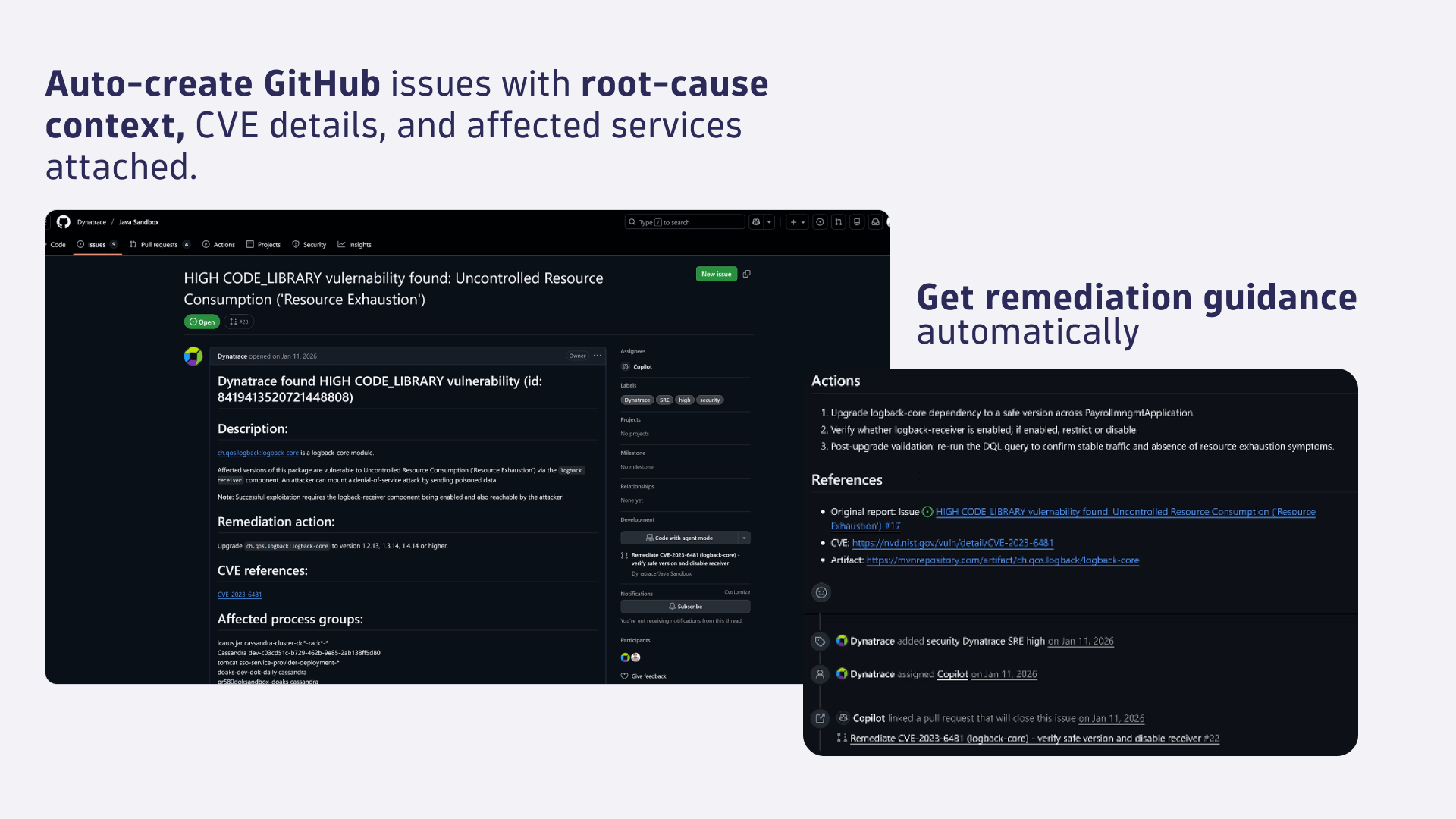
- Product information
- Release notes
Overview
The GitHub connector links your GitHub repositories to Dynatrace Workflows. From a single Workflow, you can create issues, manage pull requests, trigger CI/CD pipelines, and amend repository files driven by monitoring signals, analyzed by Dynatrace.
Connect your GitHub organization once, then build automations that respond to problems, threshold breaches, SDLC events, or scheduled triggers. Every action runs within a Workflow, so you have full control over conditions, sequencing, and approval gates.
Core capabilities:
-
Issue management. Create and update GitHub issues from Dynatrace events. Attach context such as root cause, affected entities, and remediation guidance automatically.
-
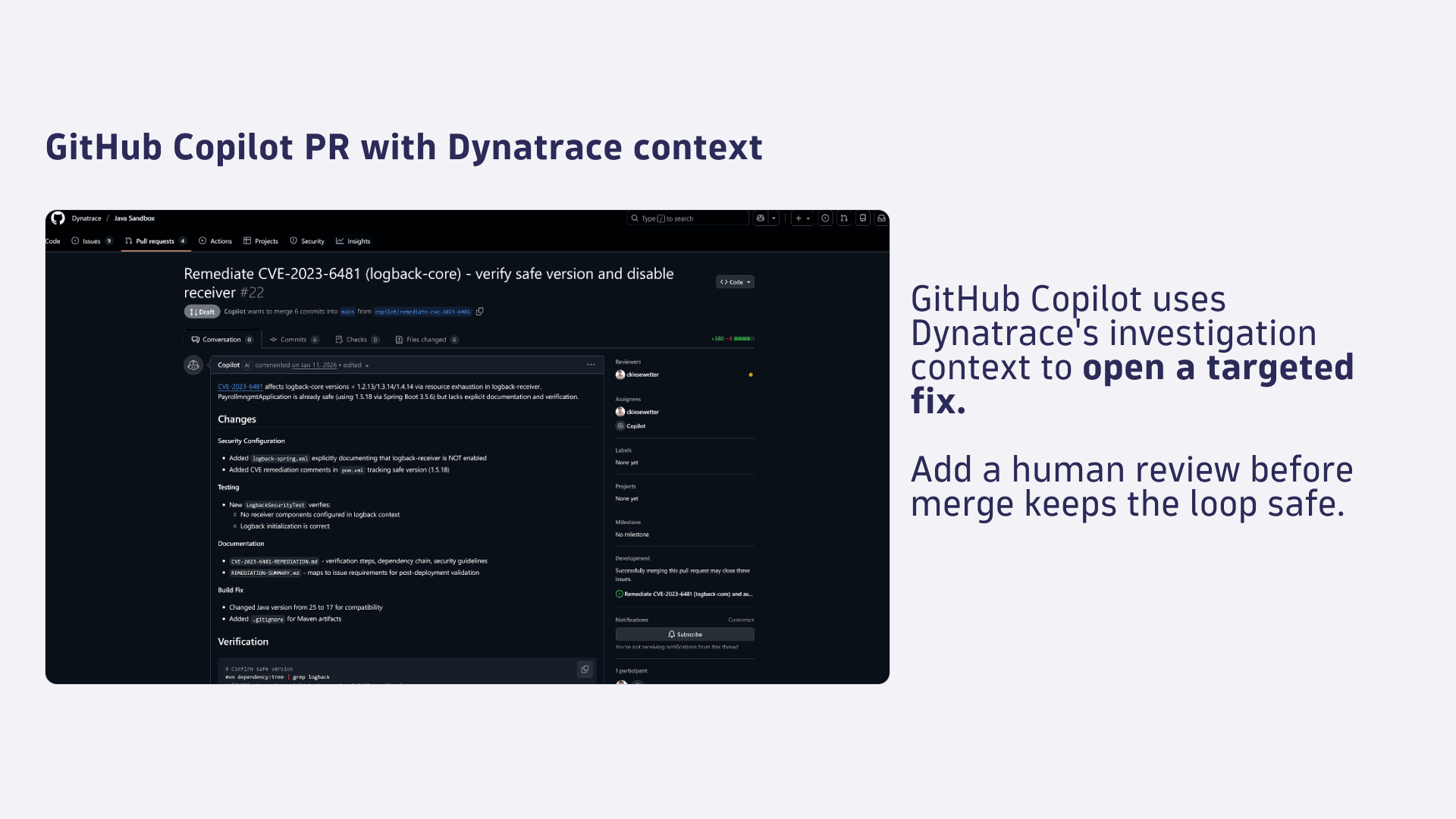
Pull request management. Create, list, and merge pull requests to drive GitOps-compliant configuration changes in your state repositories.
-
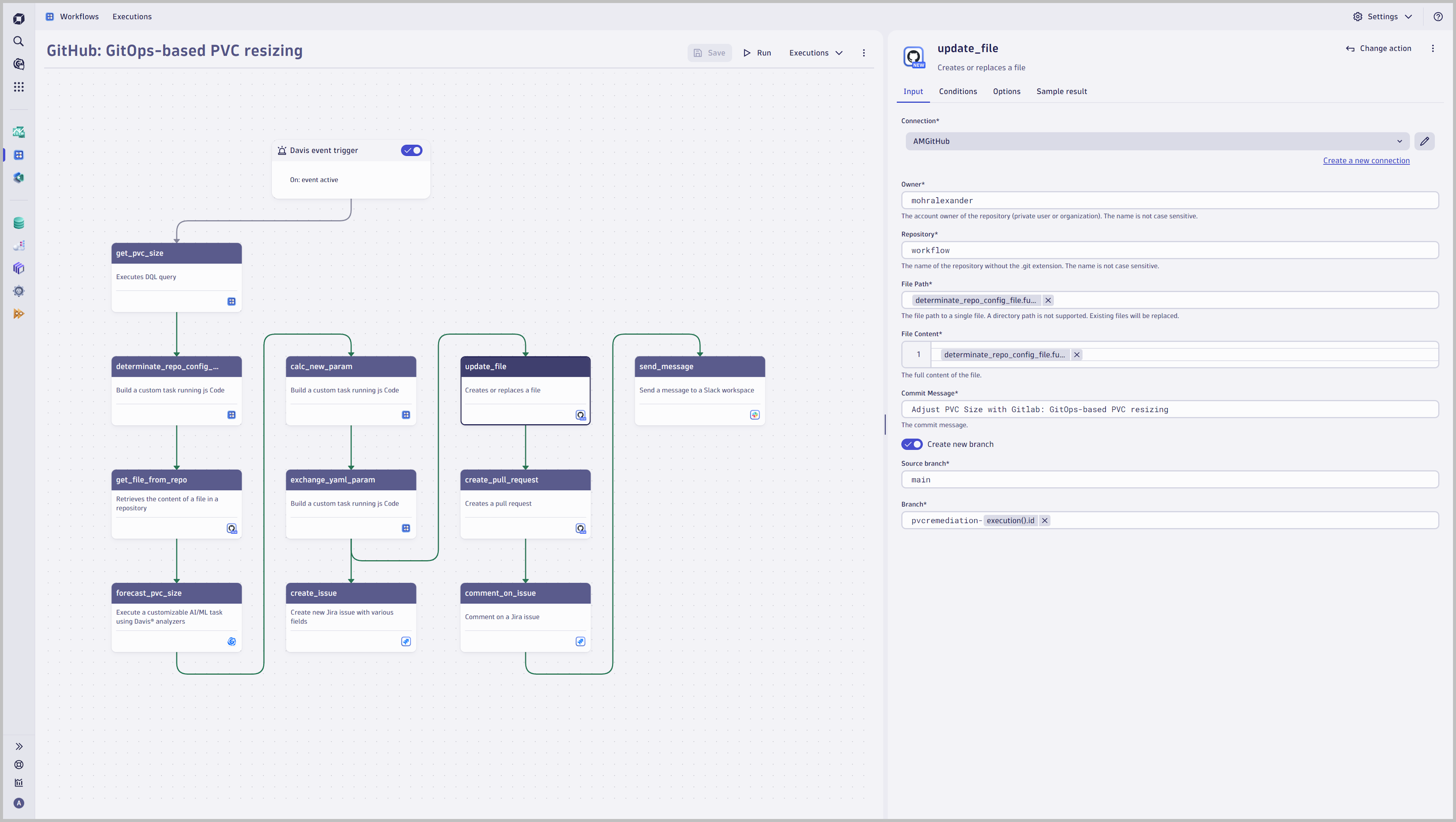
File operations. Get, create, replace, and delete files in repositories. Automate config amendments, version bumps, and remediation patches.
-
GitHub Actions workflow triggering. Trigger workflow runs, wait for completion, and retrieve full run details. Chain CI/CD pipelines directly into your observability-driven automation.
-
Comments. Add comments to issues and pull requests so your team stays informed without leaving Dynatrace.
Pre-built workflow templates get you started quickly, including templates for pull request review reminders and failed GitHub Actions run notifications. Combine the GitHub connector with Dynatrace apps such as Slack or Jira for Workflows for end-to-end incident and delivery automation.
Use cases
-
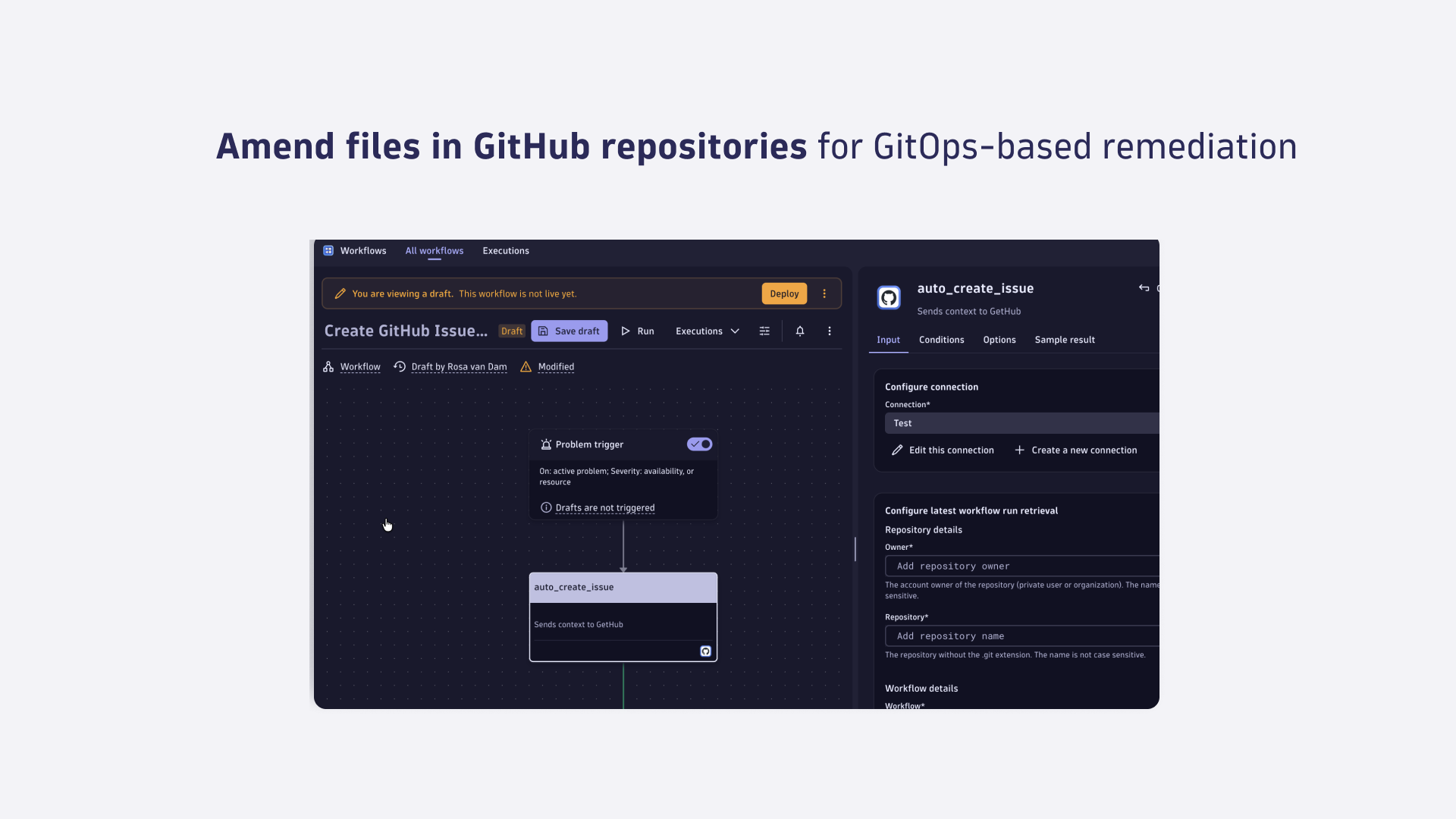
Auto-create GitHub issues from Dynatrace problems so on-call engineers have a tracked work item with full root-cause context the moment an incident fires.
-
Trigger GitOps remediation: amend configuration files in a state repository, open a pull request, and apply targeted changes such as right-sizing a PVC or scaling a deployment.
-
Notify teams about failed GitHub Actions runs with a scheduled Workflow that checks the latest run status and routes alerts to Slack or email.
-
Remind reviewers about stale pull requests with a scheduled Workflow that lists open PRs exceeding your team’s review SLA.
-
Connect CI/CD pipelines to observability signals: trigger a GitHub Actions workflow when Dynatrace detects a deployment event or quality gate result.
-
Keep deployment tracking current: comment on the originating PR or issue with post-deployment health status from Dynatrace.
Get started
The GitHub app is available from the Dynatrace Hub. Install it, then set up a connection to your GitHub organization:
-
Install the GitHub app from the Dynatrace Hub.
-
Navigate to the app and create a GitHub connection by authorizing access to your GitHub organization or repositories.
-
Open Workflows and create a new workflow, or start from one of the built-in workflow templates (e.g., PR review reminder, failed Actions notification).
-
Add a GitHub action step, select your connection, and configure the operation (create issue, trigger workflow run, etc.).
-
For detailed setup and action reference, see the GitHub connector documentation.
Details
GitHub enables users to amend files in state repositories to follow a GitOps-compliant approach for automation and remediation:
Define various incident triggers:
- Use the power of DQL and leverage events to react to any problem, security incident, or attack to trigger a pipeline run
- Use SDLC events as a trigger to react on extended events like a deployment event, failed release validation with Site Reliability Guardian, specific log messages, or external system events
- Define a scheduler for periodic tasks
Repository Management
- Get File content
- Create a new file, replace or delete an existing file in your repository
- Create a pull request, list pull requests, or merge an existing pull request
Full version history
ReleaseDate
Full version history
- Updated dependencies
- Updated internationalization
Full version history
- Updated dependencies
Full version history
- Trigger workflow run: Added option to wait for the workflow run to finish and return the full workflow run details
- Updated dependencies
- Updated internationalization
Full version history
- Get content: Added support for non latin1 characters
- Get Content: Added sha to the response
- Create or replace file: Added support for non latin1 characters
- Updated dependencies
- Updated internationalization
Full version history
- Added workflow template for pull request review reminder
- Added workflow tempalte to notify on failed GitHub Actions run
- Adapted connection settings page according to style guide
- Updated dependencies
- Updated internationalization
Full version history
- Trigger workflow run: Added new action
- Create issue: Added new action
- Create comment: Added new action
- Get latest workflow run: Added new action
- Update issue: Added new action
- Updated dependencies
- Updated internationalization
Full version history
- Fixed scroll bars in create/edit connection dialogs
- Improved error messages for connectors management
- Changed the styling of the table in the connection overview
- Updated dependencies
- Updated internationalization
Full version history
- Improved internationalization
- Changed the legacy hint text in the connection overview
- Updated dependencies
Full version history
- Added history revision for connection settings
- Fixed wrong background color in light theme
- Reworked message containers design and hint texts in the modal, intent and connection overview
Full version history
- Fixed bug where the connection settings form stayed open after editing a connection
- Updated dependencies
- Increased schema version
- Improved error handling of GitHub server-side issues
- Added expression validation
- Adjusted height in create and edit connection intent
- Added further validation to the create/edit connection form to deny connection names that begin or end with whitespaces
Full version history
- Migrated to owner based access control
Full version history
- Updated dependencies
Full version history
- Improved user facing error message if a directory path is provided instead of a file path.
- Updated dependencies
Full version history
1.4.2
- Renamed app to "GitHub" (former "GitHub for Workflows")
1.4.1
- Group related input fields by headers
- Updated dependencies
- Fixed unnecessary scrollbar in ConnectionOverview by updating dependencies
1.4.0
- Added query parameters when creating or editing a connection
- Grouped related input-fields visually
- Updated dependencies
1.3.0
- Added expression support for connection picker
- Made app headless
Full version history
1.2.1
- Updated dependencies
1.2.0
- Added confirmation modal for closing unsaved connection settings
- Updated dependencies and resolved deprecation warnings
Full version history
1.1.0
- Aligned footer and use case text in connection overview
- Hint text improvements
- Updated app icon
Full version history
1.0.1
- Fixed missing scroll bar in dropdowns for Chrome versions 129.0.6668.xx or higher
1.0.0
- Introduce a new, streamlined connection management experience with a modernized interface. This update makes adding and editing connections directly within workflows easier and provides connection control and convenience in one place.
Full version history
0.8.0
- Added connector management overview
- Added create and edit connection intents