


























Skip to technology filters Skip to main content
Dynatrace Hub

Extend the platform,
empower your team.

Popular searches:
Home hero bg
Microsoft TeamsMicrosoft Teams
Microsoft Teams

Microsoft Teams

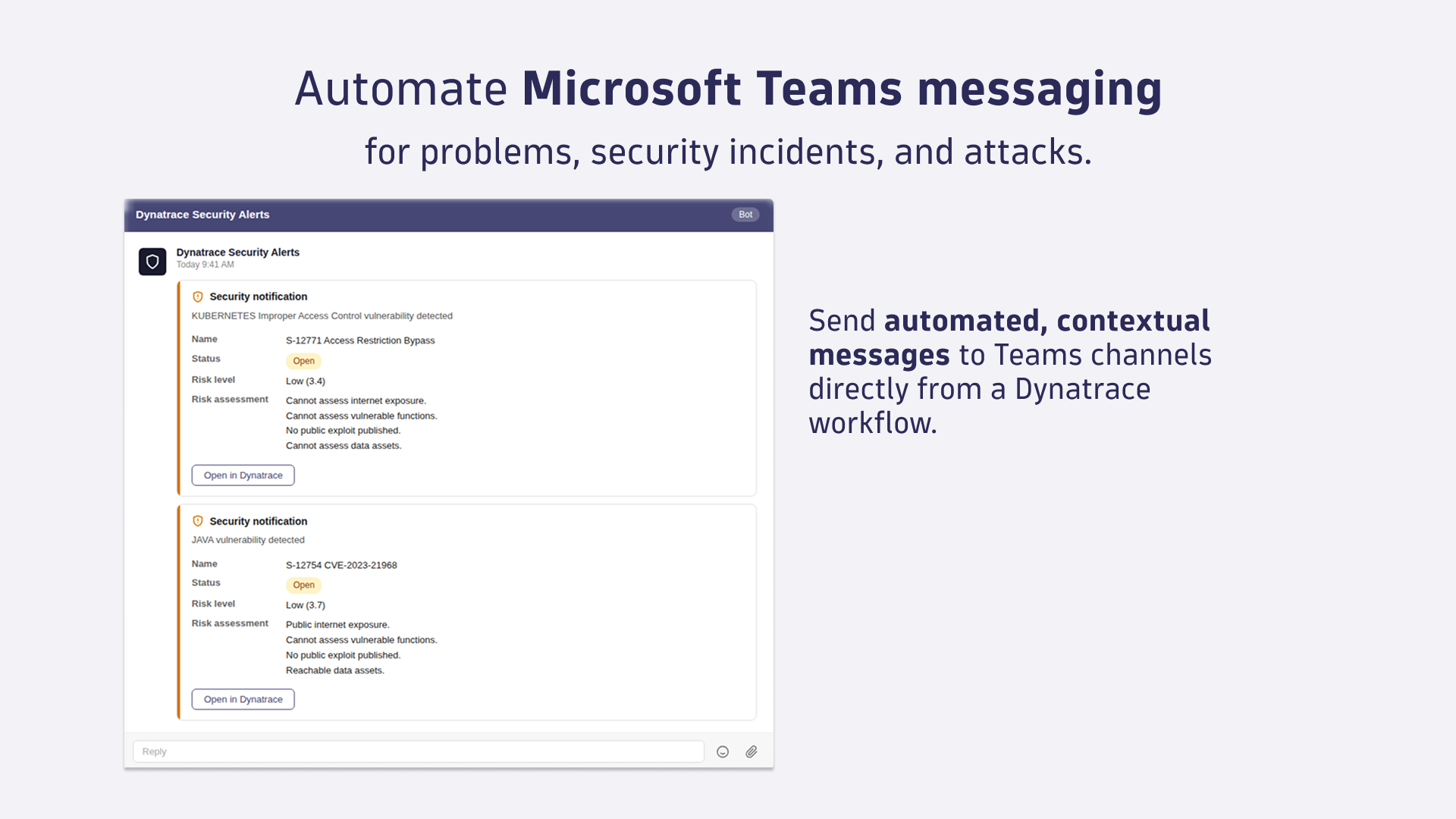
Automate Microsoft Teams messaging for problems, security incidents or attacks.

App
Free trialDocumentation
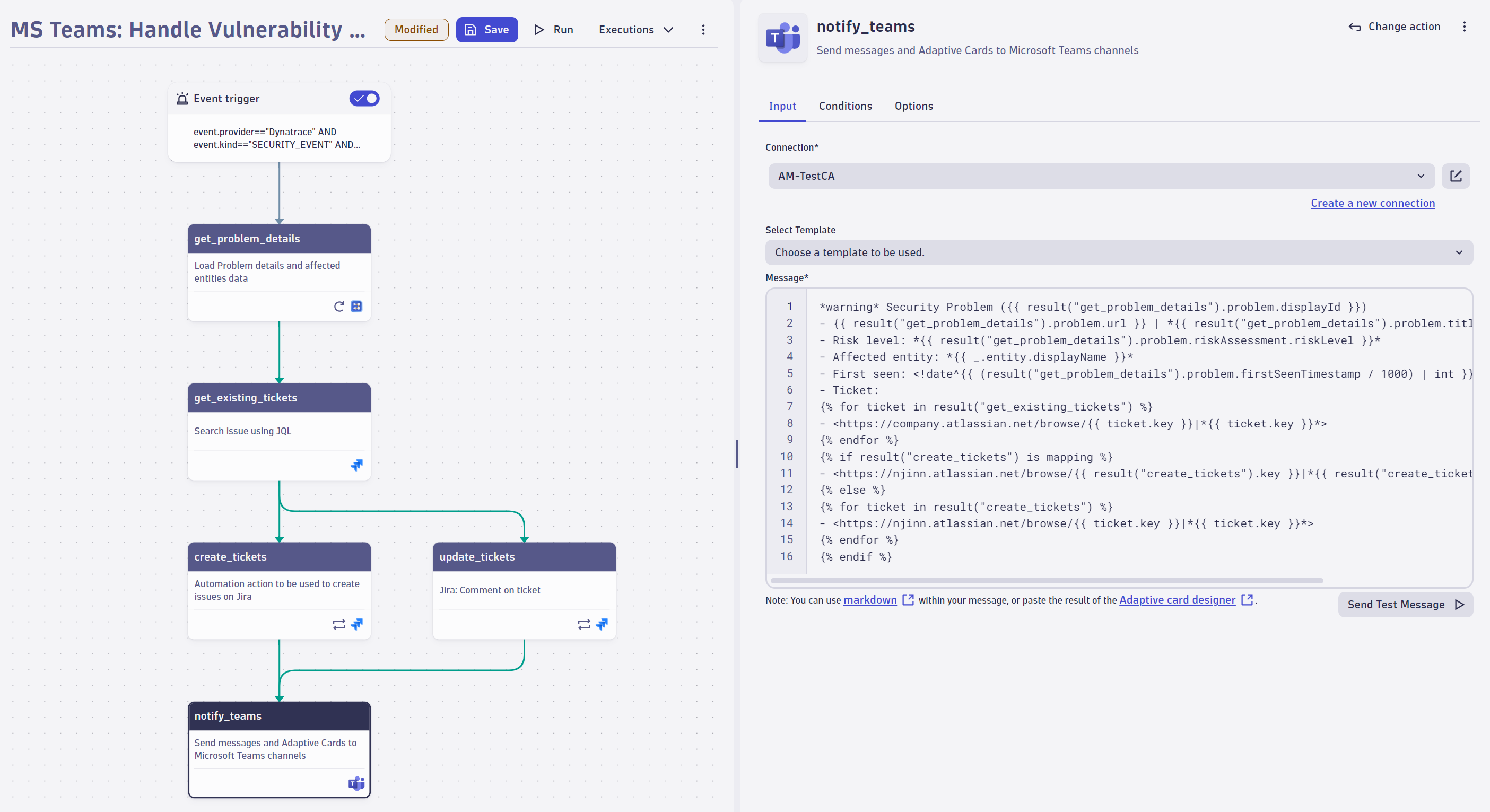
Get automated, contextual messages into your Teams channels directly from a Dynatrace workflowCreate a workflow to enrich security information, create tickets, and inform users via Microsoft Teams about security incidents and tickets.
  • Product information
  • Release notes

Overview

Microsoft Teams for Workflows lets you send automated, contextual messages to Teams channels directly from a Dynatrace workflow, triggered by problems, security incidents, attacks, business events, or a schedule.

Workflow templates are available for common Teams notification scenarios. Select a prebuilt automation from the Workflows catalog and customize it rather than building from scratch.

Key capabilities include:

  • Event-driven triggers: react to problems, security incidents, attacks, or business events using DQL; schedule recurring notifications

  • Card templates: send pre-formatted problem and security incident cards without custom message composition

  • Rich message composition: enrich messages with tags, entity hierarchy, expression builders, and workflow step results

  • File and report attachments: attach logs, reports, and other files for additional context

  • Workflow templates: ready-to-use automations for common Teams notification scenarios

Use cases

  • Send a formatted card to Teams automatically when Dynatrace detects a problem or security incident, with incident details pre-populated.

  • Start Teams notifications quickly using workflow templates for problems and security incidents without building the automation from scratch.

  • Enrich Teams alerts with full context by including tags, entity relationships, and links back to the Dynatrace incident view.

  • Attach reports and logs to Teams messages so responders have the information they need without switching tools.

  • Schedule recurring operational summaries to keep teams informed with regular status updates delivered to the right channel.

Get started

Install Microsoft Teams for Workflows from the Dynatrace Hub, configure an outbound connection, and authorize it. After installation, open Workflows and select a Teams workflow template to start with a prebuilt notification automation rather than building from scratch.

Dynatrace
DocumentationMore Information
By Dynatrace
Dynatrace support center
Subscribe to new releases
Copy to clipboard

Full version history

ReleaseDate

Full version history

  • Various improvements and dependency updates.

Full version history

  • Various improvements and dependency updates.

Full version history

  • New Workflow templates – Added ready-to-use Workflow templates, making it faster to set up common Microsoft Teams notifications and messaging workflows.

Full version history

  • Various improvements and dependency updates.

Full version history

  • Various improvements and dependency updates.

Full version history

  • Webhook Deprecation Notification – Added a notification to inform users about the deprecation of Microsoft Teams webhook URLs, ensuring clarity and smoother migration planning.
  • Fixed Message Field Hint Link – Corrected an incorrect link in the hint text of the message field.
  • Removed Send-Test-Message Button – The send-test-message button is now hidden when sending messages via intent, streamlining the interface and reducing confusion.

Full version history

  • Intent Schema Update Compatibility – Updated the app to support changes introduced in intent schema v0.8.0:
    • Added support for new fields: instantMessage and description
    • Removed deprecated fields: message, target and type
  • Improved Validation for Connection Details – Enhanced the validation logic within the send-message action to ensure more reliable connection configurations.
  • Bugfix for Action Widget - Fixed an issue that could cause the action widget to crash when provided with an invalid connection ID.

Full version history

  • Various improvements and dependency updates.

Full version history

  • Bugfix for selecting a connection in expression mode - Resolved an issue where the widget would crash when switching away from expression mode in the connection input field.
  • Bugfix for Connection Settings Form - Resolved an issue where the connection settings form remained open after editing a connection.
  • Improved Connection Management - When creating or editing a connection from within an intent, the form now opens in a new tab, offering better usability.

Full version history

  • Various improvements and dependency updates

Full version history

  • Various improvements and dependency updates.

Full version history

  • New Intents - Reworked the send-message intent to enable forwarding of problems to MS Teams.
  • Access Control for Connectors Management - Added fine-grained access control for connections, enabling only specific users to have access to connection settings.

Full version history

  • Optimized Connections Overview - The height of the Connections overview table in Connector Settings is now limited to the window size.

Full version history

  • Optimized Retry Logic - Reduced the time allocated for retrying API calls, enhancing overall efficiency.
  • Grouped input fields - Improved the user experience by grouping related input fields, making navigation and usage easier.

Full version history

  • Expression in Connection Selection - An expression can now be used when selecting the connection, providing greater flexibility and customization.

Full version history

Connection Management - All connections of the App can now be managed via the newly released Settings App. To manage your connections got to Settings > Connections > Microsoft Teams.

Full version history

  • New Connectors Management - Introduce a new, streamlined connection management experience with a modernized interface. This update makes adding and editing connections directly within workflows easier and provides connection control and convenience in one place.
  • App renamed to "Microsoft Teams" - Streamlined the app name by removing the suffix “for Workflows”.

Full version history

  • Bugfix: Fixed an issue with dropdowns breaking in Chrome 129

Full version history

  • Major release: The App is now officially released, we removed the "(Preview)" postfix.
  • Send message action: The intent is now an add-on intent, meaning that it will show up in an in-app modal instead of a different window.

Full version history

  • Dual Webhook Compatibility due to Office 365 Webhooks Deprecation: To address the upcoming deprecation of Office 365 webhooks, our application now supports both the traditional Office 365 webhooks and the new Microsoft Power Automate webhooks. Please be aware that according to Microsoft’s latest announcement, Office 365 webhooks will stop working after December 31, 2024. For detailed guidance on migrating to the new webhook format, please refer to our documentation.
  • Breaking change: Changed Connection list to an unordered list.
  • Bugfix: Fixed an issue in the message field where the cursor occasionally jumped to the beginning of the editor.
  • Bugfix: Fixed a problem where error logs were not shown to the user.
  • Updated the App icon.

Full version history

  • Small UI enhancements

Full version history

  • Maintenance release

Full version history

  • Maintenance release

Full version history

  • Error handling: Improve error handling for the microsoft teams API.

Full version history

  • General App and performance improvements

Full version history

No release notes

Dynatrace Hub
Hub HomeGet data into DynatraceBuild your own app
Dynatrace Intelligence - Agentic Operations SystemThe Dynatrace Agentic AI ecosystem
All (914)Log Management and AnalyticsKubernetesAI and LLM ObservabilityInfrastructure ObservabilityApplication ObservabilityApplication SecurityBusiness ObservabilityDigital Experience
Filter
Type
Built and maintained by
Deployment model
SaaS
  • SaaS
  • Managed
Partner FinderBecome a partnerDynatrace Developer

Software Delivery

Empower DevOps platform engineers, SREs, and development teams to deliver higher quality software, faster, and more securely.

Popular integrations

See more (1)
GitHub logo

GitHub

Automate GitHub issues, pull requests, and workflows from Dynatrace.

Jira logo

Jira

Open, update, and close Jira tickets automatically from Dynatrace Workflows.

Jenkins logo

Jenkins

Trigger Jenkins builds and monitor job status from Dynatrace Workflows.

GitLab logo

GitLab

Amend files in GitLab repositories, trigger pipelines, and manage issues.

Slack logo

Slack

Automate Slack messaging for security incidents, attacks, remediation, and more.

ServiceNow logo

ServiceNow

Create and manage ServiceNow incidents from Dynatrace Workflows.

More options

Workflows logo

Workflows

Automate tasks in your IT landscape and move towards autonomous operations.

Keptn logo

Keptn

Event-based control plane for continuous delivery and automated operations.

Configuration as Code logo

Configuration as Code

Manage observability and security configurations as code via Terraform or Monaco.

Site Reliability Guardian logo

Site Reliability Guardian

SRG: Automated change impact analysis for your deployment and release processes.

Service-Level Objectives logo

Service-Level Objectives

Manage SLOs and error budgets to ensure service performance and reliability SLAs.

More resources

AWS Connector logo

AWS Connector

Automate your AWS infrastructure with actions across EC2, S3, Lambda, and more.

Claude Connector for Workflows logo

Claude Connector for Workflows

Connect with Claude and send prompts for further analysis using Workflows.

CI/CD Observability logo

CI/CD Observability

Monitor CI/CD pipelines such as Azure Devops, Gitlab, Github and more.

Observability for Developers on Cursor logo

Observability for Developers on Cursor

Get Real time Code-Level data directly to your Cursor IDE.

Email logo

Email

Send out-of-the-box targeted Emails with workflows.

Gemini Connector for Workflows logo

Gemini Connector for Workflows

Connect with Gemini and send prompts for further analysis using Workflows.

GitHub Copilot Coding Agent logo

GitHub Copilot Coding Agent

Automate vulnerability remediation and boost developer productivity.

GitHub Copilot Custom Agent logo

GitHub Copilot Custom Agent

Automate your development workflows with specialized agent definitions.

Observability for Developer on JetBrains logo

Observability for Developer on JetBrains

Get real-time code-level data directly to your Jetbrains IDE.

Kubernetes Connector logo

Kubernetes Connector

Automate your Kubernetes clusters: Delete failed pods and restart deployments.

Microsoft 365 logo

Microsoft 365

Send targeted emails from workflows using your Microsoft 365 account.

OpenAI Connector for Workflows logo

OpenAI Connector for Workflows

Connect with OpenAI and send prompts for further analysis using Workflows.

Ownership logo

Ownership

Enables the import of and access to ownership information of entities.

Pagerduty for Dynatrace Workflows logo

Pagerduty for Dynatrace Workflows

Streamline incident management with automated Pageruty workflows.

Red Hat Ansible logo

Red Hat Ansible

Integrate with Red Hat Ansible (EDA, AAC, AWX) to trigger job templates.

Snowflake for Workflows logo

Snowflake for Workflows

Access, query, and store Snowflake data to analyze further within Dynatrace.

Observability for Developers on VSCode logo

Observability for Developers on VSCode

Get Real time Code-Level data directly to your VSCode IDE.

Cursor IDE logo

Cursor IDE

Boost developer productivity and get real-time, code-level insights into Cursor.

Observability for Developers on Windsurf logo

Observability for Developers on Windsurf

Get real-time code-level data directly to your Windsurf IDE.

Are you looking for something different?

We have hundreds of apps, extensions, and other technologies to customize your environment

Extend your knowledge

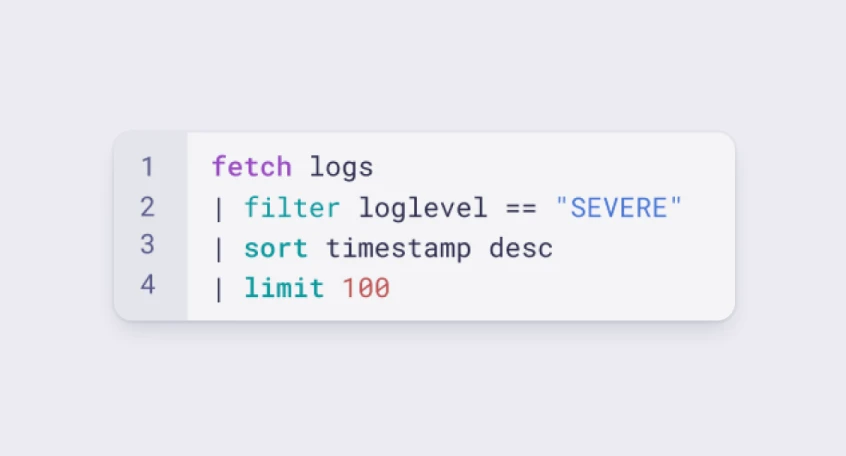
Learn the Dynatrace Query Language

Learn the Dynatrace Query Language

Explore data, discover patterns, anomalies and outliers, and create statistical modeling with DQL, our powerful query language.
Learn DQL
Solve problems with custom apps

Solve problems with custom apps

Dynatrace Developer makes it easy to create custom apps for your organisation. Start with one of our templates or use your own code.
Build apps