

Skip to technology filters Skip to main content
Dynatrace Hub

Extend the platform,
empower your team.

Popular searches:
Home hero bg
OpenPipelineOpenPipeline
OpenPipeline

OpenPipeline

Configure ingest, processing, and persistence of data sent to Grail.

App
Free trialDocumentation
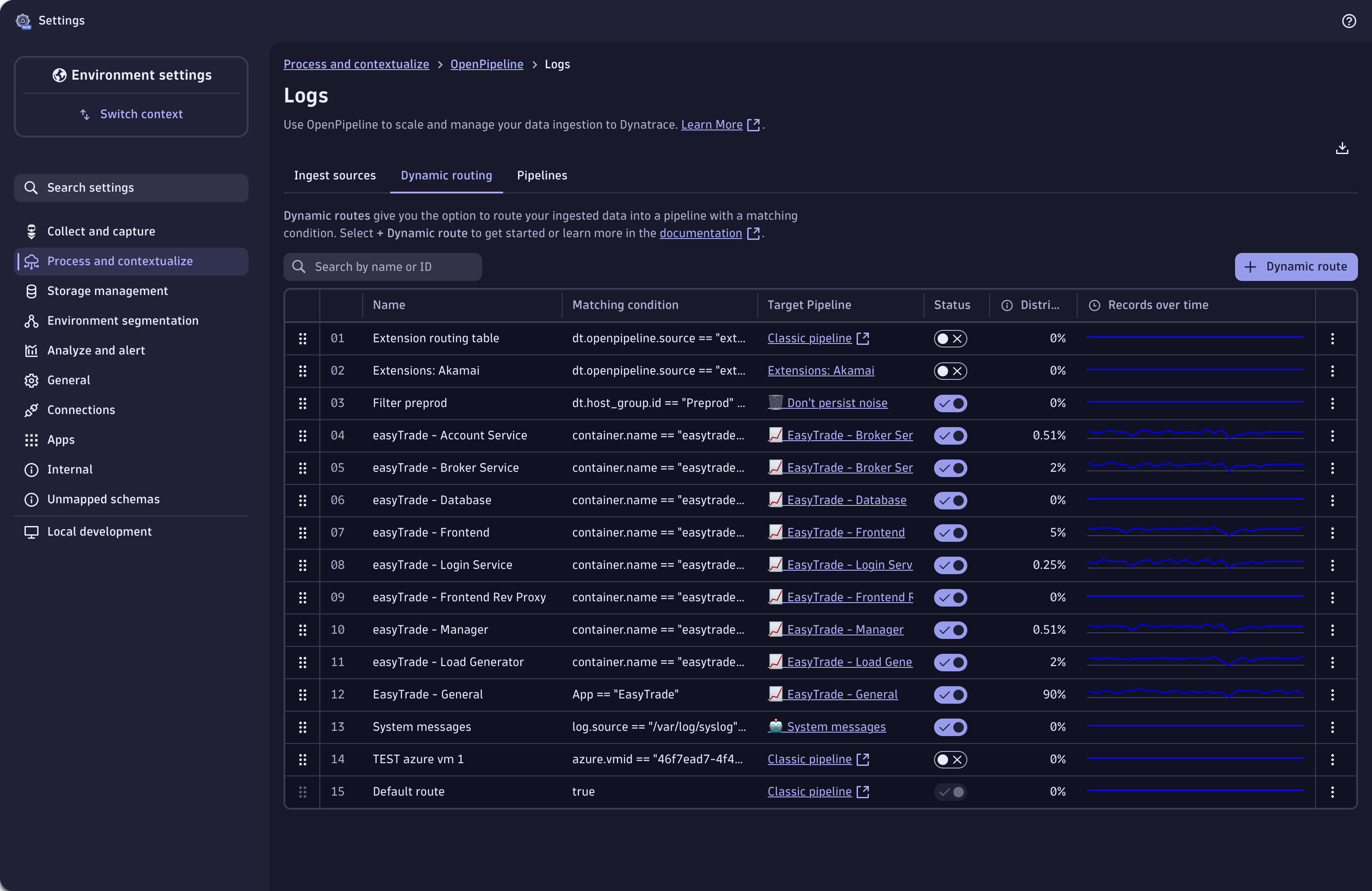
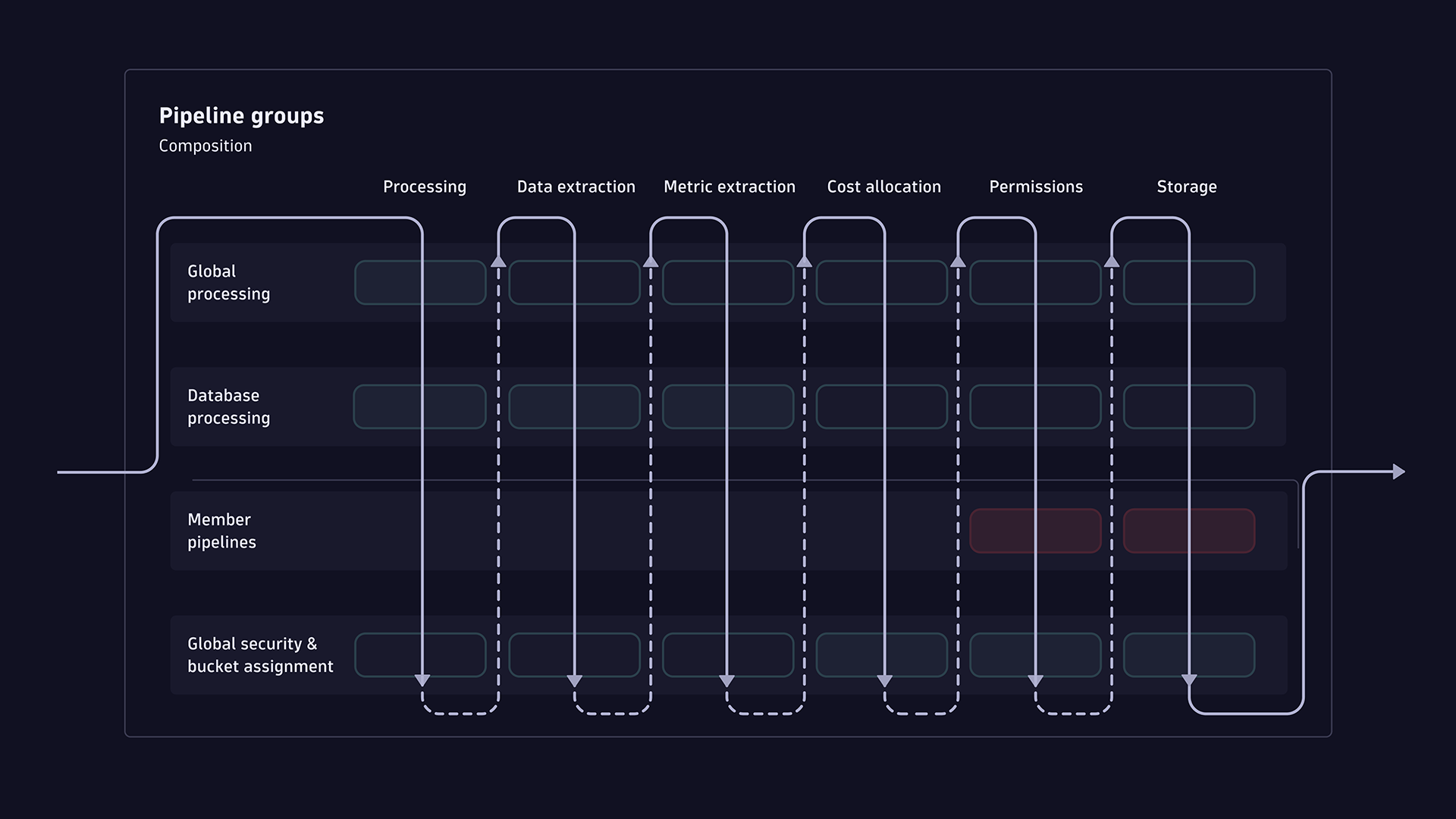
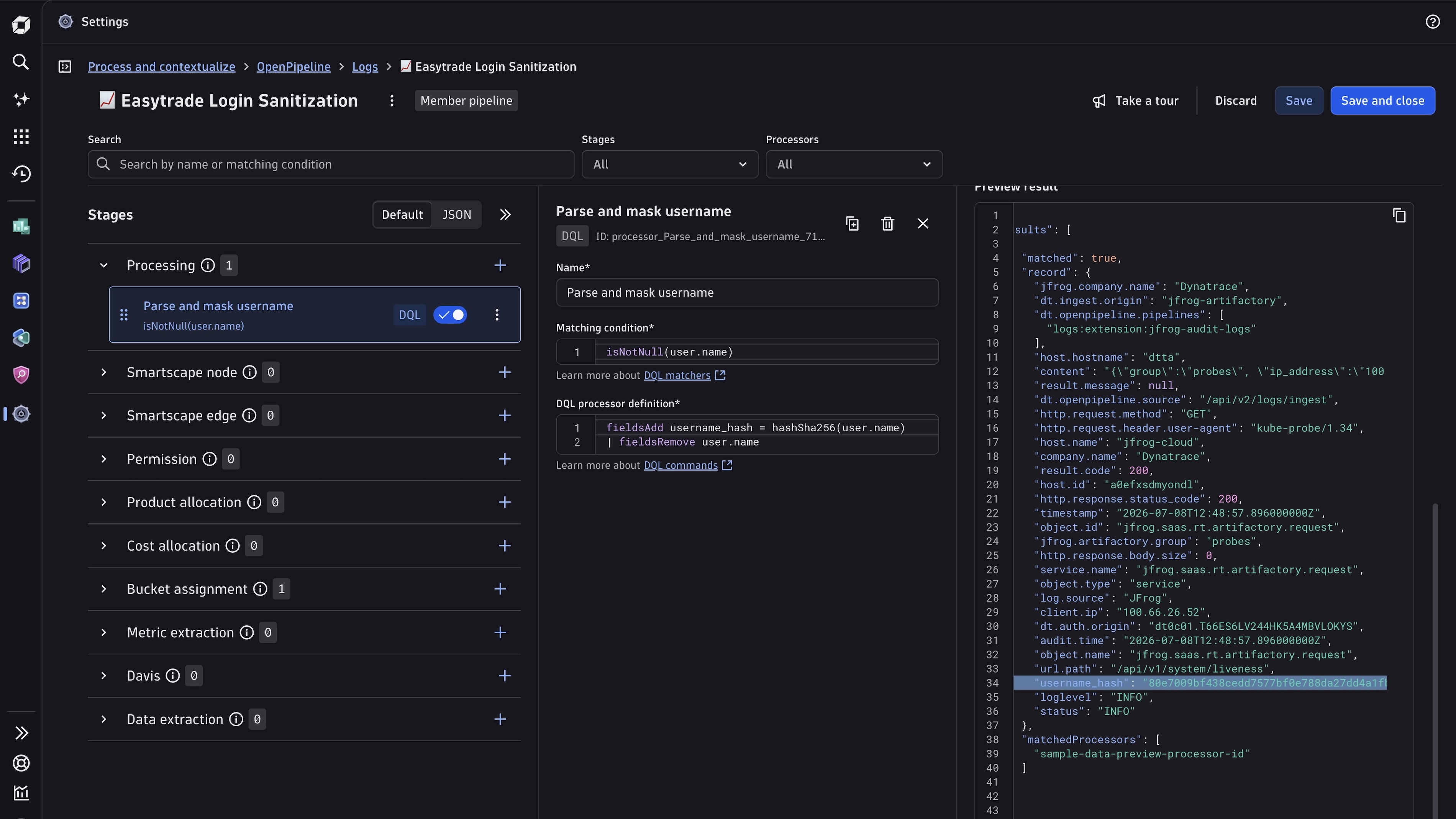
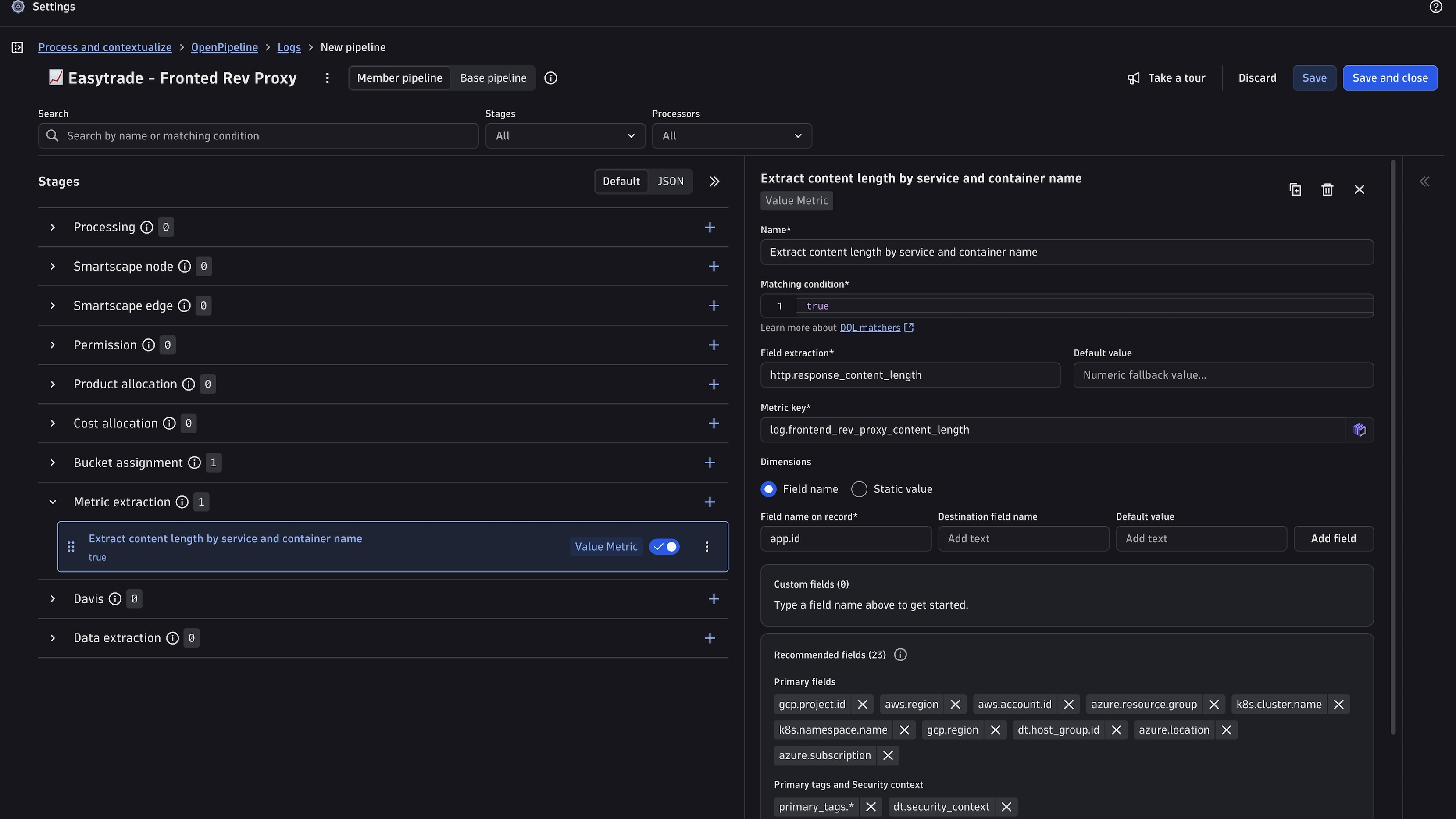
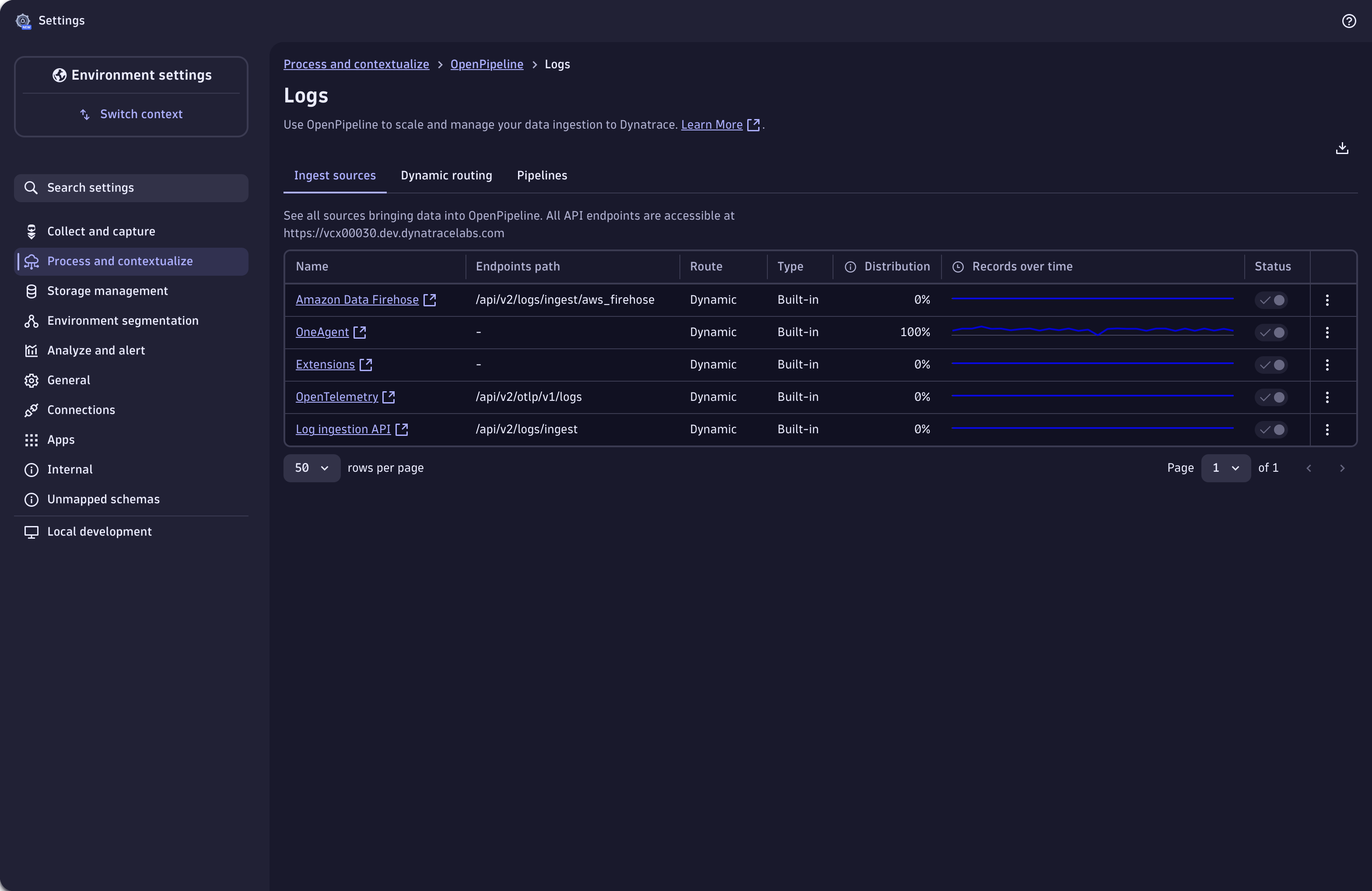
Use dynamic routing to route incoming records into pipelines.Self-service pipelines - Manage thousands of pipelines with granular access controlLog record processing: masking fields from log data.Extract metrics from your log record.Define ingest sources of log data.
  • Product information
  • Release notes

Overview

With OpenPipeline, you can configure all aspects of ingesting, processing, and persisting streaming data into Dynatrace. It is designed to meet the high-throughput and processing demands of cloud- and AI-native companies and ...

  • Ensures compliant, secure ingestion across diverse data sources
  • Improve data quality through normalization, enrichment, and validation
  • Allows to extract other data types from logs, spans or events.
  • Simplifies pipeline setup, governance, and management

Use cases

With OpenPipeline you can:

  • Mask and filter records to remove sensitive data and comply with security and privacy requirements
  • Parse, add, remove, and rename fields to reshape or normalize the data format
  • Aggregate metrics from records for easier and faster query and dashboard display
  • convert a record to a different data type for domain-specific usage (eg create a business event out of a log record)
  • Set security-specific meta-data for defining record-based permissions
  • Assign data to Grail buckets to comply with proper retention time
  • Self-service pipelines - Manage thousands of pipelines with granular access control

Get started

OpenPipeline is part of the unified Settings experience, inside the built-in Settings app and comes preinstalled with all Dynatrace SaaS environments.

  • Navigate to Settings > Process and contextualize > OpenPipeline
  • Create a new pipeline or open an existing one
  • Use one of the built-in parsing rules or create your own
  • Add further processing or data extraction steps directly on ingest before the record is stored in Grail

Today, OpenPipeline supports logs, spans, metrics, security / software development lifecycle, Dynatrace Assist and generic events, and business data with more data types to come soon.

Dynatrace
DocumentationMore Information
By Dynatrace
Dynatrace support center
Subscribe to new releases
Copy to clipboard

Related to OpenPipeline

OneAgent logo

OneAgent

The simplest way to capture all observation signals automatically and in context.

Grail logo

Grail

Dynatrace's data lakehouse providing unified storage for any type of data.

OpenTelemetry logo

OpenTelemetry

Ingest and analyze OTel traces & metrics, set health alerts & view in context.

Storage Management logo

Storage Management

Organize your data and define retention times with custom Grail buckets.

Full version history

ReleaseDate

Full version history

  • Improved dynamic route settings initialization

Full version history

  • Major Pipeline UI improvements
    • Only UI changes, no functionality change
    • Reordering of Stages to reflect the actual processing order
    • Improving usability and ease of use
  • Fixed a race condition in the Dynamic Routes tab that could cause routing rules to be lost when refreshing the browser.
  • Fixed duplicate link on pipeline details page.
  • Fixed error not being propagated to the stages panel.
  • Fixed dynamic routing table performance issues.
  • Fixed readonly processors in pipeline details to be actually readonly with

processor actions disabled.

  • Update texts in create modal of the forwarding feature
  • Fixed issue where cardinality verification would not return field names when multiple where failing.
  • Fixed an issue where high cardinality validation wasn't considering timeframe for spans, user.events and user.sessions correctly
  • Prevent clicks on the add button when write permission is not granted.
  • Show technology bundle only for dedicated, assigned config-scopes.
  • Show error toast when copy to clipboard fails.
  • Improved accessibility across multiple OpenPipeline views.
  • Improved scrolling indicator in Processor Details Page by fixing container height.

Full version history

  • Fix settings menu entries for OpenPipeline

Full version history

  • Added forwarding connection validation.
  • Replace hard-disabled controls with Tooltip.
  • Unify delete-confirmation dialog component.
  • Allow digits for nodeIdFieldName in the Smartscape Node Processor
  • Limit bulk pattern length to 512 characters for data forwarding.
  • Show only supported forwarding options for each configuration scope.
  • Add IP2Geo processor support

Full version history

  • Adapted permissions handling to be compliant with Dynatrace standards
  • Added validation for the Node type field in the Smartscape Node processor
  • Added high cardinality validation for metric processors
  • Added hover-revealed copy button to ingest sources endpoint path cells
  • Added security context recommended fields
  • Added column visibility options for Ingest sources and Pipeline tables
  • Displayed a processor count chip next to each stage tab name in the pipelines and ingest sources sheets
  • Extended processor matching condition field to support max of 4096 characters
  • Allowed digits for node ID field in Smartscape Node processor
  • Fixed app crashing on permission issue

Full version history

  • Fixed app crashing when user unselects edge type in Smartscape Edge processor
  • Fixed app crashing when user has no correct permissions

Full version history

  • Security patch - removing sourcemaps

Full version history

  • Added a search input to the processor list panel for easier navigation
  • Logs pipelines now automatically include a default storage-stage processor
  • Updated migration banner to reflect end-of-life
  • Deprecated technology bundles are no longer shown when adding a new processor to a pipeline
  • Disabled drag & drop reordering in the Dynamic Routes table when a filter is active
  • Added a static dimensions option in metric extraction processors
  • Added a refresh button for all tables
  • Added recommended fields for the Davis event extraction processor
  • Fixed chip overflow that hid the delete button for long values
  • Fixed an issue where the duration field was sent to the backend when it should not have been

Full version history

  • Fixed issue where the duration field was sent to backend when it should not have been.

Full version history

  • Added literal (static string) support in Data extraction processors
  • Added custom and recommended sections for Smartscape Node processor
  • Added custom and recommended sections for Data extraction processors
  • Added custom and recommended sections for Metric extraction processors
  • Enhanced read only view hints
  • Extended description for Logs pre-processors
  • Fixed Davis event extraction processor UI

Full version history

  • Hide default storage processors

Full version history

  • Allow either readonly or extension badge to verify readonly state

Full version history

  • Adapted high-risk fields warning message in metric extraction processors
  • Added support for Composition pipelines
  • Added "Set up log ingest" button
  • Added new routing for duplication of elements
  • Added documentation links for DQL inputs
  • Fixed pipeline select for dynamic routes in Config API
  • Fixed out of memory issue by using an optimized davis event template editor

Full version history

  • Removed sampleData property if its an empty string
  • Fixed dynamic route duplicate not auto-selecting built-in pipeline
  • Fixed pipeline select for dynamic routes when using not migrated schemas

Full version history

  • Switched to confirmation modal for changing ingest sources status
  • Added warnings for high-cardinality fields
  • Added support for pipelines and ingest sources created by Extensions
  • Improved Smartscape Node Extraction UX

Full version history

  • Added Smartscape Node Extraction stage and processor and Smartscape Edge Extraction stage and processor (with version 1.330)
  • Added warning for banned dimensions for metric extraction processors
  • Added icons for new technology bundles
  • Added pagination info to the url, which is needed to have deep-linking work properly
  • Added text-highlighting for name columns in all tables
  • Adapted validation rules for field name, field extraction and dimension name fields according to docs

Full version history

  • Fixed ingest source duplicate issue for migrated schemas

Full version history

  • Added revision history
  • Updated list of disallowed event buckets
  • Updated ready-made dashboard OpenPipeline Usage Overview
  • Added refresh ingest sources and pipelines table after ownership is transferred
  • Added translations to OpenPipeline

Full version history

  • Removed histogram metric processor from UI when its not enabled on backend

Full version history

  • Fixed app crashing due to metrics not loaded
  • Reworked metric-dimension validations
  • Added deep linking capability
  • Added warning for matching-condition true on all necessary processors

Full version history

Patch Changes

  • Fixed incorrect bucket error message showing up when viewing an ingest source

Full version history

2.1.5

  • Fixed validation violations in sampling aware metric extraction processors for datatype spans

Full version history

  • Initial release with support for new migrated schemas
  • Updated dependencies
  • Fixed dynamic routes sheet form reset for avoiding triggering the dirty handler

Full version history

  • Fixed metric extraction processor when entering 'duration' in field extraction

Full version history

Major Changes

  • The stand-alone OpenPipeline app has been removed to streamline the user experience for your contextualizing and processing workload (from now on, you can access OpenPipeline as part of Settings. You can find it in Settings > Process and contextualize > OpenPipeline)

Minor Changes

  • Added sampling aware metric extraction processors for spans
  • Added default value for metric extraction processors
  • Added "View in Notebooks" button when editing metric extraction processor
  • Hid divider in widget header
  • Adapted chart filtering to support pipeline ID and ingest source unique identifier
  • Added handling for configuration disabled state
  • Modified message for OpenPipeline not fully enabled state
  • Improved pipelines select for Dynamic routes and Ingest Sources
  • Improved "Sample data preview" section
  • Marked Davis events and Davis problems configurations with label "New"
  • Added warning to matching conditions to make user aware that certain values shouldn't be used
  • Fixed search in Pipelines tab for default pipeline
  • Added one retry to our queries to minimize logs
  • Added check for backticks for dimension name

Full version history

  • Fixed editing first route in dynamic routes
  • Fixed status column display when filtering dynamic routes

Full version history

  • Fix interactions (edit, delete) with dynamic routes when filtering table

Full version history

  • Enabled OpenPipeline in Settings
  • Hid chart columns in ingest sources for metrics, events, security, business events, system events, and security events
  • Added default dimensions to metric extraction processors
  • Disabled row-ordering for dynamic routes in read-only mode
  • Unified help menu options

Full version history

  • Fixed move-to-end function in processors list

Full version history

  • Fixed edit of undefined on filtered dynamic routes

Full version history

  • Fixed Davis Event extraction processor error

Full version history

  • Added missing mandatory items to the Help dropdown menu
  • Made selection of Buckets clearable
  • Added traffic over time chart to the dynamic routes table
  • Added distribution column for Dynamic Routes
  • Improved UI elements for better user experience

Full version history

  • Aligned OpenPipeline with guidelines
  • Added open in Notebooks action for pipelines
  • Added a warning support from /matcher/verify endpoint while user edits matching condition
  • Added intents for viewing pipelines and ingest sources on a new tab
  • Added traffic distributions cells to pipelines
  • Added search by pipeline ID
  • Improved behavior of technology bundle search
  • Removed config scope prefix from metric extraction UI

Full version history

  • Fixed download for Mozilla and improved download for Safari
  • Added new open in Notebooks option
  • Added technology processor to ingest sources sheet for SDLC configuration
  • Added distribution for ingest sources in new column
  • Added sparkline charts for ingest sources

Full version history

  • Provided ready-made dashboard for OpenPipeline
  • Added discard modal on new dynamic routes and disabled tabs when unsaved changes on ingest-sources
  • Added intent to open a dynamic route on a new tab

Full version history

  • Fixed issue with undefined object

Full version history

  • Added extracted metric dimension naming
  • Added special handling for version conflict case when adding a new pipeline
  • Added metric extraction processors for spans
  • Added download configuration option

Full version history

  • Added link to builtin and default dynamic routes in the used by column
  • Added more information to bucket select option
  • Added flexible matching condition for technology processor
  • Fixed matcher behavior in modal

Full version history

  • Added sample data field to technology
  • Added readonly mode
  • Added link to open Storage Management inside of Settings
  • Added default-bucket to storage step in pipeline
  • Added validation for dimensions in metric extraction processors
  • Added functionality to enable or disable an ingest source
  • Refactored pipeline name input component
  • Fixed bug that would close pipeline sheet without showing discard-modal first
  • Fixed rename fields processor not properly processing data.

Full version history

  • Added modal for choosing a technology processor
  • Added tooltip to chips component
  • Added list to 'Used by' column in ingest sources and pipelines
  • Added sliders to resize the page size in the processor menu
  • Changed minor UI inconsistencies and improve UX
  • Fixed validation issue for business event processor
  • Fixed delete processor issue
  • Fixed safari onBlur behaviour

Full version history

  • Added Permission stage to "Spans" config scope

Full version history

  • Added "Technology" processor to Logs
  • Added "Drop record" processor
  • Added "Software Development Lifecycle" config scope
  • Added Third option for "Security Context" processor - static array (combined with 1.304+)
  • Fixed style issues for smaller screens

Full version history

  • Updated dependencies

Full version history

  • Added System Events to OpenPipeline (available from version 302)
  • Added length constraint to sample data preview
  • Added a feedback button

Full version history

  • Added autocomplete for Matching Condition and DQL processor
  • Added error state for sample data preview
  • Added tab-navigation
  • Dynamic route highlighted when navigating from Pipelines
  • Added "Copy endpoint" as a cell action

Full version history

  • Adapted minor wording things and improve UX
  • Added link from classic pipelines to Settings screen
  • Fixed responsiveness-issues of the app
  • Added Pipeline ID and Processor ID in UI
  • Added scrollbar to processor-menu
  • Added metric key validation
  • Updated message when OpenPipeline is not fully enabled

Full version history

  • Changed sidebar menu component
  • Renamed "AppSec" sidebar label and title to "Security events"
  • Updated columns for ingest sources table
  • Added onboarding banner
  • Handled non-existing link

Full version history

  • Initial release of OpenPipeline App
Dynatrace Hub
Hub HomeBuild your own app
Dynatrace Intelligence - Agentic Operations SystemThe Dynatrace Agentic AI ecosystem
All (914)Log Management and AnalyticsKubernetesAI and LLM ObservabilityInfrastructure ObservabilitySoftware DeliveryApplication ObservabilityApplication SecurityBusiness ObservabilityDigital Experience
Filter
Type
Built and maintained by
Deployment model
SaaS
  • SaaS
  • Managed
Partner FinderBecome a partnerDynatrace Developer

Get data into Dynatrace

Dynatrace supports a wide range of methods for data ingestion. Below are some of the most popular ways to get data into Dynatrace and start observing your whole environment.

Start observing

Hyperscalers

Hyperscalers

Dynatrace seamlessly integrates with all of your hyperscalers and cloud environments.
Read more
OpenTelemetry

OpenTelemetry

Ingest OpenTelemetry traces & metrics, pin them to a dashboard, set alarms, analyze them in the context of metric, log, and diagnostic data.
Read more
OpenPipeline

OpenPipeline

Ingest, process and persist your observability, business and security data from any source in any format and any scale.
Read more

Ingest data using Dynatrace technology

Automatically collects all observability signals with OneAgent, monitor remote extensions, or stay flexible with our versatile API ingest.

OneAgent logo

OneAgent

The simplest way to capture all observation signals automatically and in context.

ActiveGate logo

ActiveGate

Route traffic, monitor clouds and remote technologies & run Synthetic monitors.

Custom Data ingest via API logo

Custom Data ingest via API

Extend Dynatrace with custom ingest APIs.

Get data using these popular technologies

OpenTelemetry logo

OpenTelemetry

Ingest and analyze OTel traces & metrics, set health alerts & view in context.

Prometheus logo

Prometheus

Unlock Prometheus power with intelligent analytics and automated insights.

Micrometer logo

Micrometer

Ingest Spring metrics and put them in context of trace, log and diagnostics data.

Telegraf logo

Telegraf

Monitor hundreds of Telegraf provided plugins and metrics with Dynatrace.

OpenTracing logo

OpenTracing

Ingest and chart OpenTracing data, set alerts, and analyze everything in the context of traces, metrics, logs, and diagnostics data.

StatsD logo

StatsD

The easiest way to get your custom application metrics into Dynatrace.

Stream Log Data

Use these popular Open Source data processing pipelines.

Logstash logo

Logstash

Stream log data from Logstash and analyze it in Dynatrace.

Fluentd logo

Fluentd

Stream log data to Dynatrace via Fluentd for analysis.

Fluent Bit logo

Fluent Bit

Stream logs to Dynatrace via Fluent Bit for analysis and AI observability.

Get data from container platforms

Seamlessly monitor and trace requests of microservices in your container platforms.

See more (5)
Docker logo

Docker

Automated distributed tracing and metrics for microservices running in Docker.

OpenShift Control Plane logo

OpenShift Control Plane

Get insights into your OpenShift control plane with metrics from its components.

containerd logo

containerd

Distributed tracing and metrics for services in containerd in Kubernetes.

VMware Tanzu logo

VMware Tanzu

Harness automation and AI to simplify Kubernetes observability at scale.

Cloud Foundry logo

Cloud Foundry

Harness automation and AI to simplify observability on Cloud Foundry at scale.

Pivotal Platform logo

Pivotal Platform

Multi-cloud platform for the deployment, management, and continuous delivery of applications. Pivotal is now VMware Tanzu.

Get real user monitoring data from mobile and web applications

iOS logo

iOS

Optimize iOS app performance with real-time monitoring and UX insights.

Android logo

Android

Monitor Android app stability, performance, and usage in real-time.

React Native logo

React Native

Monitor mobile applications built with React Native running on iOS or Android.

Mobile logo

Mobile

Analyze real user monitoring data of mobile apps in context with the backend.

OneAgent logo

OneAgent

The simplest way to capture all observation signals automatically and in context.

ActiveGate logo

ActiveGate

Route traffic, monitor clouds and remote technologies & run Synthetic monitors.

Get data from security products and tools

See more (18)
Amazon ECR logo

Amazon ECR

Ingest Amazon Elastic Container Registry vulnerability findings and scan events.

Google Artifact Registry logo

Google Artifact Registry

Ingest Google Artifact Registry vulnerability findings.

OCSF logo

OCSF

Ingest security findings in Open Cybersecurity Schema Framework (OCSF) format.

Tenable logo

Tenable

Ingest Tenable vulnerability findings, scan events, and audit logs.

Snyk logo

Snyk

Ingest Snyk vulnerability findings, scans, and audit logs.

Sonatype Lifecycle logo

Sonatype Lifecycle

Ingest Sonatype vulnerability findings, scans, and audit logs.

Are you looking for something different?

We have hundreds of apps, extensions, and other technologies to customize your environment