


















Skip to technology filters Skip to main content
Dynatrace Hub

Extend the platform,
empower your team.

Popular searches:
Home hero bg
InvestigationsInvestigations
Investigations

Investigations

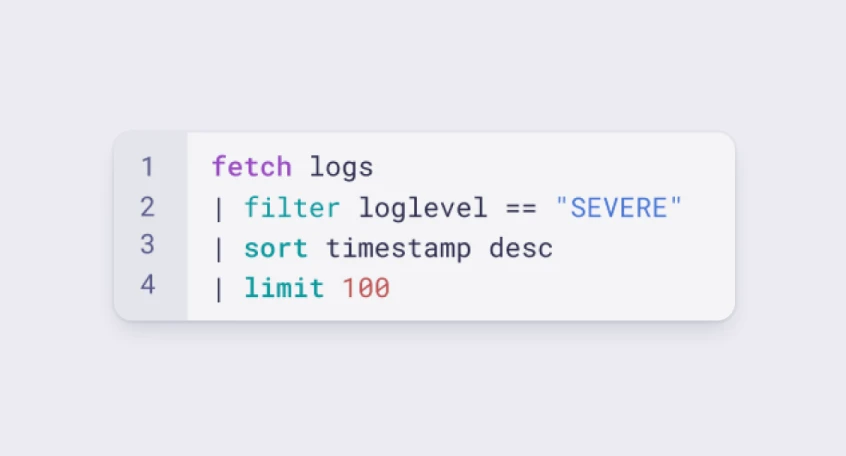
Fast and precise incident response on Grail data with DQL queries.

App
Try in PlaygroundDocumentation
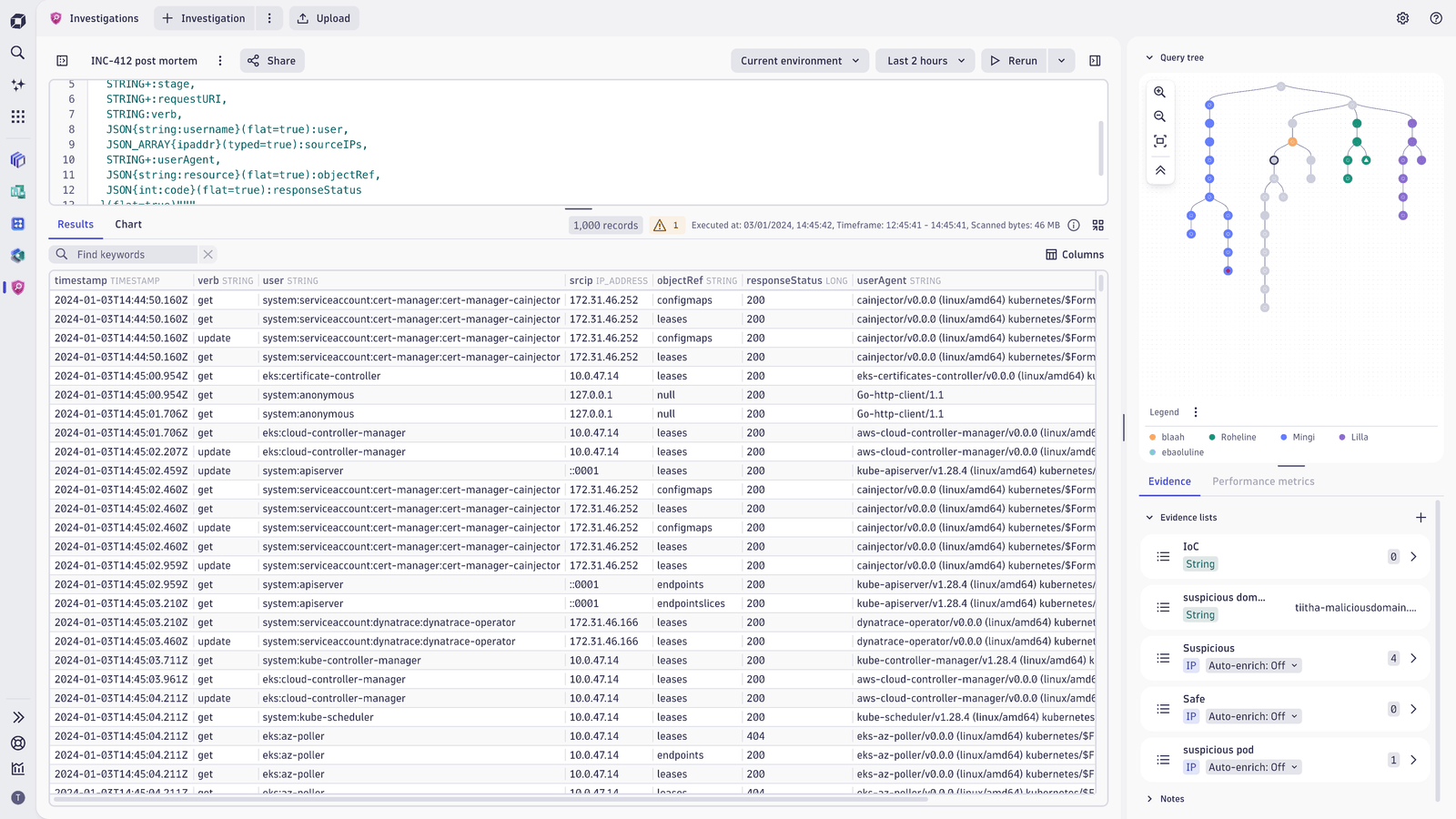
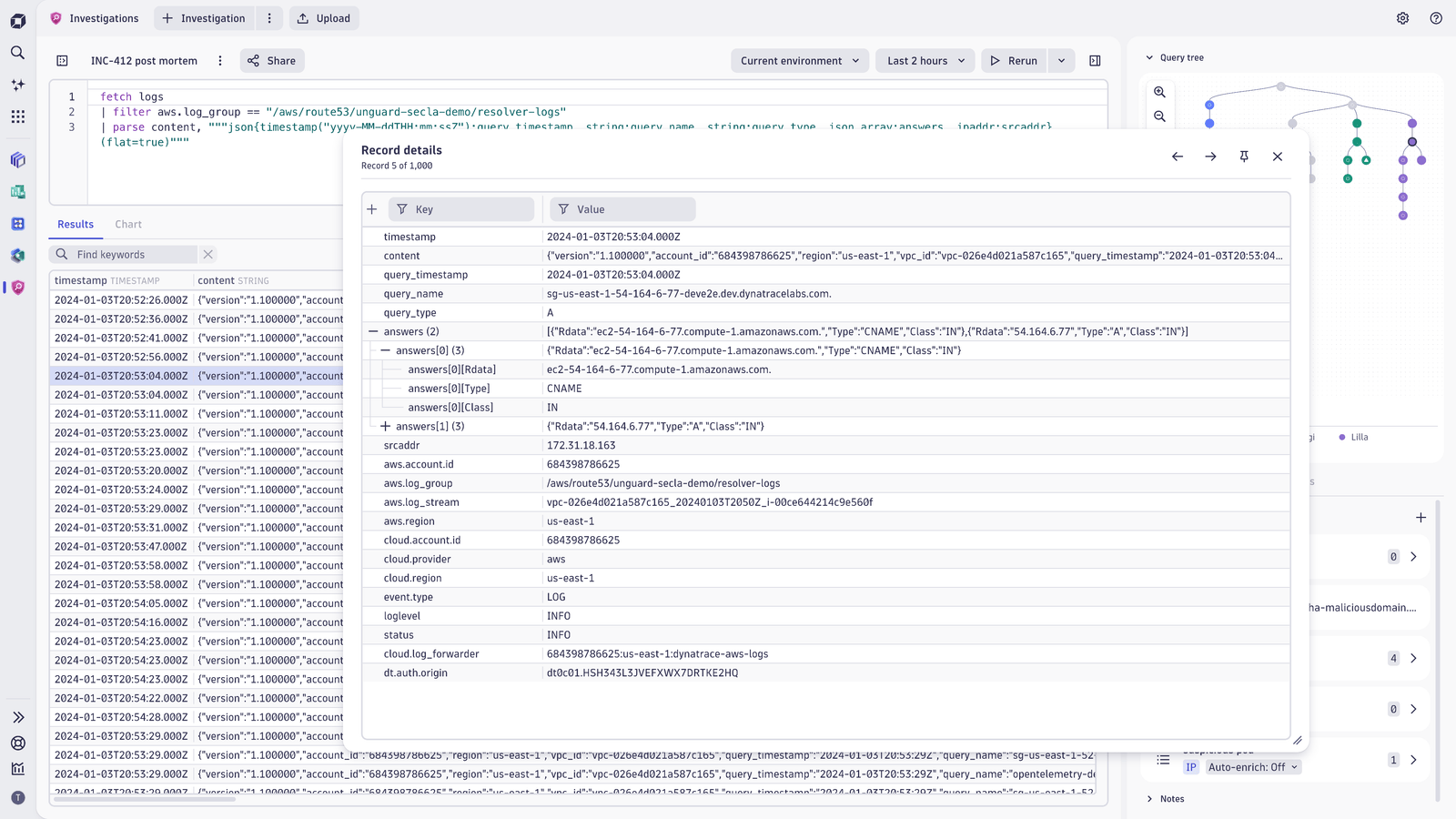
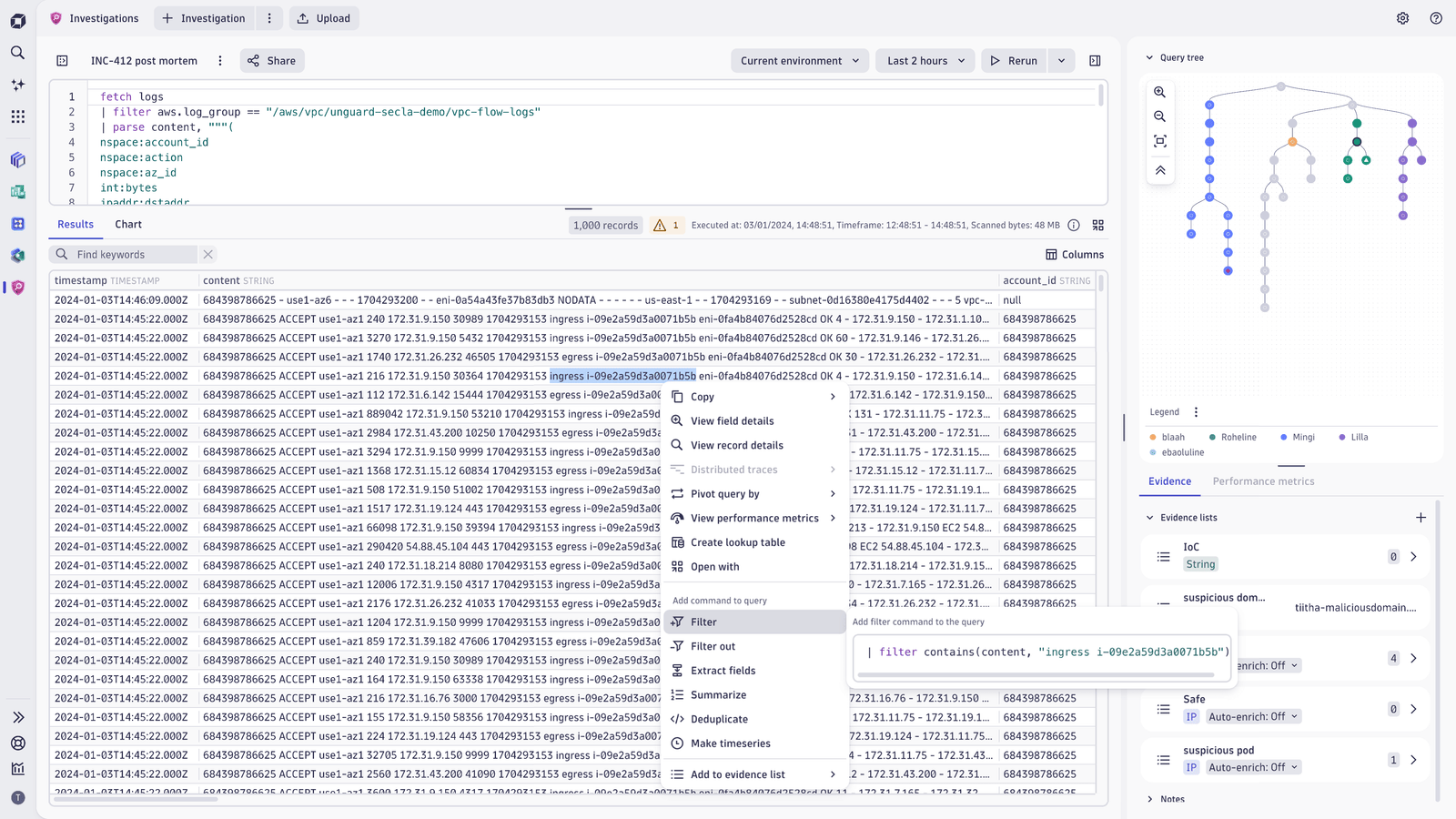
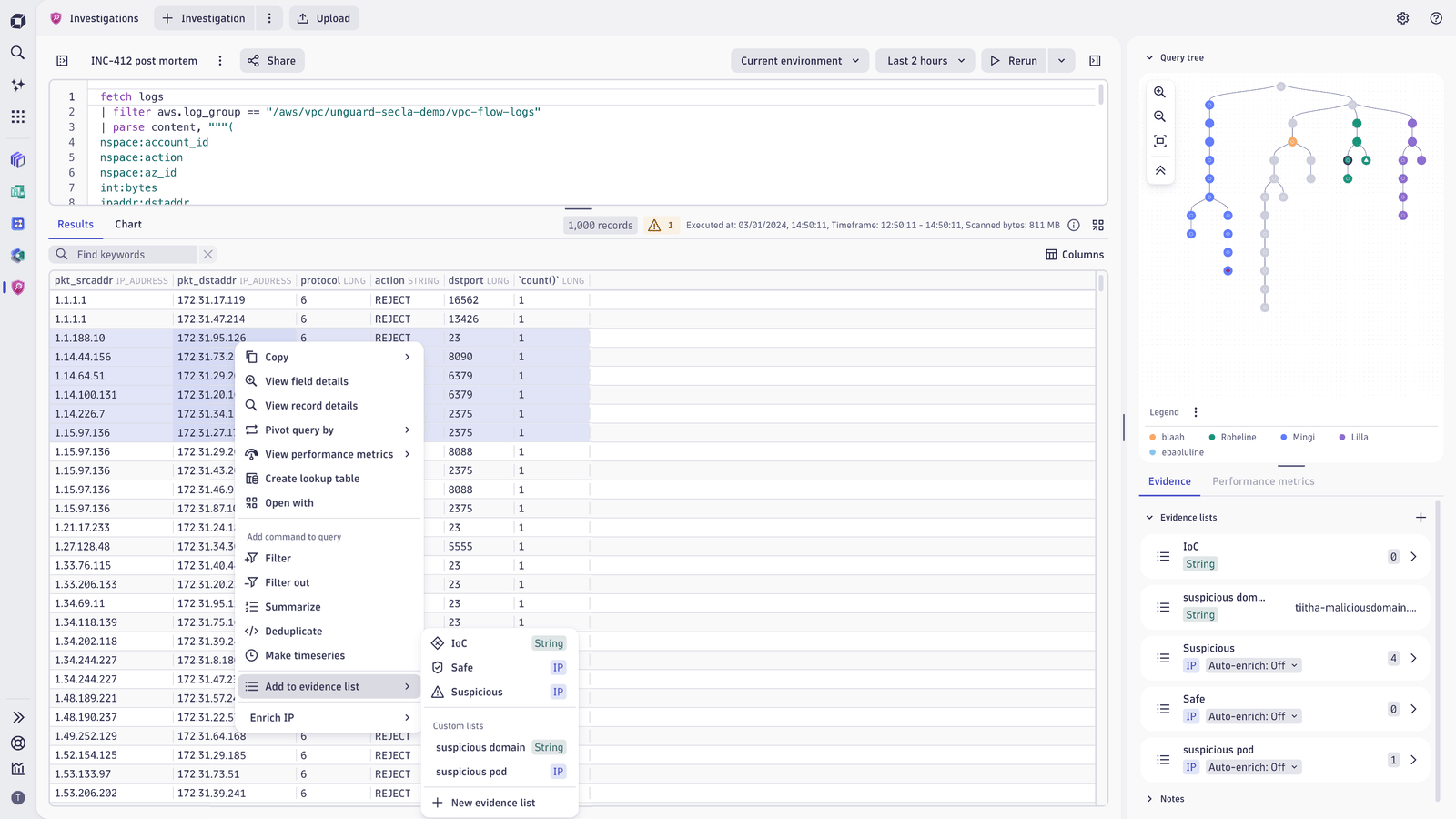
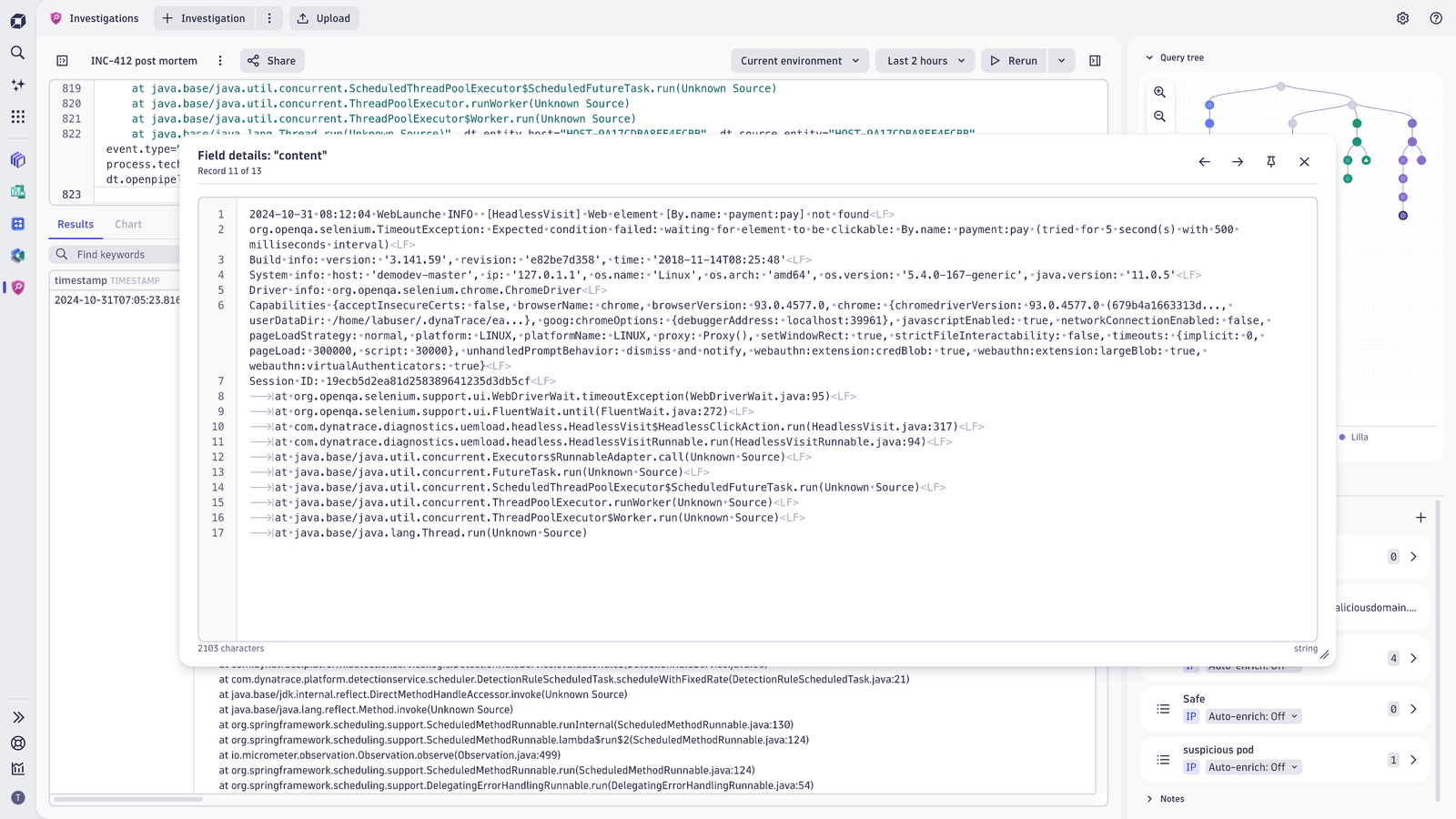
You can see your whole investigation flow as you go along with the ability to always jump back to the previous step of the investigation.Detailed view of the record will show all record fields at once with the possibility to drill down to the details of the field.You can use the data in results with the character precision. Creating new evidence of DQL filters can be done by selecting portion of the field.Evidence and filter manipulations can be done with multiple values: just select the range of IP-s and create a DQL filter based on the values!Investigations enables you to view your data in wrapped and multi-line modes. With Inspector view you can also visualize the non-printable characters.
  • Product information
  • Release notes

Overview

Dynatrace Investigations is one of the pre-installed apps shipped with Dynatrace. It's designed for evidence-driven security use cases based on the logs, metrics, and traces ingested into Grail.

Investigations enables you to

  • Keep your whole investigation flow in context
  • Analyze large DQL results in their original form at a detailed level
  • Perform complex investigations on data stored in Dynatrace Grail®
  • Build DQL queries quickly and efficiently based on your findings
  • Save and use the found evidence to build your DQL queries and find answers to your questions
  • Navigate with ease to any point in your investigation history and review queries and results
  • Fetch detailed results in the original format to quickly understand the information
  • Analyze the observability metrics connected to your log sources

Use cases

  • Threat hunting and hunting for the unknown
  • Forensic analysis, where keeping track of the investigation is a must
  • Incident root cause analysis, where evidence-driven queries bring clarity to the incidents
  • Create faster filters for DQL queries to speed up any investigation
  • Investigate API call throttling using DQL and Investigations
  • Debug AWS Integration issues

Learn how to perform threat hunting and forensics

Are you looking for additional use cases and functionality? Let us know in the Dynatrace Community Forum!

Get started

Investigations comes preinstalled on Dynatrace SaaS environments. Launch the app and Create your first investigation scenario.

Dynatrace
Documentation
By Dynatrace
Dynatrace support center
Subscribe to new releases
Copy to clipboard

Related to Investigations

Grail logo

Grail

Dynatrace's data lakehouse providing unified storage for any type of data.

Full version history

ReleaseDate

Full version history

1.343.1

With this release you can now

  • develop your query faster with the query editor context menu which provides quick access to editors functions like duplicating query lines
  • create Grail Lookup tables in a faster and more convenient way from the whole result set

Full version history

1.339.0

With this release, minor fixes and improvements were added to improve your user experience.

Full version history

1.336.0

With this release you can now:

  • See the references to Dynatrace entities (e.g. Security Events in Threats & Exploits), where the Investigation was started from, keeping track of all the connected entities relevant for your investigation
  • Bookmark your most relevant investigations for faster access
  • Selecting all the descending nodes from in a query tree to speed up query management in Investigations

Full version history

1.334.1

With this release, minor fixes and improvements were added to improve your user experience.

Full version history

1.332.1

With this release, minor fixes and improvements were added to improve your user experience

Full version history

1.330.0

Security Investigator is now called Investigations!

Additionally you can now:

  • easily choose to show and hide columns in the results table
  • access distributed traces from your results in a faster way from the right-click menu
  • filter record details by their column name or a value in the Record Details pane

Full version history

1.329.2

With this version of Security Investigator you can now

  • Create DQL queries, add filters to your query and highlight logs in results table from Performance Metrics chart
  • Create lookup tables from query results or from files from your disk
  • Create custom results pivoting dimensions
  • Beautify your DQL queries in Query Editor using a shortcut Mod+L

Full version history

1.324.0

With this release you can now:

  • Create reference time and query filters directly from Performance Metrics charts
  • Upload files from your computer and store them as Lookup tables in Grail
  • Create lookup tables from your query results

Full version history

1.323.0

Minor Changes

  • to performance metrics
  • to results table

Full version history

1.320.1

Minor Changes

  • to performance metrics

Full version history

1.319

With this release You can now

  • View performance metrics of the system from query results
  • Set reference time from record details
  • Enrich IP addresses in your DQL query results

Full version history

1.317.2

With this release You can now

  • Enrich IP addresses for additional context from external sources
  • Download cases as templates and vice versa
  • Get more data with fetching data from Grail up to 300mb at once

Full version history

1.316.1

With this release You can now

  • Quickly shift your investigations based on metadata fields using Query Pivoting. Read more from Dynatrace documentation
  • Download cases as templates and vice versa
  • Copy your results in CSV format to operationalize your query results
  • Access filtering and copying functions from the Record Details view
  • Fetch data from Grail up to 300MB at once

Full version history

1.313.1

With this release you can now

  • Share cases with all environment users in read-only mode at once
  • Upload cases as templates and vice versa
  • Select all values in a column at once from the column header menu
  • Search results table by a keyword and jump to the next occurrence of your search keywords
  • See the in-place filters count above the results table
  • Define query editor settings - toggle between condensed and normal code view and enable/disable line wrap

Full version history

1.312.0

With this version you can now:

  • use chart visualization automatically when fetching timeseries data
  • use reference time as additional context when conducting investigations.
  • enable the line wrap option from settings for DQL query window

Full version history

1.310

With this release you can now

  • Save multi-line evidence to evidence list
  • Use automated charts for data visualization
  • Access security events in Grail

Full version history

1.308.0

With improved case management features, you can now

  • duplicate existing cases to create snapshots or continue cases that are shared with you
  • download and upload the cases to move them between environments
  • create use case templates as boilerplates for your investigations

To streamline investigations, you can work with your findings more efficiently by clicking on evidence to copy it directly from your Evidence list. You can use the copied evidence in DQL queries, or case reports directly and fast.

To speed up investigations and grasp results faster, you can now visualise your results as charts

Minor changes:

You can now

  • access query tree color labels and their titles from the query tree legend
  • view complex data elements (like arrays and records) in a multiline mode in the response table
  • share your cases from the main page without opening the case
  • share templates with everyone on your environment with one click
  • filter your cases and templates on the main page by their type: either view All the cases accessible by you, see only My cases or only cases that have been Shared with you.

Full version history

1.305.0

With this version of Security Investigator it is now possible to:

  • Create custom timeframe by clicking on analysis timeframe in result statistics.
  • Add time range filters for timestamp data type.

Full version history

1.304.3

With this version of Security Investigator it is now possible to:

  • Download selected nodes as a Notebooks document
  • Upload evidence to an evidence list from text file

Full version history

1.302.1

Patch Changes

  • Minor bug fixes.

Full version history

1.302

With this version of Security Investigator it is now possible to:

  • execute a query without creating a new node
  • add IP addresses from a string-type fields to IP evidence lists
  • create new cases from every page of the Security Investigator
  • access Distributed Traces when analyzing your logs by right-clicking on the record in the results table
  • see Duration datatype in the results table in a human-readable format

Full version history

1.298.8

Patch Changes

  • Fixed bugs related to sharing in safari.

Major Changes

  • Introducing Case Sharing: It is now possible to share your investigations with peers and stakeholders!
    • You can share your cases with either a link or share cases to a person or a group.
    • Cases can be shared in either a read-only mode or with edit privileges.
    • Read more at https://www.dynatrace.com/news/blog/collaborate-with-peers-in-hunting-security-threats/ .

Full version history

1.295

  • A search field has been added to highlight keywords in the result table.
  • User can set record limits for DQL queries in the App settings
  • Added color legend with customizable color labels in query tree.

Full version history

1.291

You can now:

  • View the query tree legend to see the explanations of different query node statuses.
  • Rename your cases on the main page in the Cards' menu.
  • Open the Security Investigator from other Dynatrace applications.

Full version history

1.290.0

Minor Changes

  • Updated result statistics and notifications.
  • Added a new result status indicator to the query tree.
  • Added a context menu to the field details window.

Full version history

1.289.0

Minor Changes

  • 138f865: Added filtering to the context menu in the record details window.
  • 29ce2db: Added an 'Add field' command for nested objects in the record details window.

Patch Changes

  • 5f84f0a: Added the selected record number to the record details window.
  • 9fa665a: Updated the result table context menu.
  • f05b039: Added a 'Copy field' option to the context menu in the results table.

Full version history

1.288.0

Patch Changes

  • 4574b72: Close inspect and complex view if DPL Architect is opened. Remove back button if inspect view is opened directly from result table.
  • f2c946e: Added possibility to cancel queries in multiple nodes that are running at the same time
  • 50573cb: Close DPL Architect if case is switched. Close toasts after 5 seconds.
  • 662d89d: Modify query tree deletion portion. Strip trailing newlines and scroll editor to bottom when DQL is added to query.
  • 542c37e: Cosmetic improvements
  • cda16d3: Update adding new evidence collections
  • 834049a: Add help menu
  • eb8a6cd: Add view-query intent

Full version history

1.0.0

Patch Changes

  • c6d0b00: Update record count on poll response
  • 51b21a8: Remove milliseconds in timeframe selector
  • 241ef0e: Add multiline and line wrap support
  • c92a971: Different nodes can be polled separately and result is updated only for selected node
  • b6d7178: Add case heading menu
  • a971214: Add filter out option
  • 62b4e45: Update result statistics timeframes
  • ce7d7fa: UI improvements
  • 8305454: Update complex view and timeframes
  • 787ada3: Fix submit forms with enter
  • f7c31f4: Add header filter and timeframe rename
  • 3cd4e5e: Multiple samples now can be passed to DPL Architect when clicking "Extract fields"
  • a35f624: Add metrics, bizevents and spans scopes
  • 11d1490: Add filter and delete for selection in collection details
  • 59e45c0: Analytics walk-through e2e tests
  • c1a9045: Ask the user if he wants to cancel polling queries
  • 58e79cd: Fix filterOut statements
  • 7f3d38b: Add new collection creation in context menu
  • 1fb2569: Update zooming in query tree
  • f3249db: Rework details panel
  • 6923e54: Add JSON formatting into detailed content viewer
  • 59b0f6b: Add evidences from collections list menu
Dynatrace Hub
Hub HomeGet data into DynatraceBuild your own app
Dynatrace Intelligence - Agentic Operations SystemThe Dynatrace Agentic AI ecosystem
All (914)Log Management and AnalyticsKubernetesAI and LLM ObservabilityInfrastructure ObservabilitySoftware DeliveryApplication ObservabilityBusiness ObservabilityDigital Experience
Filter
Type
Built and maintained by
Deployment model
SaaS
  • SaaS
  • Managed
Partner FinderBecome a partnerDynatrace Developer

Application Security

Scale your DevSecOps with our unique approach to securing clould-native applications at runtime combined with intelligent automation.

Get started with these essentials

Vulnerabilities logo

Vulnerabilities

Detect and prioritize vulnerabilities to improve your environment's security.

Security Posture Management logo

Security Posture Management

Detect, prioritize, and remediate security and compliance findings with SPM.

Threats & Exploits logo

Threats & Exploits

Understand, triage, and investigate detection findings and alerts.

Investigations logo

Investigations

Fast and precise incident response on Grail data with DQL queries.

Real-time vulnerability detection at runtime

Get continuous monitoring of third-party, code-level & runtime vulnerabilities.

Vulnerabilities logo

Vulnerabilities

Detect and prioritize vulnerabilities to improve your environment's security.

Continuous Security Posture Management

Simplify compliance monitoring with pre-built policies for CIS, DORA, DISA STIG, and more, saving time and reducing complexity.

Security Posture Management logo

Security Posture Management

Detect, prioritize, and remediate security and compliance findings with SPM.

Protect your environment right when attacks happen

Detect and block the most severe attacks without affecting critical processes.

Threats & Exploits logo

Threats & Exploits

Understand, triage, and investigate detection findings and alerts.

Detect, investigate and respond to threats

Investigate and respond to cloud security incidents with powerful analysis tools

Investigations logo

Investigations

Fast and precise incident response on Grail data with DQL queries.

Threat intelligence ingest & enrichment

Ingest threat reports and enrich observables with threat intelligence integrations.

Security Enrichment logo

Security Enrichment

Connect any HTTP-based threat intelligence source to enrich observables.

AbuseIPDB logo

AbuseIPDB

Enrich observables with threat intelligence from AbuseIPDB.

VirusTotal logo

VirusTotal

Enrich observables with threat intelligence from VirusTotal.

CrowdStrike logo

CrowdStrike

Ingest CrowdStrike detection findings, threat reports, and audit logs.

LevelBlue (AlienVault) OTX logo

LevelBlue (AlienVault) OTX

Ingest LevelBlue (AlienVault) OTX threat reports.

Security findings ingest

Ingest detection, vulnerability, and compliance findings, as well as security scan events, and audit logs from DevSecOps product integrations.

See more (17)
OCSF logo

OCSF

Ingest security findings in Open Cybersecurity Schema Framework (OCSF) format.

Amazon ECR logo

Amazon ECR

Ingest Amazon Elastic Container Registry vulnerability findings and scan events.

Google Artifact Registry logo

Google Artifact Registry

Ingest Google Artifact Registry vulnerability findings.

AWS Security Hub logo

AWS Security Hub

Ingest AWS Security Hub vulnerabilities, detections, and compliance findings.

Microsoft Defender for Cloud logo

Microsoft Defender for Cloud

Ingest Microsoft Defender for Cloud security findings and scan events.

Tenable logo

Tenable

Ingest Tenable vulnerability findings, scan events, and audit logs.

Security logs ingest

Ingest logs from security-related products.

See more (2)
Akamai logo

Akamai

Ingest logs and security events from Akamai products.

CyberArk logo

CyberArk

Ingest CyberArk audit logs via SIEM integration for reporting and analysis.

Okta logo

Okta

Ingest Okta audit logs via the System logs API.

AWS Web Application Firewall (WAF) logo

AWS Web Application Firewall (WAF)

Web application firewall that lets you monitor the HTTP(S) requests.

Azure logs logo

Azure logs

Get insights from Azure logs with Log Management and Analytics.

Amazon API Gateway logo

Amazon API Gateway

Service for developers to create, publish, maintain, monitor, and secure APIs.

More resources

GitHub Copilot Coding Agent logo

GitHub Copilot Coding Agent

Automate vulnerability remediation and boost developer productivity.

GitHub Copilot Custom Agent logo

GitHub Copilot Custom Agent

Automate your development workflows with specialized agent definitions.

Are you looking for something different?

We have hundreds of apps, extensions, and other technologies to customize your environment

Extend your knowledge

Learn the Dynatrace Query Language

Learn the Dynatrace Query Language

Explore data, discover patterns, anomalies and outliers, and create statistical modeling with DQL, our powerful query language.
Learn DQL

Solve security issues with custom apps

Solve security issues with custom apps

Dynatrace Developer makes it easy to create custom apps for your organization. Start with one of our templates or use your own code.
Build apps
Skill up with on-demand courses

Skill up with on-demand courses

Go to Dynatrace University for focused courses and learning paths -- from platform basics to key certifications.
Build skills