
























Skip to technology filters Skip to main content
Dynatrace Hub

Extend the platform,
empower your team.

Popular searches:
Home hero bg
Service-Level ObjectivesService-Level Objectives
Service-Level Objectives

Service-Level Objectives

Manage SLOs and error budgets to ensure service performance and reliability SLAs.

App
Try in PlaygroundDocumentation
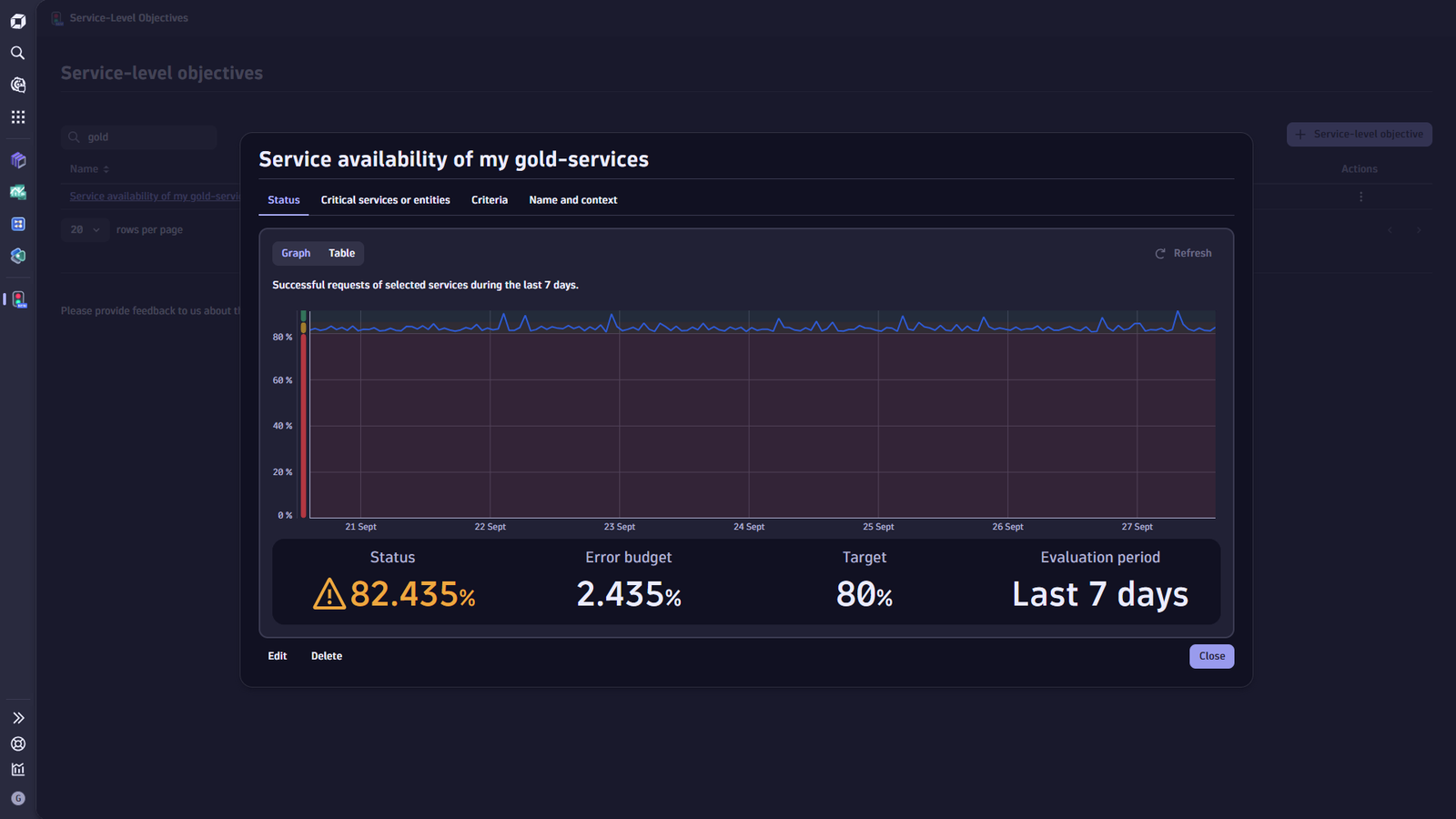
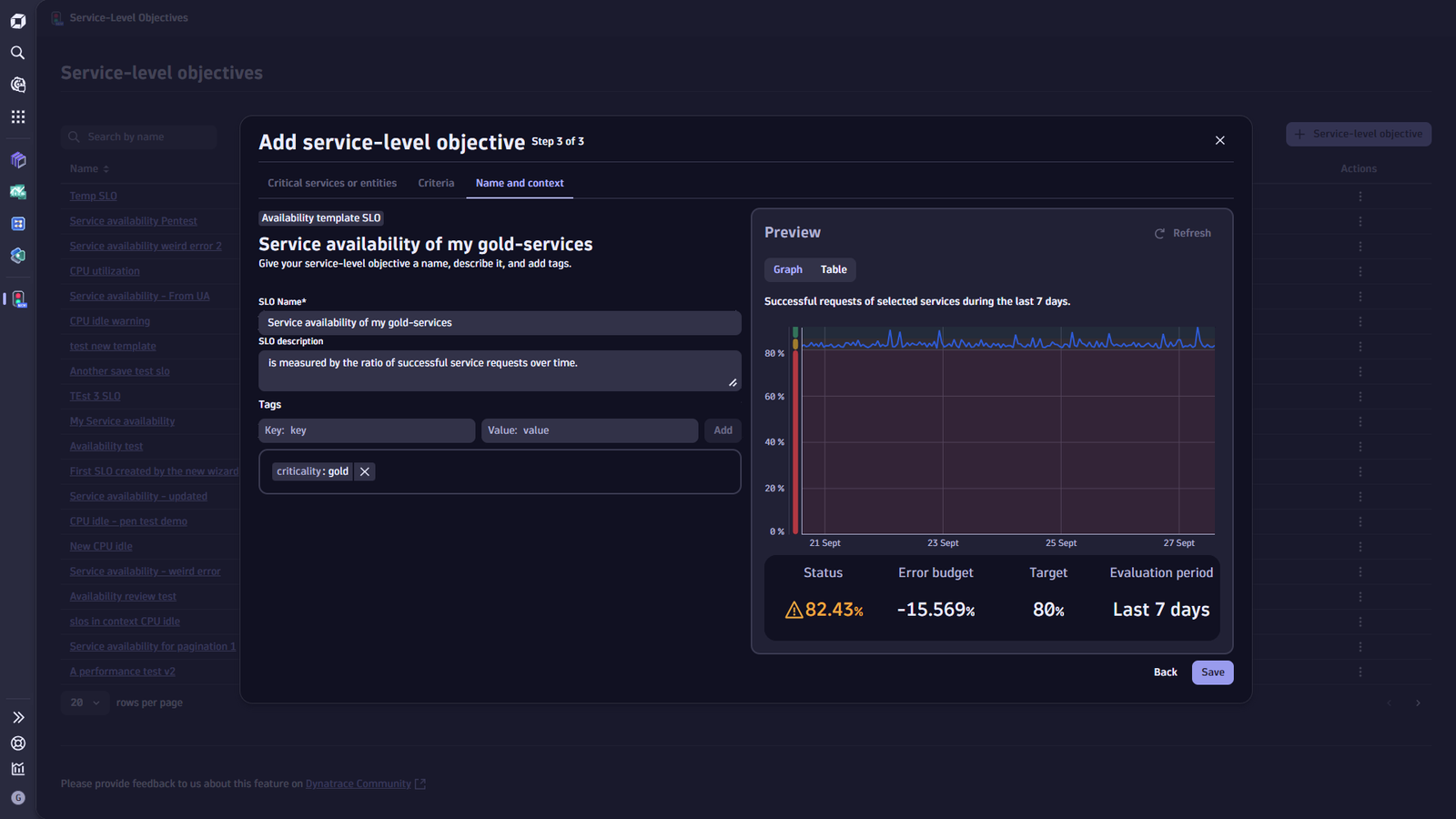
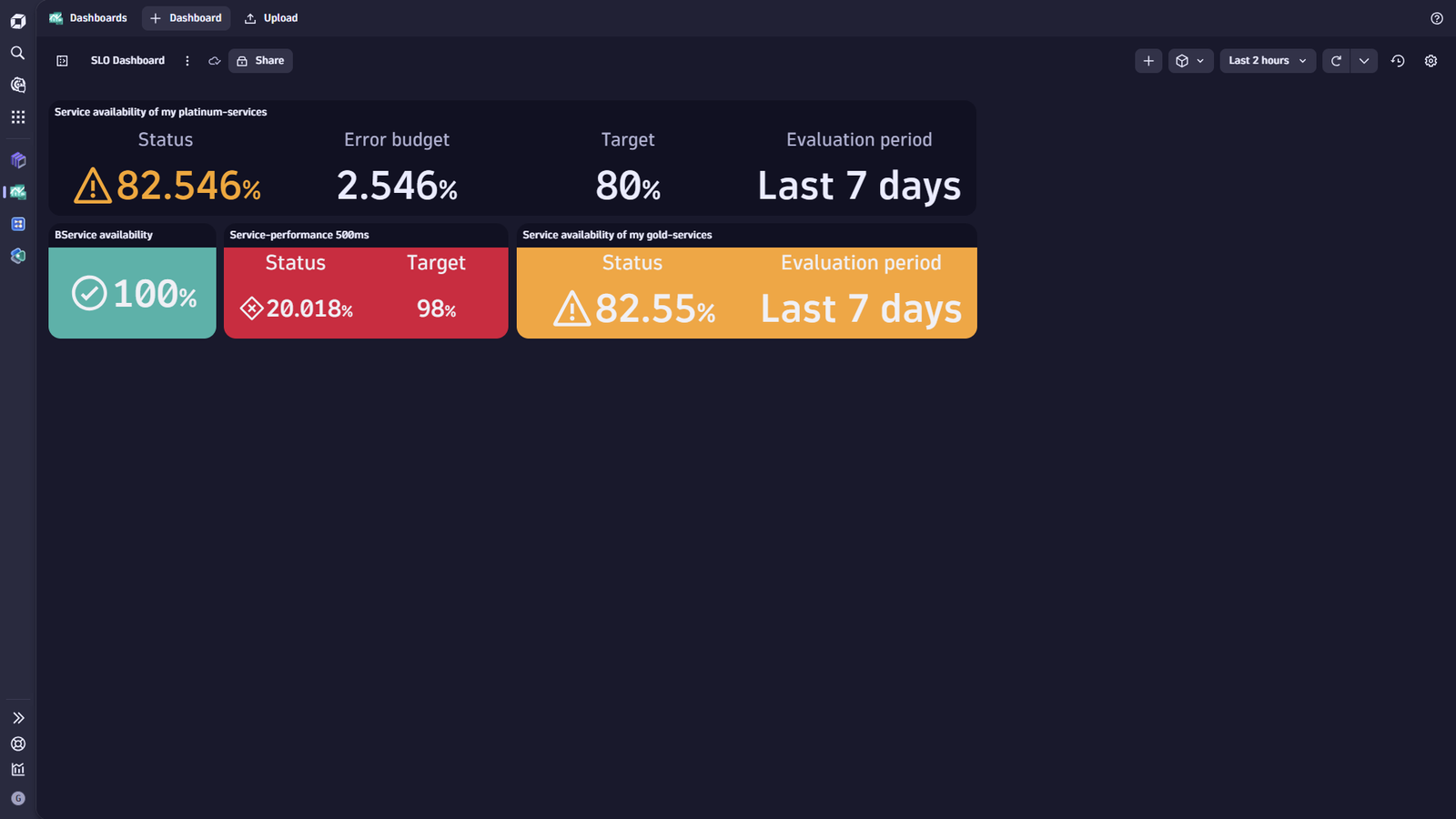
SLO management and details viewUI-guided SLO creation wizardDynatrace supports dedicated dashboard tiles, where existing SLOs can be visualized and customized to display the most critical KPIs.
  • Product information
  • Release notes

Overview

Service-level objectives represent a best-practice SRE to monitor business-critical or user-impacting services' health status and error budget. The SLO functionality enables

  • Creation
  • Maintenance
  • Analysis

of SLOs. Furthermore, it offers capabilities to visualize SLOs.

Note: Dedicated and tailored burn-rate alerts for proactive notification of performance degradation and configuration as code support will be added soon.

Use cases

SLOs provide a handy and efficient tool to define and track error budgets for your critical components, which allows you to proactively take action in case your error budgets are consumed abnormally fast and put your SLAs at risk.

Typically, SLOs are set based on latency, failure rate, and availability metrics, but they can also be defined to identify an increase in a particular error-log pattern.

Get started

SLOs are most valuable when selectively set on your business-critical and end-user-impacting services.

Configure your SLOs

  • Identify your critical services
  • Open the SLO management view and create a new SLO.
  • Add an SLO for service availability and service-performance per critical service
  • Use the preview to identify a suitable threshold and evaluation period, e.g., the last 2 weeks.
  • Add your SLOs to a your health and performance dashboard for a combined visualization

Visualize your SLOs

  • View your created SLOs and pin them to a dedicated dashboard to have your most important SLOs always at hand at a glance.

Details

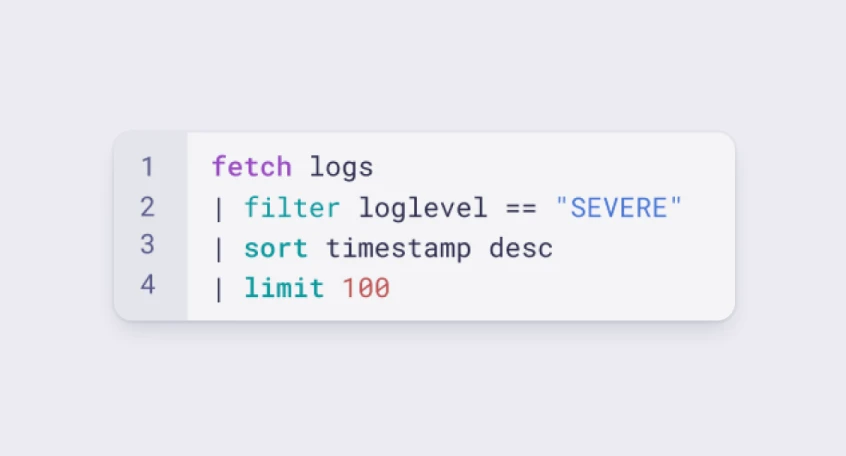
With the latest release, Dynatrace service-level objectives can be set on all data types, leveraging the power of Grail as central data platform via DQL.

This enables you to define your SLI based on what matters to you and your customers, independently of whether they are based on classic latency and failure rate metrics or specific log patterns.

For more information, please see our help documentation or reach out to our support teams.

Compatibility information

Service-level objectives are built on selected service-level indicators that are defined via DQL. Every data type available in Grail can be used to make a timeseries and serve as SLI for your SLOs.

Dynatrace
DocumentationMore Information
By Dynatrace
Dynatrace support center
Subscribe to new releases
Copy to clipboard

Related to Service-Level Objectives

Anomaly Detection logo

Anomaly Detection

Detect and alert on anomalies and custom patterns using any DQL time series.

Configuration as Code logo

Configuration as Code

Manage observability and security configurations as code via Terraform or Monaco.

Dashboards logo

Dashboards

Transform complex data into clear visualizations with custom dashboards.

Full version history

ReleaseDate

Full version history

1.16.1

Patch Changes

  • Maintenance release.

1.16.0

Minor Changes

  • Feature improvement: Improved the raw DQL error in graph and table previews.
  • Feature improvement: Reject unsupported rounded timeframes using the "@" operator in the SLO wizard.
  • Feature improvement: Typing free text without a key or predicate in the SLO overview filter no longer shows an incomplete statement error.
  • Bug fix: Resolved an issue where SLO detail tabs became disabled after visiting Critical services or entities in read-only mode.
  • Bug fix: Prevented the "Customize with DQL" button in the SLO wizard from wrapping prematurely on narrower viewports.
  • Bug fix: Fixed an edge-case layout issue in WizardTabsLayout.

Full version history

1.14.0

Minor Changes

  • Feature improvement: Added new Smartscape templates and deprecated the previous template set.

Patch Changes

  • Feature improvement: Enhanced the Wizard’s loading logic to prevent unnecessary Grail queries.

Full version history

1.12.1

Patch Changes

  • Maintenance release.

1.12.0

Minor Changes

  • Bug fix: Resolved an issue where entering search terms containing quotes into the SLO search bar led to an exception.
  • Bug fix: Resolved an issue where absolute timeframes in the wizard's criteria tab caused SLO evaluations to fail.

Full version history

1.10.0

Minor Changes

  • Bug fix: Resolved an issue in the Criteria tab where using absolute timeframes caused SLO evaluations to fail.
  • Feature improvement: Improved error visualization when fetching SLOs, providing clearer and more informative feedback in error states.

Full version history

1.9.1

Patch Changes

  • Maintenance release.

1.9.0

Minor Changes

  • Bug fix: Fixed an issue where SLO values of zero were incorrectly displayed as '-' instead of '0%'.
  • Feature improvement: Enhanced the loading behavior in the SLO wizard, making it more apparent that the SLO evaluation is in progress after clicking the Refresh button.

Full version history

1.8.1

Patch Changes

  • Maintenance release.

1.8.0

Minor Changes

  • Feature Improvement: Added sorting functionality to the SLO preview table during SLO evaluation for improved data analysis.

Full version history

1.8.0

Minor Changes

  • Feature Improvement: Added sorting functionality to the SLO preview table during SLO evaluation for improved data analysis.

1.7.0

Minor Changes

  • Feature Improvement: Adapted the refresh button for evaluating an SLO to always be enabled in the SLO Wizard.
  • Feature Improvement: Enhanced scrolling and responsive behavior in the SLO Wizard for a smoother user experience.

Full version history

1.6.1

Patch Changes

  • Maintenance release.

1.6.0

Minor Changes

  • Bug fix: Fixed an issue where the preview graph and preview table did not update correctly when changing the timeframe multiple times.
  • Bug fix: Fixed an issue where the SLO line chart displayed 0 instead of a gap if no data is available for certain data points.
  • Bug fix: Fixed an issue where the overview did not refresh after deleting an SLO, causing the deleted SLO to still be visible.
  • Feature improvement: Added the ability to resize columns in the overview table for better visualization.
  • Feature improvement: Enabled entire rows to be clickable in the overview table, allowing users to easily open and interact with SLOs.

Full version history

1.5.0

Minor Changes

  • Feature improvement: Introduced a segment selector in custom DQL mode to filter DQL by selected segments.
  • Feature improvement: Added a segment selector in entity selection mode, enabling the filtering of entities based on selected segments.
  • Feature improvement: Improved SLO wizard behavior.

Full version history

1.4.0

Minor Changes

  • Feature improvement: Added necessary IAM scopes to support querying Security Events.
  • Feature improvement: Improved response time validation for the Service performance template.
  • Feature improvement: Added the possibility to filter objective templates by tags in the SLO Wizard.

Full version history

1.3.0

Minor Changes

  • Feature improvement: Improved Tags Visualization in SLO Wizard.

Full version history

1.2.1

Patch Changes

  • Maintenance release.

1.2.0

Minor Changes

  • Feature improvement: Added necessary IAM scopes to support querying User Events and User Sessions.
  • Feature improvement: Updated the app's help menu to include new entries such as release notes and a link to the Dynatrace playground.
  • Feature improvement: Introduced an exit confirmation modal in the SLO wizard to prevent accidental loss of changes when exiting without saving.

Full version history

1.1.2

Patch Changes

  • Bug fix: Fixed an issue where editing custom SLOs incorrectly displayed the entity selection instead of the custom DQL input field.

1.1.1

Patch Changes

  • Maintenance release.

1.1.0

Minor Changes

  • Feature improvement: Improved the handling of missing permission errors to clearly inform users about the required scopes.
  • Feature improvement: The SLO preview table now displays entity names for built-in templates, providing better clarity.
  • Feature improvement: Introduced template categorization based on entity type in the SLO wizard, along with enhanced search functionality for templates.

Full version history

1.0.7

Patch Changes

  • Bug fix: Resolved an issue in the wizard where the tabs were disabled in read-only mode.

1.0.6

Patch Changes

  • Maintenance release

1.0.5

Patch Changes

  • Maintenance release

1.0.4

Patch Changes

  • Maintenance release

1.0.3

Patch Changes

  • Bug fix: Resolved an issue in the wizard where selected entities were reset after performing a search.
  • Bug fix: Resolved an issue in the wizard where the DQL editor displayed errors for valid queries.
  • Feature adaptation: Updated the wizard to prevent selection of entity types that are incompatible with objective templates.
  • Feature adaptation: Removed the restriction in the timeframe selector, allowing the setting of absolute timeframes.

1.0.2

Patch Changes

  • 902dd36: Bug fix → Fixed an issue where the Wizard preview incorrectly displayed the status as ‘Success’ when no warning was set.

1.0.1

Patch Changes

  • 36975c9: Maintenance release

1.0.0

Major Changes

  • d0345f02: Initial release

Full version history

1.0.2

Patch Changes

  • 902dd36: Bug fix: Fixed an issue where the Wizard preview incorrectly displayed the status as ‘Success’ when no warning was set.

1.0.1

Patch Changes

  • 36975c9: Maintenance release

1.0.0

Major Changes

  • d0345f02: Initial release

Full version history

1.0.1

Patch Changes

  • 36975c9: Maintenance release

1.0.0

Major Changes

  • d0345f02: Initial release
Dynatrace Hub
Hub HomeGet data into DynatraceBuild your own app
Dynatrace Intelligence - Agentic Operations SystemThe Dynatrace Agentic AI ecosystem
All (914)Log Management and AnalyticsKubernetesAI and LLM ObservabilityInfrastructure ObservabilityApplication ObservabilityApplication SecurityBusiness ObservabilityDigital Experience
Filter
Type
Built and maintained by
Deployment model
SaaS
  • SaaS
  • Managed
Partner FinderBecome a partnerDynatrace Developer

Software Delivery

Empower DevOps platform engineers, SREs, and development teams to deliver higher quality software, faster, and more securely.

Popular integrations

See more (1)
GitHub logo

GitHub

Automate GitHub issues, pull requests, and workflows from Dynatrace.

Jira logo

Jira

Open, update, and close Jira tickets automatically from Dynatrace Workflows.

Jenkins logo

Jenkins

Trigger Jenkins builds and monitor job status from Dynatrace Workflows.

GitLab logo

GitLab

Amend files in GitLab repositories, trigger pipelines, and manage issues.

Slack logo

Slack

Automate Slack messaging for security incidents, attacks, remediation, and more.

ServiceNow logo

ServiceNow

Create and manage ServiceNow incidents from Dynatrace Workflows.

More options

Workflows logo

Workflows

Automate tasks in your IT landscape and move towards autonomous operations.

Keptn logo

Keptn

Event-based control plane for continuous delivery and automated operations.

Configuration as Code logo

Configuration as Code

Manage observability and security configurations as code via Terraform or Monaco.

Site Reliability Guardian logo

Site Reliability Guardian

SRG: Automated change impact analysis for your deployment and release processes.

Service-Level Objectives logo

Service-Level Objectives

Manage SLOs and error budgets to ensure service performance and reliability SLAs.

More resources

AWS Connector logo

AWS Connector

Automate your AWS infrastructure with actions across EC2, S3, Lambda, and more.

Claude Connector for Workflows logo

Claude Connector for Workflows

Connect with Claude and send prompts for further analysis using Workflows.

CI/CD Observability logo

CI/CD Observability

Monitor CI/CD pipelines such as Azure Devops, Gitlab, Github and more.

Observability for Developers on Cursor logo

Observability for Developers on Cursor

Get Real time Code-Level data directly to your Cursor IDE.

Email logo

Email

Send out-of-the-box targeted Emails with workflows.

Gemini Connector for Workflows logo

Gemini Connector for Workflows

Connect with Gemini and send prompts for further analysis using Workflows.

GitHub Copilot Coding Agent logo

GitHub Copilot Coding Agent

Automate vulnerability remediation and boost developer productivity.

GitHub Copilot Custom Agent logo

GitHub Copilot Custom Agent

Automate your development workflows with specialized agent definitions.

Observability for Developer on JetBrains logo

Observability for Developer on JetBrains

Get real-time code-level data directly to your Jetbrains IDE.

Kubernetes Connector logo

Kubernetes Connector

Automate your Kubernetes clusters: Delete failed pods and restart deployments.

Microsoft 365 logo

Microsoft 365

Send targeted emails from workflows using your Microsoft 365 account.

OpenAI Connector for Workflows logo

OpenAI Connector for Workflows

Connect with OpenAI and send prompts for further analysis using Workflows.

Ownership logo

Ownership

Enables the import of and access to ownership information of entities.

Pagerduty for Dynatrace Workflows logo

Pagerduty for Dynatrace Workflows

Streamline incident management with automated Pageruty workflows.

Red Hat Ansible logo

Red Hat Ansible

Integrate with Red Hat Ansible (EDA, AAC, AWX) to trigger job templates.

Snowflake for Workflows logo

Snowflake for Workflows

Access, query, and store Snowflake data to analyze further within Dynatrace.

Observability for Developers on VSCode logo

Observability for Developers on VSCode

Get Real time Code-Level data directly to your VSCode IDE.

Cursor IDE logo

Cursor IDE

Boost developer productivity and get real-time, code-level insights into Cursor.

Observability for Developers on Windsurf logo

Observability for Developers on Windsurf

Get real-time code-level data directly to your Windsurf IDE.

Are you looking for something different?

We have hundreds of apps, extensions, and other technologies to customize your environment

Extend your knowledge

Learn the Dynatrace Query Language

Learn the Dynatrace Query Language

Explore data, discover patterns, anomalies and outliers, and create statistical modeling with DQL, our powerful query language.
Learn DQL
Solve problems with custom apps

Solve problems with custom apps

Dynatrace Developer makes it easy to create custom apps for your organisation. Start with one of our templates or use your own code.
Build apps