


















Skip to technology filters Skip to main content
Dynatrace Hub

Extend the platform,
empower your team.

Popular searches:
Home hero bg
Threats & ExploitsThreats & Exploits
Threats & Exploits

Threats & Exploits

Understand, triage, and investigate detection findings and alerts.

App
Free trialDocumentation
  • Product information
  • Release notes

Overview

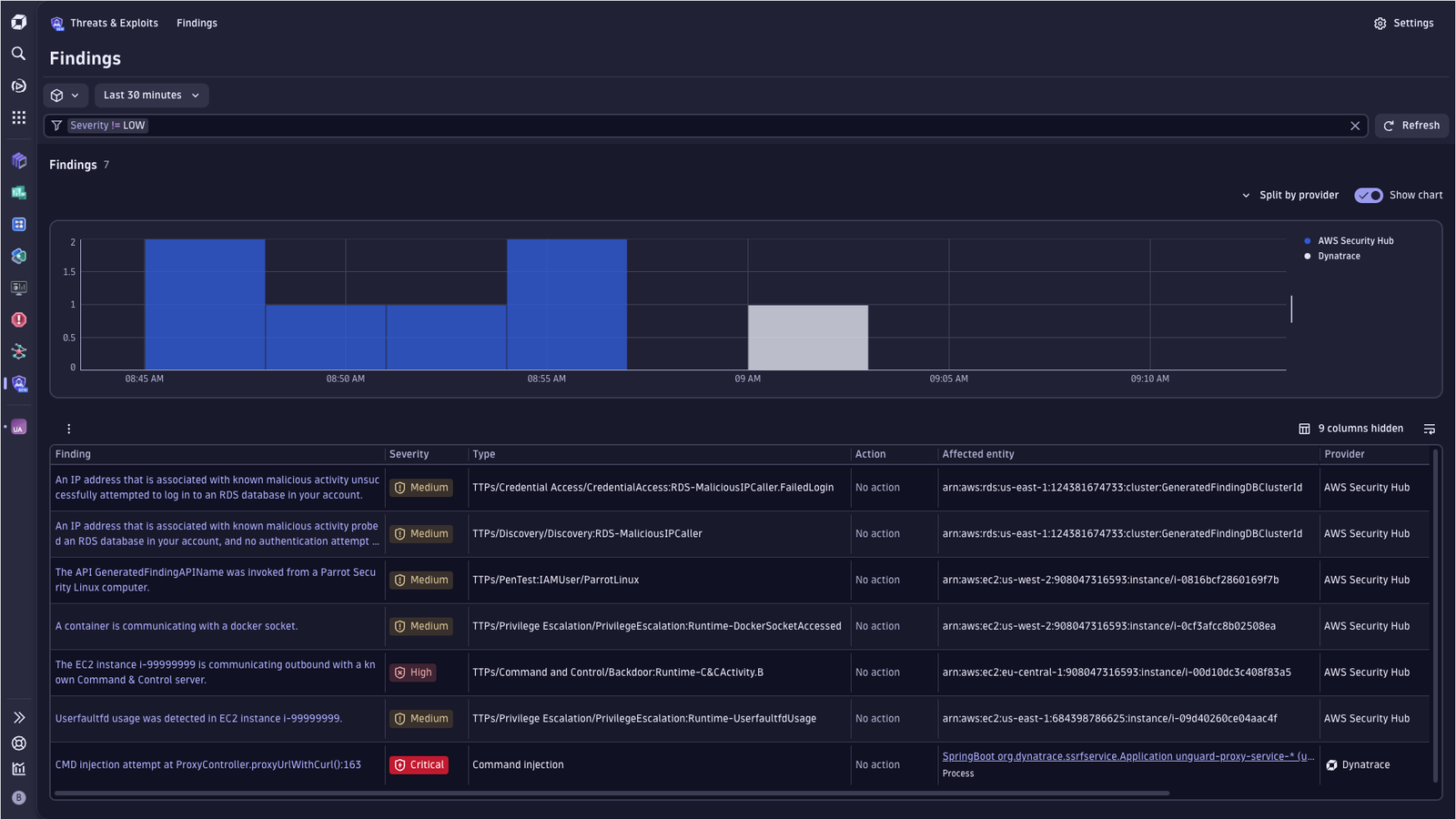
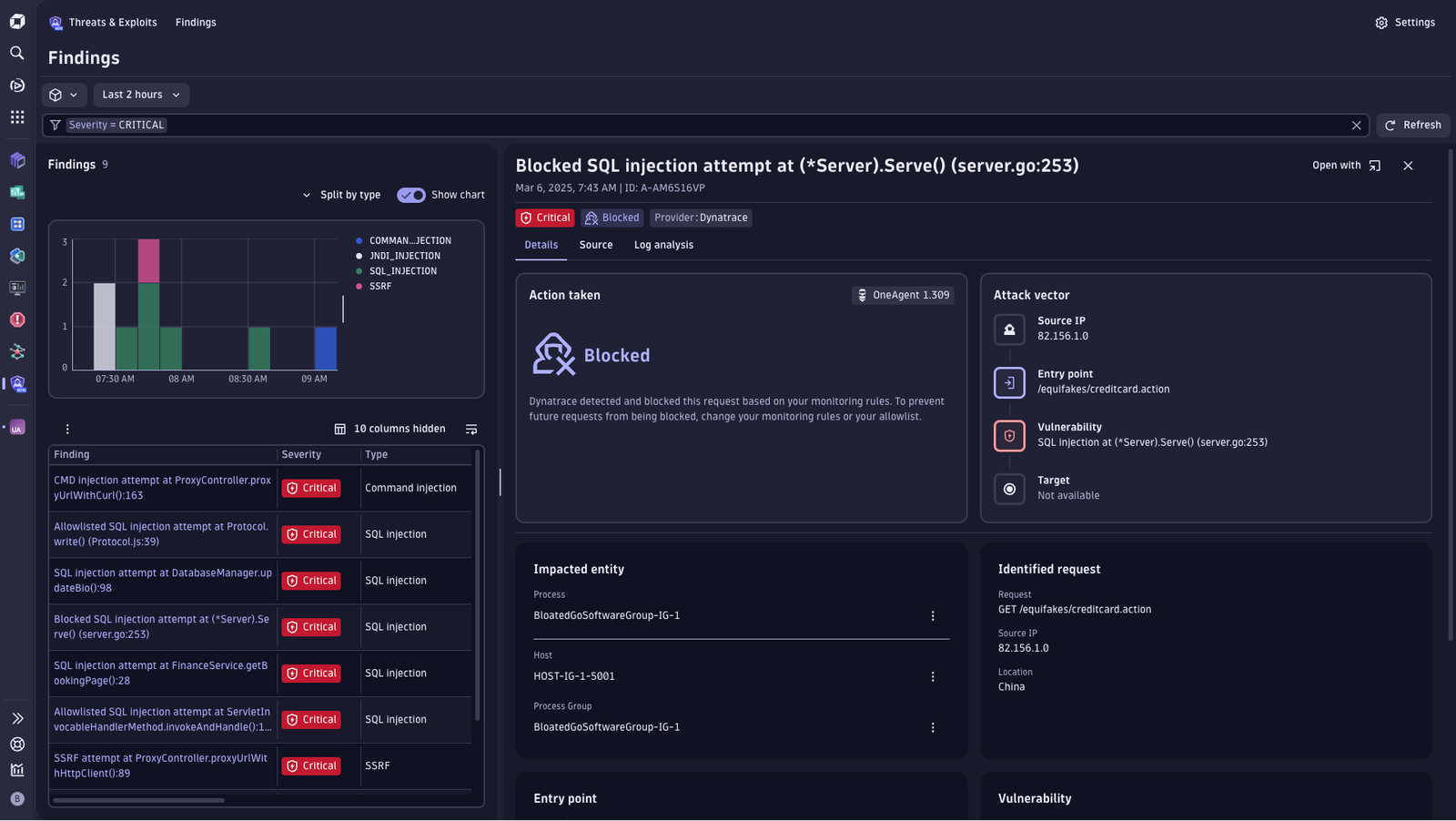
Threats & Exploits streamlines the triage of security findings, offering an up-to-date view of the application security threat landscape enhanced by Dynatrace deep observability. It helps you immediately detect zero-day vulnerabilities and take defensive measures to protect against exploitation.

Dynatrace
Documentation
By Dynatrace
Dynatrace support center
Subscribe to new releases
Copy to clipboard

Full version history

ReleaseDate

Full version history

Minor Changes

  • Removed Monitored Entities path from Related Entities Card and replaced it with full Smartscape compatibility
  • Removed "Process group", "Process" and "Affected entity" filters

Patch Changes

  • Change styling of surface elements in Detection sources to improve color contrast
  • Remove Monitored Entity fallback from the Affected Object card
  • Reduce required scopes for the app

Full version history

1.22.1

Minor Changes

  • Add related smartscape node ID filter + updated view-findings-for-entity intent

Full version history

Minor Changes

  • Batch in-table settings changes

Full version history

1.20.0

Minor Changes

  • Showing aggregation chips in main findings table when grouping is active
  • Add "Add as filter" to findings chart legend actions

1.19.0

Minor Changes

  • Add view-findings-for-entity intent to navigate T&E with entity-scope filter

Full version history

1.18.0

Minor Changes

  • Add support for custom enrichment in integrations list.
  • Added new intent to open integration screen

Patch Changes

  • Improve security-intelligence AI context truncation

Full version history

1.17.0

Minor Changes

  • Affected object lookup extended to also consider object.id to find Smartscape node

Full version history

Fixes and maintenance

  • Use different logic to reduce app function response size

1.16.2

Fixes and maintenance

  • Use toSmartscapeId to convert string ids for comparisons

1.16.1

Fixes and maintenance

  • Renamed "Open case" to "Open investigation" to align naming
  • Fixed issues in smartscapeNode query

1.16.0

Feature updates

  • All security.events queries are now free of charge.

Fixes and maintenance

  • Disabled entity intents for smartscape_source.id
  • Findings with actor.ips not conforming to the semantic dictionary are filtered out

Full version history

Feature updates

  • Finding Details now provides "Open case" intent in Investigation guidance section for easier analysis

Fixes and maintenance

  • Findings Details now shows Details tab by default for all findings, selected tab is persisted for the session

Full version history

Feature updates

  • Findings table: you can now group rows to organize related findings.
  • Finding details: the details view now shows insights into related findings.

Fixes and maintenance

  • Fix: investigation queries are again offered when a finding contains only an actor IP or a trace ID.

Full version history

Fixes and maintenance

  • Updated Kubernetes filters and added column grouping for Kubernetes and Hyperscaler columns
  • Fixed issues in investigation guidance queries
  • Removed support for events using detection.type, detection.action and dt.security.rap.action fields

Full version history

Feature updates

  • Remove ownership component from Affected Object card
  • Added filters to better filter for Hyperscaler and Kubernetes-specific fields
  • Added columns to the findings table to show Hyperscaler and Kubernetes-specific data.
  • Added view topology button for Dynatrace monitored entities

Fixes and maintenance

  • Improved clarity of settings permission tooltip
  • Fixed alignment issues in the form fields for allowlist rules in RAP settings

Full version history

Fixes and maintenance

  • Fix duplicated input field in Allowlist form

Full version history

Feature updates

  • Affected entity, related entity, and entities in the Source tab are linked to their respective apps if supported
  • Offer "Open in Investigations", "Open in Notebooks", and "Open with" from the table and finding details
  • Investigation guidance is collapsible and shows the number of queries
  • Increased the number of investigation guidance queries

Fixes and maintenance

  • Renamed "Properties" button to "Show properties".
  • Add support for downloading table as CSV for fields: ID, Affected entity, Affected Smartscape node, and Vulnerability
  • storage:smartscape:read permission is now mandatory to avoid issues loading Smartscape related data in the findings table

Full version history

Feature updates

  • Added "Investigation Guidance" section to replace the "Logs" tab

Full version history

Fixes and maintenance

  • Segment selector is visible again

Full version history

Feature updates

  • Added intent links to “Affected entity” and “Affected Smartscape node” columns
  • Moved segments and timeframe selector to the filter bar line
  • Added affected object and related entity context to conversation starter
  • Added Properties details to “Affected object” and “Related entities” cards
  • Added context value to the Prevalence chart sparkline

Full version history

Feature updates

  • Updated "Affected object" card to provide more insights into the monitored entity
  • Introducing "Related entities" card to give insights into topology
  • Introducing more context with number of vulnerabilities, number of detection findings and number of problems per entity.
  • Added "Affected entity ID" filter and column
  • Added "Affected smartscape node" filter and column
  • Added "Affected smartscape node ID" filter and column
  • Adding new intent for severity and affected entity or affected smartscape node

Full version history

Feature updates

  • Introduced entity type-specific intents to the affected object card and source tab

Fixes and maintenance

  • Enrichment: Send NO_READ cache parameters on refresh
  • Fixed wrong default value for RAP GO settings

Full version history

Fixes and maintenance

  • Fixed deployment issue

Full version history

Feature updates

  • Added IP enrichment feature for actor IP information. For full functionality, the following user permissions are needed:
    • security-intelligence:enrichments:run
    • document:documents:read
    • app-settings:objects:read
    • app-engine:apps:run
  • "Explain with AI" now also gets IP enrichment information to better provide guidance.

Fixes and maintenance

  • Fixed issues with enriching EC2 instances for GuardDuty integration.

Full version history

Feature updates

  • Added 3rd-gen native settings for Runtime Application Protection.
  • Added "Explain with AI" feature to help understand individual findings.

Full version history

Feature updates

  • General: Switching app to new Security Events table. Changed mandatory permissions:
  • Removed: storage:events:read, Added: storage:security.events:read, Updated: context of storage:buckets:read
  • Detection Sources: All currently available "Security events ingest" options are listed.
  • Findings table: Removed icons for provider, product and vendor.
  • Finding details: Introducing the "Actor" card for finding details.

Fixes and maintenance

  • Source tab: Improved rendering of empty arrays, null and undefined
  • Findings table: Switched to finding.type, added backwards compability with detection.type field
  • Findings table: Adjusted "Open with" functionality to improve consistency between apps.
  • Finding details: Improved error messages for 4xx when loading details of a finding.
  • General: Updated app logo

Full version history

Fixes and maintenance

  • App intents now support passing segments and, for the view-detection-finding intent, vulnerability.display_id
  • Segments filter was not triggering a reload of the table.

Full version history

Feature updates

  • Finding table supports server-side sorting for up to 10.000 findings.
  • Added 'View trace' button to 'Attack vector' card.
  • Search functionality added to Source tab.

Fixes and maintenance

  • Improved string array visualization in Source tab.

Full version history

Fixes and maintenance

  • Fixed a permissions issue that prevented users with conditioned permissions to use the app.
  • Changed default sorting to use finding.time.created instead of timestamp

Full version history

Feature updates

Added "What's new" to the help menu

The “What’s new” section provides insights into the features and fixes provided in the individual releases.

Upgrade dependencies for new functionality and performance improvements

Using the latest Strato library version brings more functionality to the app and improved the apps performance

Improved query performance for detail view

Streamlined queries to fetch only what is needed and when it is needed, improved the loading time of the detail view. Especially when reopening findings.

Improved translation of the app

Table and filters are now translatable.

Fixes and maintenance

  • Make table more condensed by adjusted chips.
  • Fixed an issue where info icon above table could not be clicked
  • Fixed an issue where events containing an array of actor.ips containing null not being displayed correctly
  • Deduplicate Entry Point user-controlled input

Full version history

1.0.1

Major Changes

  • Initial release
Dynatrace Hub
Hub HomeGet data into DynatraceBuild your own app
Dynatrace Intelligence - Agentic Operations SystemThe Dynatrace Agentic AI ecosystem
All (914)Log Management and AnalyticsKubernetesAI and LLM ObservabilityInfrastructure ObservabilitySoftware DeliveryApplication ObservabilityBusiness ObservabilityDigital Experience
Filter
Type
Built and maintained by
Deployment model
SaaS
  • SaaS
  • Managed
Partner FinderBecome a partnerDynatrace Developer

Application Security

Scale your DevSecOps with our unique approach to securing clould-native applications at runtime combined with intelligent automation.

Get started with these essentials

Vulnerabilities logo

Vulnerabilities

Detect and prioritize vulnerabilities to improve your environment's security.

Security Posture Management logo

Security Posture Management

Detect, prioritize, and remediate security and compliance findings with SPM.

Threats & Exploits logo

Threats & Exploits

Understand, triage, and investigate detection findings and alerts.

Investigations logo

Investigations

Fast and precise incident response on Grail data with DQL queries.

Real-time vulnerability detection at runtime

Get continuous monitoring of third-party, code-level & runtime vulnerabilities.

Vulnerabilities logo

Vulnerabilities

Detect and prioritize vulnerabilities to improve your environment's security.

Continuous Security Posture Management

Simplify compliance monitoring with pre-built policies for CIS, DORA, DISA STIG, and more, saving time and reducing complexity.

Security Posture Management logo

Security Posture Management

Detect, prioritize, and remediate security and compliance findings with SPM.

Protect your environment right when attacks happen

Detect and block the most severe attacks without affecting critical processes.

Threats & Exploits logo

Threats & Exploits

Understand, triage, and investigate detection findings and alerts.

Detect, investigate and respond to threats

Investigate and respond to cloud security incidents with powerful analysis tools

Investigations logo

Investigations

Fast and precise incident response on Grail data with DQL queries.

Threat intelligence ingest & enrichment

Ingest threat reports and enrich observables with threat intelligence integrations.

Security Enrichment logo

Security Enrichment

Connect any HTTP-based threat intelligence source to enrich observables.

AbuseIPDB logo

AbuseIPDB

Enrich observables with threat intelligence from AbuseIPDB.

VirusTotal logo

VirusTotal

Enrich observables with threat intelligence from VirusTotal.

CrowdStrike logo

CrowdStrike

Ingest CrowdStrike detection findings, threat reports, and audit logs.

LevelBlue (AlienVault) OTX logo

LevelBlue (AlienVault) OTX

Ingest LevelBlue (AlienVault) OTX threat reports.

Security findings ingest

Ingest detection, vulnerability, and compliance findings, as well as security scan events, and audit logs from DevSecOps product integrations.

See more (17)
OCSF logo

OCSF

Ingest security findings in Open Cybersecurity Schema Framework (OCSF) format.

Amazon ECR logo

Amazon ECR

Ingest Amazon Elastic Container Registry vulnerability findings and scan events.

Google Artifact Registry logo

Google Artifact Registry

Ingest Google Artifact Registry vulnerability findings.

AWS Security Hub logo

AWS Security Hub

Ingest AWS Security Hub vulnerabilities, detections, and compliance findings.

Microsoft Defender for Cloud logo

Microsoft Defender for Cloud

Ingest Microsoft Defender for Cloud security findings and scan events.

Tenable logo

Tenable

Ingest Tenable vulnerability findings, scan events, and audit logs.

Security logs ingest

Ingest logs from security-related products.

See more (2)
Akamai logo

Akamai

Ingest logs and security events from Akamai products.

CyberArk logo

CyberArk

Ingest CyberArk audit logs via SIEM integration for reporting and analysis.

Okta logo

Okta

Ingest Okta audit logs via the System logs API.

AWS Web Application Firewall (WAF) logo

AWS Web Application Firewall (WAF)

Web application firewall that lets you monitor the HTTP(S) requests.

Azure logs logo

Azure logs

Get insights from Azure logs with Log Management and Analytics.

Amazon API Gateway logo

Amazon API Gateway

Service for developers to create, publish, maintain, monitor, and secure APIs.

More resources

GitHub Copilot Coding Agent logo

GitHub Copilot Coding Agent

Automate vulnerability remediation and boost developer productivity.

GitHub Copilot Custom Agent logo

GitHub Copilot Custom Agent

Automate your development workflows with specialized agent definitions.

Are you looking for something different?

We have hundreds of apps, extensions, and other technologies to customize your environment

Extend your knowledge

Learn the Dynatrace Query Language

Learn the Dynatrace Query Language

Explore data, discover patterns, anomalies and outliers, and create statistical modeling with DQL, our powerful query language.
Learn DQL

Solve security issues with custom apps

Solve security issues with custom apps

Dynatrace Developer makes it easy to create custom apps for your organization. Start with one of our templates or use your own code.
Build apps
Skill up with on-demand courses

Skill up with on-demand courses

Go to Dynatrace University for focused courses and learning paths -- from platform basics to key certifications.
Build skills