










Skip to technology filters Skip to main content
Dynatrace Hub

Extend the platform,
empower your team.

Popular searches:
Home hero bg
Users & SessionsUsers & Sessions
Users & Sessions

Users & Sessions

Discover how users and cohorts with common characteristics experience your app.

App
Free trial
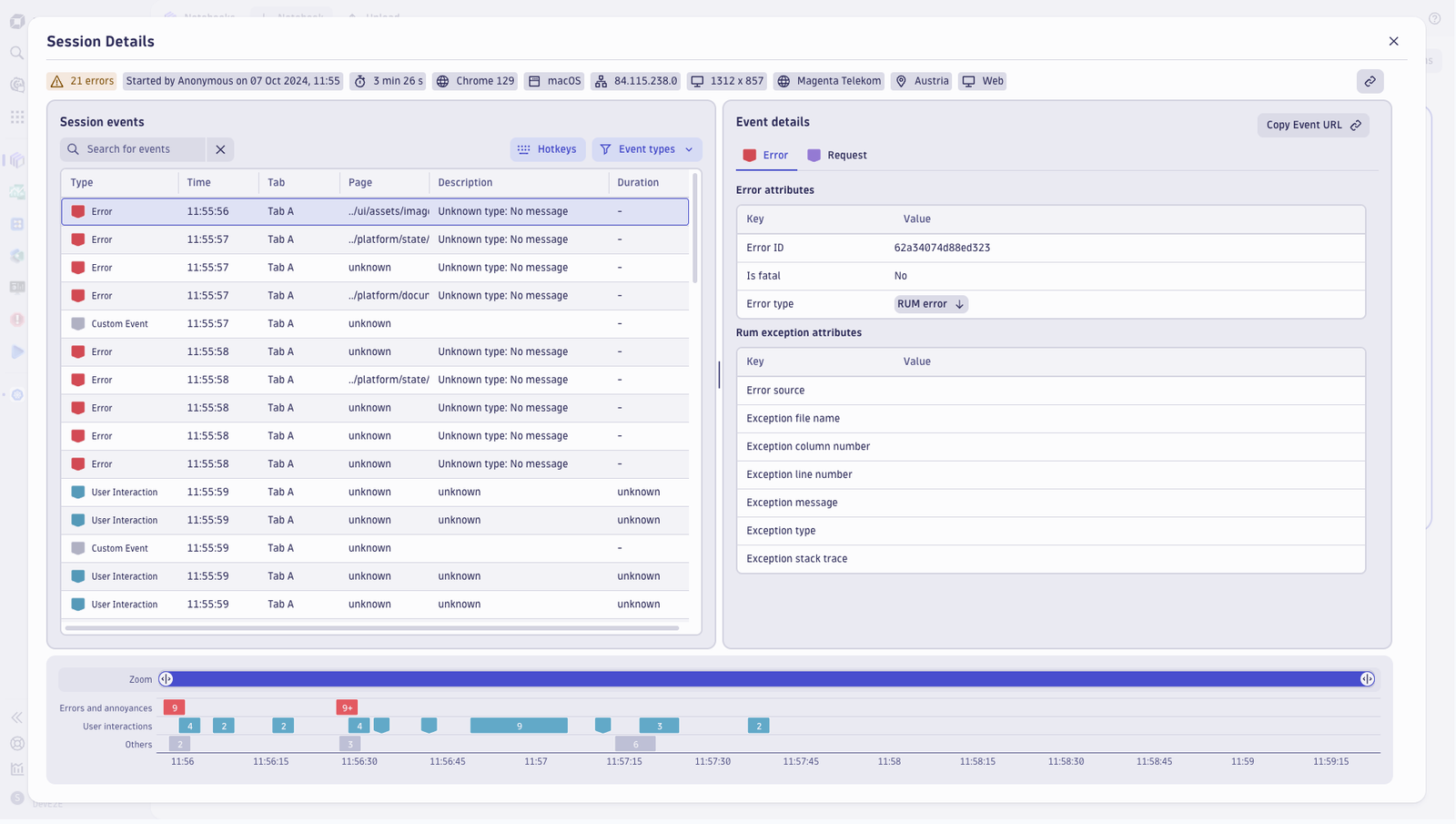
Session events and details and attributes (browser, screen resolution, location). Shows a list of errors, user interactions, and custom events.
  • Product information
  • Release notes

Overview

A user session, also called a "visit," "journey," or "clickpath," is any interaction between an individual user's device and your application. It encompasses a sequence of user actions performed by the same user in your application during a limited period. Each user session includes at least one user action.

With Session Details, you can understand how individual users who share common characteristics experience your application by isolating problematic sessions and exploring details.

Use cases

Get full visibility into how your users experience every digital transaction across web, mobile, and custom applications. You can categorize your application's user sessions into meaningful cohorts based on shared characteristics, such as an operating system, browser type, or location. Swiftly resolve customer support requests by analyzing specific users and sessions via advanced filtering.

Dynatrace
By Dynatrace
Dynatrace support center
Subscribe to new releases
Copy to clipboard

Full version history

ReleaseDate

Full version history

1.11.1

Patch Changes

  • Add missing scopes for segments

Full version history

1.11.0

What's New

  • Added key-press support for Session Replay playback.
  • Session Replay status is now visible.

Improvements & Fixes

  • Event list descriptions now show the associated user action name.
  • Smartscape enablement now uses the platform Phase flag instead of a feature flag.
  • Improved accessibility for the event-type filter button, with better keyboard and screen-reader support.
  • Improved accessibility for intent buttons.
  • Investigation mode no longer enables automatically when using the Error Inspector intent.
  • Fixed an issue preventing display of data from custom buckets.
  • Fixed replay offset calculation and improved session-boundary handling in EventTimelineZoom.
  • Fixed a regression affecting mobile native replays.
  • Reduced Session Replay timeline query load for better performance.
  • Session Replay now handles timeline-data failures gracefully without interrupting playback.

Full version history

1.10.1

Improvements & Fixes

  • Fix not displaying RUM data from custom buckets

Full version history

1.9.3

Patch Changes

  • Fix endpoint for Session Replay masking settings

Full version history

1.8.0

What’s New

  • Applications now use the new 3gen Smartscape field exclusivelly, improving consistency and enabling future enhancements. (Rolling out gradually)
  • Page grouping now also considers user actions, making it easier to analyze user behavior.

Improvements & Fixes

  • Clearer permission messages
  • Improved source map security
  • Better Session Replay experience and performance
  • Added a close button to return from session details to the session list
  • Fixed resource loading issues in non-Firefox browsers
  • More accurate waterfall timings

Full version history

1.7.1

Patch Changes

  • Fix recent session query for dt.rum.user_tag

Full version history

1.6.1

Minor Changes

  • Implement link component in sessions table for redirecting to session viewer in a new browser tab

Patch Changes

  • Set scrollToRow to center
  • Added Live indicator in session and allow replay if possible
  • Use request type from the event.
  • Show waterfall for requests
  • Migrate masking serialization
  • Fix crash when navigating through Problems app intent

Full version history

1.3.1

Patch Changes

  • Session replay web options exposed, extract nested css disabled by default

Full version history

1.3.0

Minor Changes

  • Enable filtering and timeframe selection in recent sessions
  • Add button in session list cell options to open session viewer in new tab functionality
  • Enable timeframe stepper for sessions and recent sessions

Patch Changes

  • Timeline Zoom bar visual improvements
  • Added Live indicator in session and allow replay if possible
  • Add link from Event details to Smartscape
  • Add link from Event details to Logs
  • Add link from navigations to traces
  • Use default view formatter for navigation events if mobile
  • Transform app id to frontend name from view-entity-list intent

Full version history

1.2.1

Patch Changes

  • Fix masking permissions handling in session viewer

Full version history

1.2.0

Minor Changes

  • Enable server-side sorting in sessions list table

Patch Changes

  • Fix Navigation events having wrong event type
  • Update dashboard with experience standards issues
  • Zoom timeline visual and performance improvements
  • Added gesture, rotation, focus, blur and zoom details
  • Added tab for Common details in all events
  • Fix app crash for older sessions
  • coalesce browser tab id field with new and old key

Full version history

1.1.1

Patch Changes

  • Fix Navigation events having wrong event type
  • Fix app crash for older sessions

Full version history

1.0.1

Patch Changes

  • Prevent first session to miss some resources

Full version history

1.0.0

Major Changes

  • Global availability of the app

Minor Changes

  • Added option to group the event table by user actions

Patch Changes

  • Fix Session Viewer breadcrumbs items wrongly truncating
  • Added show and hide background events and redesign event filters on Session Viewer
  • Make recent sessions accessible to all users
  • Fixed missing aria labels for icons
  • SR player doesn't wait jumping to a time
  • Update jenkinsfile to automatically generate changeset
  • Fixed url to Experience Vitals
  • Added learning resources to the dashboard footer
  • Use new user.identifier field after dt.rum.user_tag is being deprecated
Dynatrace Hub
Hub HomeGet data into DynatraceBuild your own app
Dynatrace Intelligence - Agentic Operations SystemThe Dynatrace Agentic AI ecosystem
All (914)Log Management and AnalyticsKubernetesAI and LLM ObservabilityInfrastructure ObservabilitySoftware DeliveryApplication ObservabilityApplication SecurityBusiness Observability
Filter
Type
Built and maintained by
Deployment model
SaaS
  • SaaS
  • Managed
Partner FinderBecome a partnerDynatrace Developer

Digital Experience

Ensure that all your applications are available, functional, fast, and efficient across every channel, from mobile and web to IoT and APIs.

Real user monitoring

Analyze and manage real user monitoring (RUM) data of web, mobile, and custom applications.

See more (1)
Experience Vitals logo

Experience Vitals

Optimize UX with core vitals, frontend error tracking, and end-to-end visibility.

Error Inspector logo

Error Inspector

Discover, triage, and manage errors across all your frontends.

Web logo

Web

Analyze and manage real user monitoring (RUM) data of Web applications.

Mobile logo

Mobile

Analyze real user monitoring data of mobile apps in context with the backend.

Session Replay Classic logo

Session Replay Classic

Fix bugs and simplify complex issues with visual recordings of user sessions.

Session Segmentation logo

Session Segmentation

View and analyze the Real User Monitoring (RUM) sessions from all applications.

Synthetic monitoring

Synthetic logo

Synthetic

Monitor your application's health around the world and around the clock.

Credential Vault logo

Credential Vault

Securely store credentials for your synthetic monitors and extensions 2.0.

More resources

Android Webkit logo

Android Webkit

Provides tools for browsing the web.

Apple Safari logo

Apple Safari

Graphical web browser developed by Apple, based on the WebKit engine.

Flutter logo

Flutter

Monitor mobile applications built with Flutter on iOS or Android.

Google Chrome logo

Google Chrome

Cross-platform web browser developed by Google.

iOS Safari logo

iOS Safari

Graphical web browser developed by Apple, based on the WebKit engine.

Microsoft Edge logo

Microsoft Edge

Real user monitoring - visibility and monitoring starting on you clients browser (desktop, tablet, mobile).

Microsoft Internet Explorer logo

Microsoft Internet Explorer

Series of graphical web browsers.

Mozilla Firefox logo

Mozilla Firefox

Free, open source web browser that uses the Gecko layout engine.

Opera logo

Opera

Freeware web browser for Microsoft Windows, Android, iOS, macOS, and Linux operating systems.

React Native logo

React Native

Monitor mobile applications built with React Native running on iOS or Android.

Users & Sessions logo

Users & Sessions

Discover how users and cohorts with common characteristics experience your app.

Xamarin logo

Xamarin

Monitor mobile applications built with Microsofts's popular Xamarin platform running on iOS or Android.

Xcode logo

Xcode

Environment containing a suite for developing software for macOS, iOS, iPadOS, watchOS, and tvOS.

Are you looking for something different?

We have hundreds of apps, extensions, and other technologies to customize your environment

Support

Crash-free, 5-star mobile apps

Crash-free, 5-star mobile apps

Learn to leverage mobile analytics to fix app performance issues before they impact your users and revenue.
Learn the top tips

Connect logs for better user journeys

Connect logs for better user journeys

Deepen your insights into real user journeys and user experience pitfalls when you connect logs to session replay.
Read more
Maintain location health the easy way

Maintain location health the easy way

Learn to use private synthetic locations to immediately identify which of your locations need personal attention.
Learn how
An end to Android app crashes

An end to Android app crashes

Dynatrace mobile app monitoring enables immediate, accurate analysis of real user sessions on Android as well as iOS.
Read more
Simpler, easier mobile monitoring

Simpler, easier mobile monitoring

Learn how to make our automated, all-in-one approach to monitoring mobile apps work for you.
Read how
Prioritize optimizations with AI help

Prioritize optimizations with AI help

Get more value from Dynatrace, with AI support to identify user experience problems, root causes, and remedies.
Learn more