























Skip to technology filters Skip to main content
Dynatrace Hub

Extend the platform,
empower your team.

Popular searches:
Home hero bg
VulnerabilitiesVulnerabilities
Vulnerabilities

Vulnerabilities

Detect and prioritize vulnerabilities to improve your environment's security.

App
Try in PlaygroundDocumentation
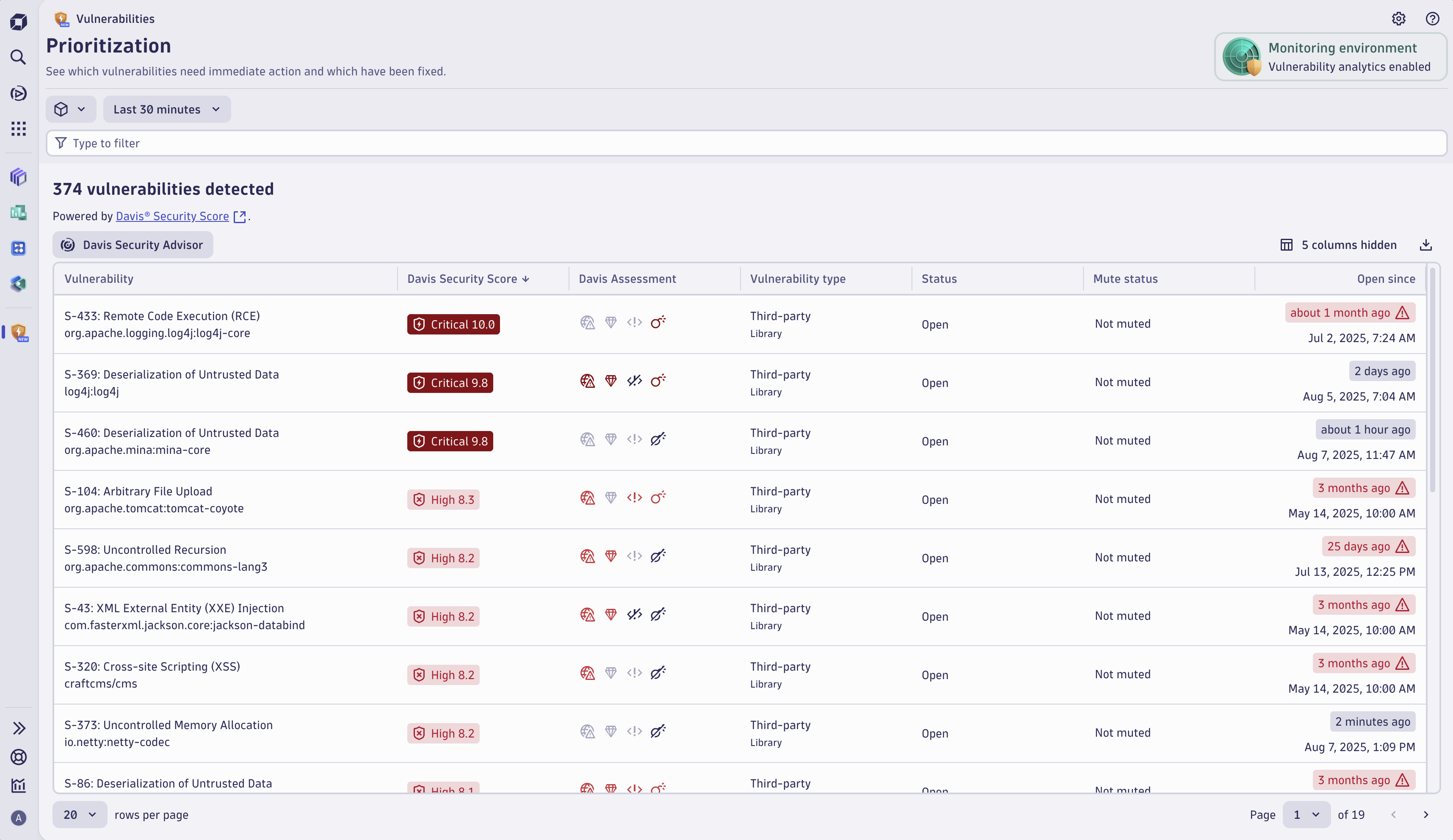
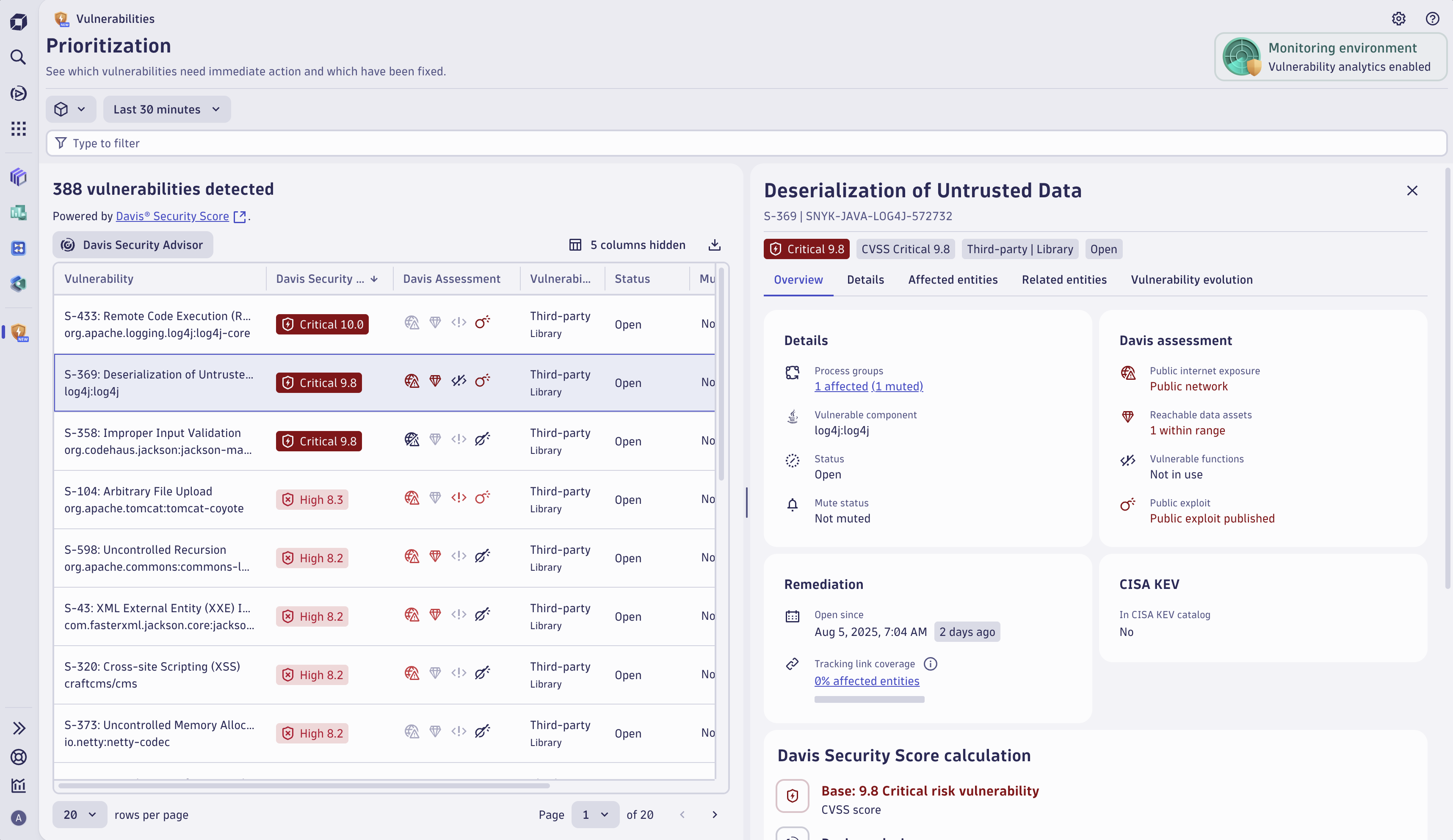
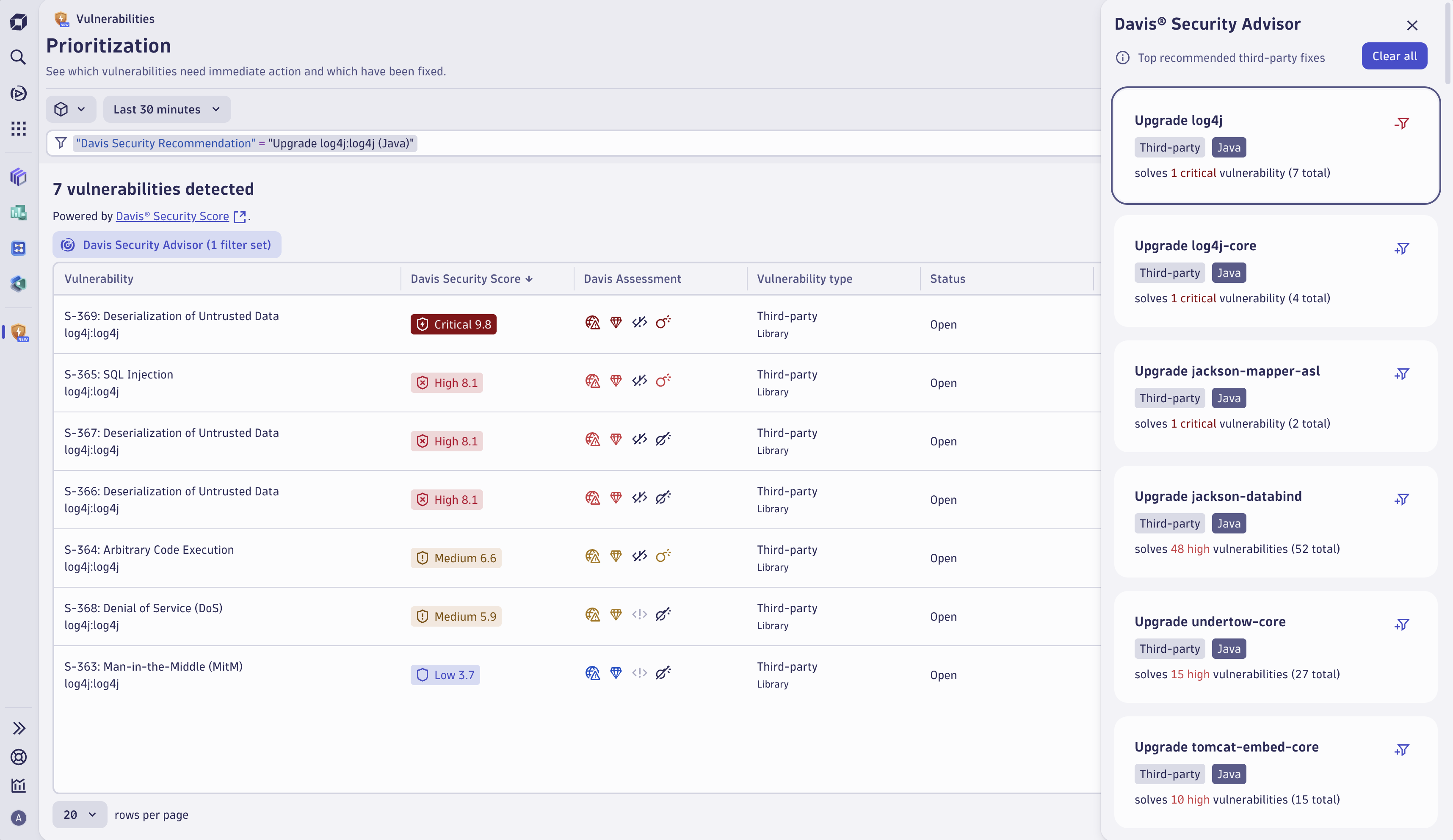
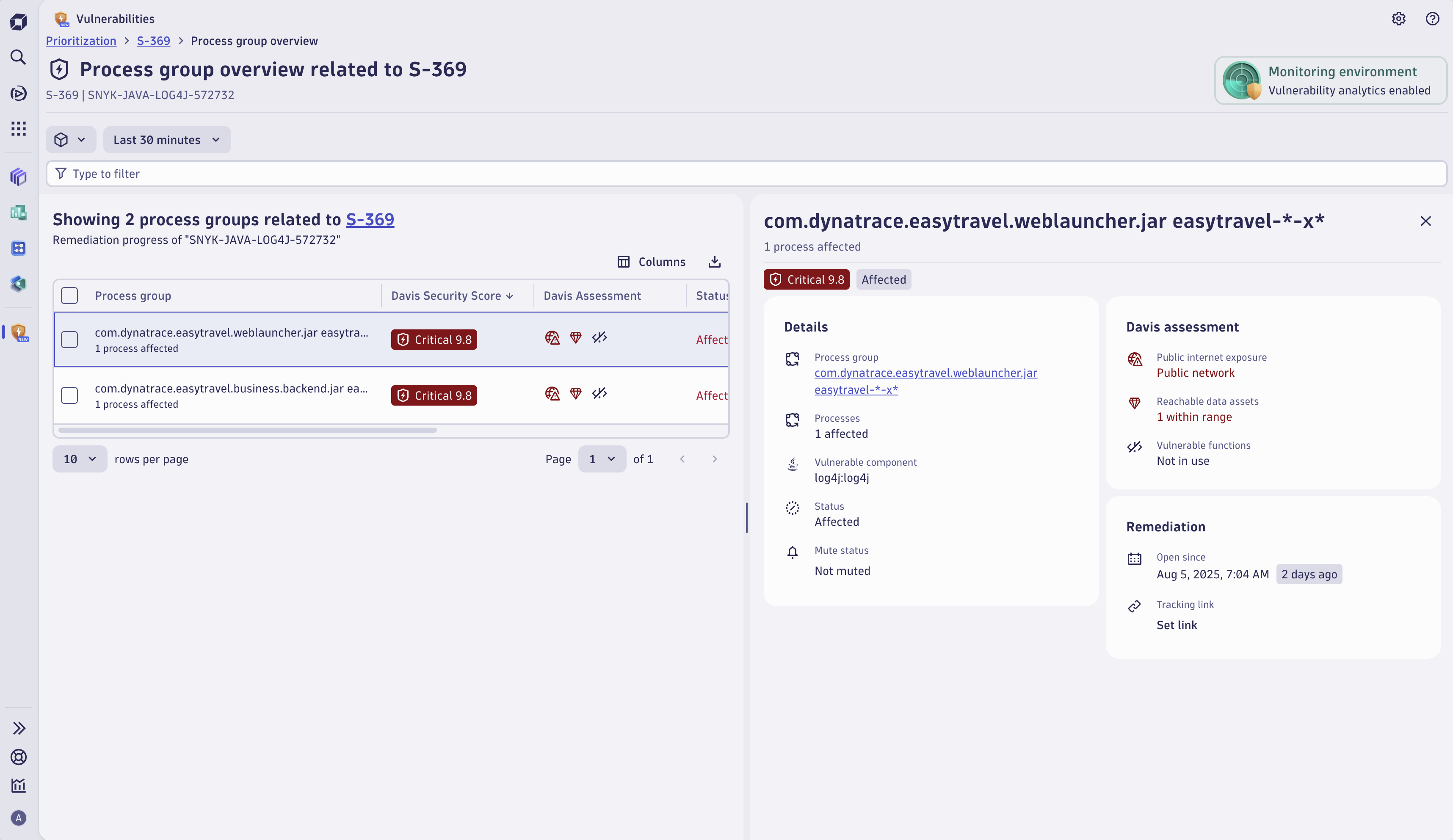
The prioritization page shows the overview of vulnerabilities in your environment in real-time while adding context and automated risk assessments.The details view shows meaningful insights into the impact of the vulnerability: risk, exposure, affected processes, reachable assets, and more.Davis Security Advisor recommends fixes consisting of library updates in the monitored technologies, helping your team prioritize the most critical vulnerabilities in your environment.The overview page of the affected entities allows you to inspect the vulnerability impact on specific process groups and track their remediation progress.
  • Product information
  • Release notes

Overview

Vulnerabilities is our Dynatrace Runtime Vulnerability Analytics platform experience for detecting, visualizing, analyzing, monitoring, and remediating vulnerabilities across your application stack. You can:

  • Detect code-level, third-party, and runtime vulnerabilities in your application code, displaying all issues in a combined, prioritized view
  • Search and filter vulnerabilities based on specific parameters while exploring their potential impact
  • Optimize remediation to fix the vulnerabilities

Use cases

  • Prioritize third-party, code-level, and runtime vulnerabilities based on Davis Security Score, which combines CVSS with observability context.
  • Understand what is at risk and why: view affected processes, related services, applications, and hosts, as well as Kubernetes workloads, nodes, and clusters.
  • Zoom into vulnerabilities based on a specific risk vector: are affected entities accessible from the public internet or connected to data assets? Is there a public exploit available?
  • Optimize remediation activities using recommendations from Davis Security Advisor: determine which patches and upgrades to apply for maximum remediation impact.
  • Address remediation: connect remediable entities to your ticketing system.

Drive automation use cases and access security findings and details via the API.

Get started

  1. Activate Application Security
  2. Assign permissions
  3. Enable and configure Dynatrace Runtime Vulnerability Analytics
  4. Ask your administrator to install Vulnerabilities from the Dynatrace Hub.

Details

Known limitations

Please note that

  • Process group instance view is currently unavailable

Send us your feedback in the community forum!

Dynatrace
DocumentationMore Information
By Dynatrace
Dynatrace support center
Subscribe to new releases
Copy to clipboard

Full version history

ReleaseDate

Full version history

2.21.1

Patch Changes

  • Fix related container images not showing: transformer was reading lookup.containerImageId/lookup.containerImageName from the DQL result record, but those fields have no lookup prefix in the query output.

Full version history

2.21.0

Minor Changes

  • Add related smartscape node ID filter + updated view-findings-for-entity intent
  • Replace object.name with smartscape node columns
  • Updated app to not rely on dt.entity queries anymore. Disabled data assets for phase 3 and removed related databases.

Patch Changes

  • Removed filters that rely on deprecated dt.entity
  • Changed styling of surface elements in Detection sources to improve color contrast
  • Added warning banner for LIMITED_BY_SERVICE_DETECTION_V2 assessment accuracy reduced reason
  • Fix name resolution issues for affected processes

Full version history

2.20.0

Minor Changes

  • Add related smartscape node ID filter + updated view-findings-for-entity intent
  • Added settings migration banners

Full version history

Minor Changes

  • Update filter fields and libraries to newer versions

Full version history

2.18.0

Minor Changes

  • Added new intent to view findings for an entity
  • Adding extensions to the list of security integrations

Patch Changes

  • Update lodash version
  • Fix Related entities timestamp issue

Full version history

2.17.0

Minor Changes

  • Added detection sources overlay

Full version history

2.16.2

Patch Changes

  • Fixed rendering issue with markdown headings in vulnerability description

Full version history

2.16.0

Minor Changes

  • Added grouping to the findings table
  • Add "View topology" button to the affected object card

Patch Changes

  • Fixed the crashing of the app when there were too many CVEs on a finding
  • Changed queries to use toSmartscapeId

Full version history

2.15.0

Minor Changes

  • Added "Affected processes" tab on the affected entities details view.
  • Added more informative permission error screens, that show the exact missing permissions to use a feature of the app.
  • Added finding ID to the details card of the overview tab of a finding.

Patch Changes

  • Improved error handling in Dynatrace security score calculation card on the vulnerability details.
  • Improved error handling for exploit attempts count.
  • Improved query performance of the vulnerability evolution card.

Full version history

2.14.1

Patch Changes

  • Improved related container image query performance.

2.14.0

Minor Changes

  • Added subheaders to Dynatrace Assessment card.
  • Added CVE column to vulnerabilities table and add filter suggestions.
  • Added CVEs to the Details card of the overview tab of a vulnerability.
  • Added update/refresh button to filter on the prioritization and affected entities pages.

Patch Changes

  • Renamed occurrences of Security Investigator to Investigations.
  • Aligned the interaction for muting and tracking links.
  • Fixed wrongly displayed "Dynatrace Assessment changed" evolution event color.
  • Removed affected entities section from details tab for Code-Level vulnerabilities.
  • Removed various unnecessary icons.

Full version history

2.13.1

Patch Changes

  • Fixed copy and filter actions for the findings object name column.
  • Fixed misaligned text on the findings chart and table.
  • Fixed a page crash when navigating back after clicking a related security problems filter.

2.13.0

Minor Changes

  • Added new Findings tab, featuring a Findings table and detailed view of a finding.

Patch Changes

  • Added missing icon for muted entities in Dynatrace Security Score card table.
  • Fixed vulnerability evolution list sometimes showing toggle button incorrectly.
  • "Open since" column in Prioritization table now sorts empty values on top.
  • Added ready-made dashboard for coverage.

Full version history

2.12.0

Minor Changes

  • Renamed the "CVE ID" filter to "CVE".
  • Renamed "Davis Security Advisor" to "Security Advisor".
  • Renamed "Davis Security Score" and "Davis Assessment" to "Dynatrace Security Score" and "Dynatrace Assessment".
  • Added "Explain Vulnerability" feature

Patch Changes

  • Fixed release notes being sorted incorrectly in the "What's new" modal.
  • Improved vulnerability exploit count lookup, ensuring syntax errors are prevented.
  • Improved filter field behavior when deleting filters one by one.
  • Fixed vulnerable component text overflow on certain browsers.
  • Improved related entities table on the Prioritization table details.

Full version history

2.11.1

Patch Changes

  • Fixed an app crash when fetching segments that were not accessible by the user.

2.11.0

Minor Changes

  • Added support for segments with arrays in variables.

Patch Changes

  • Fixed error for long-running DQL queries up to 120 seconds when fetching Related Entities and Related Container Images.
  • Intents with past end times are now auto-corrected to the current time.
  • Fixed incorrectly showing no error if a bulk muting request partially fails.
  • Cards on vulnerability and affected entity details pane now have equal width.
  • Improved security score appearance for resolved and muted affected entities.
  • Removed "Security sample Dashboards on GitHub" link due to deprecation.

Full version history

2.11.0

Minor Changes

  • Added support for segments with arrays in variables.

Patch Changes

  • Fixed error for long-running DQL queries up to 120 seconds when fetching Related Entities and Related Container Images.
  • Intents with past end times are now auto-corrected to the current time.
  • Fixed incorrectly showing no error if a bulk muting request partially fails.
  • Cards on vulnerability and affected entity details pane now have equal width.
  • Improved security score appearance for resolved and muted affected entities.
  • Removed "Security sample Dashboards on GitHub" link due to deprecation.

Full version history

2.10.0

Minor Changes

  • Added CVSS base and modified vector to the Prioritization table and to the Davis Security Score card.

Patch Changes

  • Fixed incorrectly showing CVSS v2 banner on Davis Security Score calculation card for calculations using CVSS v4.
  • Fixed Davis Security Score calculation card displaying when calculation is not possible.
  • Fixed radar settings link to navigate directly to the settings page.

Full version history

2.9.0

Minor Changes

  • Added the Related container images card.

Patch Changes

  • All affected entity links are now redirected to the app’s internal affected entities details pane.

Full version history

2.7.0

Minor Changes

  • Added support for CISA KEV.

Patch Changes

  • Fixed an issue preventing the Prioritization table from sorting by Davis Security Score per default.
  • Fixed muting not updating the row value instantly.
  • Fixed misalignment for bigger numbers of affected entities.
  • Added timeframe and segment selector on error pages.

Full version history

2.6.1

Patch Changes

  • Improved tracking link validation handling for tracking links exceeding 250 characters.

Full version history

2.6.0

Minor Changes

  • Added vulnerable function filter to process group overview page.

Patch Changes

  • Fixed an issue that prevented exploits from being shown if too much data is read.
  • Fixed minor UI inconsistencies.

Full version history

2.5.0

Minor Changes

  • Split the status column into two separate columns displaying the mute status and vulnerability/affected entity state.

Patch Changes

  • Updated icons.
  • Improved word break handling for remediation tracking status.
  • Improved labeling of the vulnerability types in the table and filter bar.
  • Added "About this app" to the help menu.
  • Improved app error handling when the Davis Security Recommendations endpoint is not reachable.
  • Improved assessment icon tooltips.

Full version history

2.4.0

Minor Changes

  • Added improved input based suggestions when inserting a valid CVE or display id into the filter.
  • Added dynamic suggestions for title filter.

Patch Changes

  • Settings are no longer shown when setting:schemas:read permission is missing.
  • Improved styling of intent links.
  • Fixed an issue with sorting in the vulnerable component card.
  • Fixed an issue where the settings button would appear when permissions were missing.
  • Fixed incorrectly setting page parameters on navigation.
  • Improved error message verbosity.
  • Improved visual feedback when invalid timeframe is selected.
  • Unified appearance of bulk actions on the Kubernetes nodes and process group overview page table.

Full version history

2.3.2

Patch Changes

  • Unified minor UI inconsistencies.

2.3.1

Patch Changes

  • Internal technical improvements

2.3.0

Minor Changes

  • Updated help menu and added settings menu.
  • Added Davis Security Advisor recommendations to the prioritization page.
  • Introduced the "What's new" section.

Patch Changes

  • Restricted Edit Application Protection settings button visibility based on permissions.
  • Prevented line breaks in filter field values.
  • Improved accessibility
  • Improved prioritization table behavior and performance.

Full version history

2.2.0

Minor Changes

  • Improved missing permission error messages.
  • Added download functionality to the affected entities table.
  • Added support for supplying a timeframe via intents.

Patch Changes

  • Changed "last detected on" to "open since" in subline of Code-level vulnerability details header.
  • Fixed the tooltip of the status bar in the Exploit and Threats card.
  • Fixed incorrect styling of affected entities header.
  • Made Vulnerabilities table display an empty table in case there are no results.
  • Small wording changed in the entry points card highlight hint.
  • Fixed "open with" intent button opening the exploits data with the wrong visualization type.
  • Fixed affected entity dropdown last update section to be always set to "Process group unmuted" by default (no event).

Full version history

2.1.0

Minor Changes

  • The app now remembers last set filter segments.

Patch Changes

  • Improved the error description for missing permissions.

Full version history

1.3.1

Patch Changes

  • The year is now included in timestamps.
  • Fixed inconsistent vulnerable function states on the risk assessment card of code-level vulnerabilities.

1.3.0

Minor Changes

  • You can navigate to the Davis Security Score card of a third-party vulnerability from the Prioritization page (expand a row, then select Davis Security Score).

Patch Changes

  • Prioritization table sorting has been disabled for more than 500 vulnerabilities.
  • Related entities in the vulnerability details now include mobile, custom, and Data Center RUM applications.

Full version history

1.3.0

Minor Changes

  • You can navigate to the Davis Security Score card of a third-party vulnerability from the Prioritization page (expand a row, then select Davis Security Score).

Patch Changes

  • Prioritization table sorting has been disabled for more than 500 vulnerabilities.
  • Related entities in the vulnerability details now include mobile, custom, and Data Center RUM applications.

Full version history

1.2.0

Minor Changes

  • Removed last updated timestamp.
  • Made the vulnerabilities table scrollable.

Patch Changes

  • Fixed a bug where the page index was not being reset on the remediation tracking table after changing page size.
  • Adjusted the sort order for the 'Status' column of the vulnerabilities table.
  • Renamed the 'Last detected' column header of the vulnerabilities table to 'Open since'.
  • Additional minor improvements.

Full version history

1.1.0

Minor Changes

  • Added the "Fix recommendations" card to the details page of a TPV.
  • Added links to the process group and Kubernetes node overview cards.

Patch Changes

  • Improved the vulnerabilities table performance.
  • Fixed the vulnerabilities table not being sortable by ID, status, and attacks.
  • Fixed intent handling for vulnerability ID.
  • Fixed the details card layout overflowing when the description contains a code block.
  • Fixed the vulnerabilities table expandable disappearing when all columns are hidden.
  • Fixed the CLV entry-point payloads not being separated by line breaks.

Full version history

1.0.0

Major Changes

  • Initial release
Dynatrace Hub
Hub HomeGet data into DynatraceBuild your own app
The Dynatrace Agentic AI ecosystem
All (914)Log Management and AnalyticsKubernetesAI and LLM ObservabilityInfrastructure ObservabilitySoftware DeliveryApplication ObservabilityApplication SecurityBusiness ObservabilityDigital Experience
Filter
Type
Built and maintained by
Deployment model
SaaS
  • SaaS
  • Managed
Partner FinderBecome a partnerDynatrace Developer

Dynatrace Intelligence - Agentic Operations System

The agentic operations system that combines the strengths of deterministic and agentic AI for reliable, autonomous action at scale.

The Operations System

The heart of Dynatrace Intelligence:

See more (2)
Dynatrace MCP Server logo

Dynatrace MCP Server

Enable your AI agents with high-quality data and real-time production insights.

MCP Server Tools logo

MCP Server Tools

Enable your agents with reliable insights, with our toolkit accessible via MCP.

Dynatrace Assist logo

Dynatrace Assist

Dynatrace Assist: Ask, analyze, and act with Dynatrace Intelligence.

Agentic Workflows logo

Agentic Workflows

Build agentic workflows to automate, orchestrate and govern operations at scale.

Dynatrace Intelligence logo

Dynatrace Intelligence

Action based on answers with deterministic insights and agentic operations.

Cloud SRE Agents logo

Cloud SRE Agents

Orchestrate cloud-native AI agents for autonomous incident resolution.

Foundational Agents

Accelerate autonomy by reducing guesswork from AI: use Dynatrace's foundational agents to operate on deterministic facts and analysis.

See more (5)
Data Analysis Agent logo

Data Analysis Agent

Executes DQL queries and retrieves analytics results.

Forecast Agent logo

Forecast Agent

Instantly create forecasts and understand trends using natural language input.

Root Cause Agent logo

Root Cause Agent

Automated context-aware root cause analysis across the full observability stack.

Smartscape Agent logo

Smartscape Agent

Maps user‑friendly inputs to the accurate Smartscape entities.

Vulnerability Agent logo

Vulnerability Agent

Quickly identify critical vulnerabilities using natural language prompts.

Help Agent logo

Help Agent

Answers general questions about Dynatrace product functionality and apps.

Agentic Workflows

Gain efficiency and have your agentic workflows do the work for you!

See more (1)
Alert Reduction Agent logo

Alert Reduction Agent

Weekly report that pinpoints noisy alert configurations causing alert fatigue.

Database Operations Agent logo

Database Operations Agent

Identify application slowdowns by automatically analyzing database performance.

Mobile Crash Agent logo

Mobile Crash Agent

AI-driven mobile crash diagnosis that delivers ready-made code fixes.

Infrastructure Optimization Agent logo

Infrastructure Optimization Agent

Gain insights and recommendations to drive cost and performance optimization.

Kubernetes Troubleshooting Agent logo

Kubernetes Troubleshooting Agent

Automated troubleshooting and root cause analysis of Kubernetes resources.

Log Pattern Agent logo

Log Pattern Agent

Reduce the time spent navigating entities and looking up individual log events.

coming soon

Security Agents

Make your business more resilient with security agents powered by Agentic Workflows.

Security Association Agent logo

Security Association Agent

Automatically correlate observability problems with security findings.

Security Insights Report Agent logo

Security Insights Report Agent

Start your week with a summarized, actionable view of what matters most.

Threat Triage Agent logo

Threat Triage Agent

Proactively reduce risk by automating threat detection and correlating findings.

Vulnerability Verification Agent logo

Vulnerability Verification Agent

Validate third-party findings that matter – focus smarter, remediate faster.

Are you looking for something different?

We have hundreds of apps, extensions, and other technologies to customize your environment

More resources

Dynatrace Intelligence

Dynatrace Intelligence

AI-powered observability from Dynatrace enables the next generation software delivery life cycle process with AI engineering, AI operations, agentic SRE, and AI business a nalytics, through real-time facts from production systems.
Read more
Dynatrace MCP Server

Dynatrace MCP Server

Enable your AI assistants to interact with Dynatrace and access live production insights.
Read more
Create your own Agentic Workflows

Create your own Agentic Workflows

Use the power of generative and agentic AI as part of your automation.
Read more
Dynatrace Assist: Ask, analyze, and act

Dynatrace Assist: Ask, analyze, and act

Your gateway to Dynatrace Intelligence, which makes you and your teams more productive and accelerates your operations.
Read more
Explore our agentic ecosystem

Explore our agentic ecosystem

Maximize value from our ecosystem of trusted AI agents. Empowers seamless, intelligent collaboration across development, operations, and business workflows.
Learn more